STOP WRAPPING WIDGETS IN DIVS?! XFrame Containers & Layout — 34 Hand-Drawn Layout Widgets, All Pure X11!
34 containers and layout widgets that hold your UI together — boxes, grids, notebooks, splitters, scroll areas — all hand-drawn X11 classes with a shared API. Full constructor, methods, signals, and a compiling example for each.
Every user interface is a box inside a box inside a box — and if the boxes are wrong, nothing else matters. Buttons can be beautiful, text fields can be flawless, but if your layout can't hold them together, stack them, scroll them, split them and tab between them, you've got a pile of widgets, not an application. This is the group that does the holding-together: 34 containers and layout widgets, every one of them hand-drawn in raw X11, every one of them documented here with its full constructor, its methods, its signals, and a compiling example you can run yourself.
XFrame is a pure X11/Xlib hand-drawn C++17 widget library — NOT GTK, despite the Gtk* names. There is no toolkit underneath, no Qt, no GTK, no CSS, no layout engine borrowed from anyone. Each widget is a standalone C++ class that draws itself with raw Xlib calls into your window. The Gtk* components recreate the look of GTK widgets as X11 classes; the T* components do the same job in Lazarus/Delphi style. What follows is article 12 of a 9-part series documenting all 194 widgets in the library, one group at a time — and this group is the skeleton every other group hangs on.
Below you'll find the shared widget contract first — the constructor, geometry, visibility, style, drawing and event handlers that are identical across all 194 widgets — then the full documentation for all 34 containers and layout widgets: boxes, grids, notebooks, stacks, splitters, scroll areas, frames and panels. Nothing is abridged. Where the header leaves a value unclear — a plain int whose meaning isn't spelled out — the docs say so honestly, and this article publishes those caveats exactly as written rather than guessing. The code lives at github.com/cnmcdee/CWidgets — go and build it.
CWidgets Documentation
XFrame — a pure X11/Xlib hand-drawn C++17 widget library. Every widget is drawn by hand with raw Xlib calls. There is no GTK here, no Qt, no toolkit at all — despite the Gtk* names. The Gtk* components recreate the look of GTK widgets as standalone X11 classes; the T* components are the same idea in Lazarus/Delphi style; plus XGraph and XSpreadsheet.
Start with the project README for the repo layout, build instructions, and test status. This index documents the widget API itself: the contract every widget shares, then one page per section with every widget in it.
Contents
| Section | Widgets | Page |
|---|---|---|
| Windows & Dialogs | 28 | windows-dialogs.md |
| Containers & Layout | 34 | containers-layout.md |
| Buttons | 24 | buttons.md |
| Display | 33 | display.md |
| Text & Entry | 28 | text-entry.md |
| Choosers | 10 | choosers.md |
| Views & Lists | 17 | views-lists.md |
| Menus & Toolbars | 16 | menus-toolbars.md |
| Misc / X | 4 | misc-x.md |
| Total | 194 |
Section assignment is defined in tools/sections.py and verified by tools/sections.py itself (run it: python3 tools/sections.py) — every widget belongs to exactly one section.
The shared widget contract
This is the part that is the same for all 194 widgets (verified by inspection across all 194 headers: every member below exists in every header). Each section page therefore lists only what is specific to each widget — constructor, widget-specific methods, signals — and does not repeat this contract.
Construction
Every widget has the identical constructor:
<Name>(Display* display, int screen, Window window, GC gc,
       SStyle_Manager* styles, int x, int y, int width, int height)
display,screen,window,gc— the X connection and the window the widget draws into, fromXOpenDisplay/XCreateSimpleWindow/DefaultGC.styles— anSStyle_Manager(fromcore/xframe_core.h) holding the named styles. Register at least a"default"style withadd_style_ex(...)and activate it withset_active_style_byName(...)before constructing widgets.x, y, width, height— the widget's initial bounds in window coordinates.
Geometry
void set_bounds(int x, int y, int width, int height);
int  width();    // x2_ - x1_
int  height();   // y2_ - y1_
bool contains(int x, int y);  // false when not visible
Visibility and enabled state
void set_visible(bool v);
bool get_visible();
void set_enabled(bool e);
bool get_enabled();
A disabled widget still draws, but greyed out (text colour forced to grey) and its event handlers refuse input. An invisible widget does not draw and contains() returns false for it.
Style
void   set_style_name(std::string s);  // "" = the manager's active style
SStyle style();                        // styles_->resolve(style_name_)
Drawing
void draw();
Draws the widget into its window with the resolved style. Returns immediately when the widget is not visible. Call it after construction and again after any handled event (the standard demo loop clears the window and redraws on every handled event).
Events
Every widget implements the same four handlers. Each returns true when it handled the event (the demo loop then clears and redraws) and false otherwise:
bool on_button_press(int x, int y, unsigned int button);   // button 1 = left
bool on_button_release(int x, int y, unsigned int button);
bool on_motion(int x, int y);
bool on_key(KeySym key, const char* str);
Typical behaviour: on_button_press sets pressed_/focused_ when the click lands inside the widget; on_button_release fires the widget's callback if the release is still inside; on_key fires the callback on Return/Space when the widget has focus. on_motion is a no-op on most widgets — only a few headers carry hover state, and the test suite found only 12 of 194 demos show a visible hover response. Do not assume a widget reacts to hover unless its section page says so.
Signals
Widgets expose their callbacks as public std::function members, e.g.:
std::function<void()> on_click; // the most common signal (85 widgets)
Assign them like any member:
widget.on_click = [] { printf("clicked\n"); };
Signal names and signatures vary by widget — on_change, on_response, on_toggled, on_value_changed, on_selection_changed, on_color_changed, on_page_selected, ... — with payloads such as void(int), void(std::string), void(bool), void(double), void(Srgb), void(TTreeNode&). The exact name and signature for each widget are listed on its section page. Never guess a signal name: if it is not in the header, it does not exist.
Minimal program skeleton
Every demo in components/<Name>/main_<Name>.cpp follows this shape (shown here for GtkButton — the section pages trim it further per widget):
#include "GtkButton.h"
#include <cstdio>

int main() {
    Display* display = XOpenDisplay(nullptr);
    if (!display) return 1;
    int screen = DefaultScreen(display);
    Window window = XCreateSimpleWindow(display, RootWindow(display, screen),
        100, 100, 800, 600, 1,
        BlackPixel(display, screen), WhitePixel(display, screen));
    XStoreName(display, window, "GtkButton - XFrame demo");
    XSelectInput(display, window, ExposureMask | KeyPressMask |
        StructureNotifyMask | ButtonPressMask | ButtonReleaseMask |
        PointerMotionMask);
    Atom wmDelete = XInternAtom(display, "WM_DELETE_WINDOW", False);
    XSetWMProtocols(display, window, &wmDelete, 1);
    XMapWindow(display, window);

    GC gc = DefaultGC(display, screen);
    SStyle_Manager styles(display, window, screen, gc);
    styles.add_style_ex("default", Srgb{225, 225, 225}, Srgb{120, 120, 120},
        Srgb{60, 60, 60}, Srgb{20, 20, 20}, 6, 1,
        "-misc-fixed-medium-r-normal--13-*");
    styles.set_active_style_byName("default");

    GtkButton widget(display, screen, window, gc, &styles, 40, 40, 340, 200);
    widget.on_click = [] { printf("clicked\n"); };
    widget.draw();

    bool running = true;
    while (running) {
        XEvent event;
        XNextEvent(display, &event);
        bool handled = false;
        switch (event.type) {
        case Expose:        handled = true; break;
        case ButtonPress:   handled = widget.on_button_press(
                                event.xbutton.x, event.xbutton.y,
                                event.xbutton.button); break;
        case ButtonRelease: handled = widget.on_button_release(
                                event.xbutton.x, event.xbutton.y,
                                event.xbutton.button); break;
        case MotionNotify:  handled = widget.on_motion(
                                event.xmotion.x, event.xmotion.y); break;
        case KeyPress: {
            char buffer[32];
            KeySym key = 0;
            int n = XLookupString(&event.xkey, buffer, sizeof(buffer) - 1,
                                  &key, nullptr);
            buffer[n] = 0;
            handled = widget.on_key(key, buffer);
            break;
        }
        case ClientMessage:
            if ((Atom)event.xclient.data.l[0] == wmDelete) running = false;
            break;
        }
        if (handled) {
            XClearWindow(display, window);
            widget.draw();
            XFlush(display);
        }
    }
    XCloseDisplay(display);
    return 0;
}
Build a single example (from the repo root, with the header's component directory on the include path):
g++ -std=c++17 -I components/GtkButton example.cpp -lX11 -o example
Or build the shipped demo instead — components/<Name>/CMakeLists.txt builds it standalone, and the top-level build builds all 194 (see the README).
Tools
- Selector palette —
palette/buildscwidgets_palette(part of the top-level build). A pure X11/XFrame window listing all 194 widgets in their 9 sections, each with its 16x16 icon. Click (or Up/Down + Enter) to select; the selection is written to the shared selection file (/tmp/cwidgets-selection.txt) for the layout tool. Self-test: 194/194 selections OK. - Layout window —
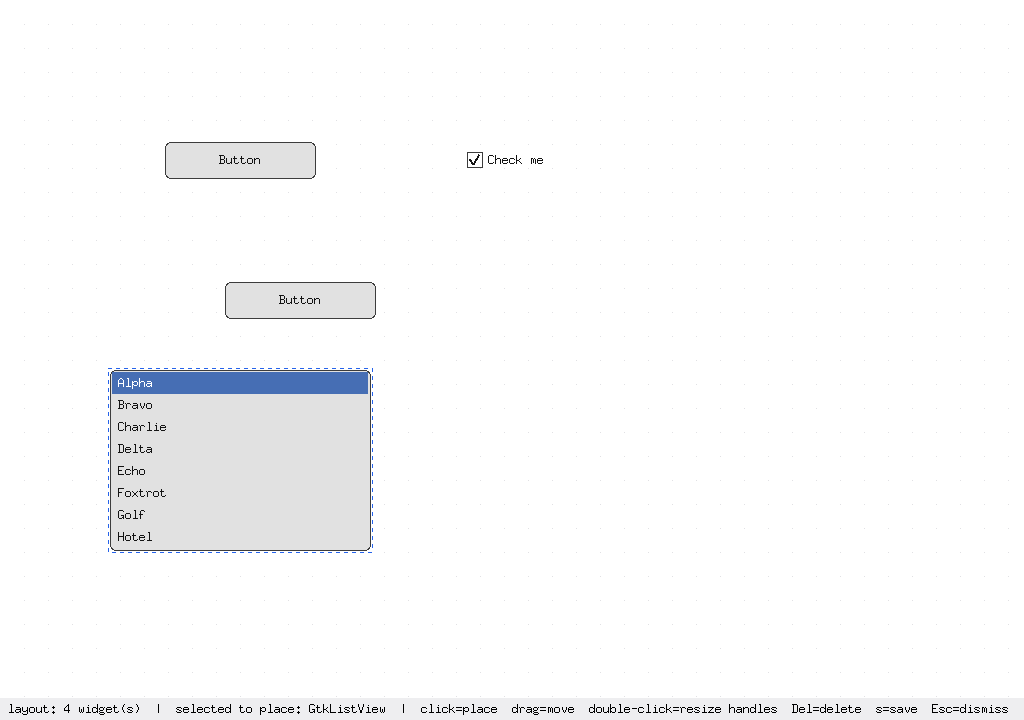
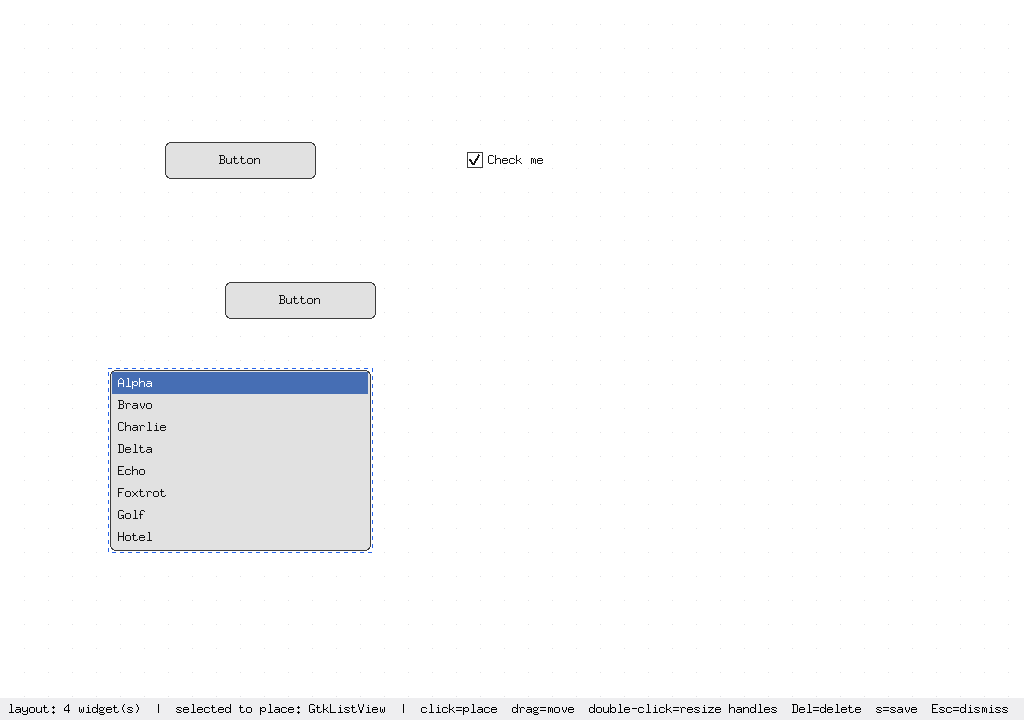
layout/buildscwidgets_layout. Instantiates the real widget classes via the generated factory incommon/registry.h(generated bytools/gen_registry.py— do not edit by hand). Click to place the selected widget, drag to move, Delete to remove,sto save/load the layout,qto quit. Double-click a placed widget for 8 orange resize handles (corners + edges); drag a handle to resize live; Escape dismisses the handles, Delete removes the widget. - Icons —
icons/<Name>.ico, one real 16x16 ICO per widget, purpose-drawn glyphs generated bytools/gen_icons.py(70 glyph kinds, section accent colours — not downscaled screenshots). Verified bytools/verify_icons.py: 194/194 parse as 16x16, all non-blank.
Test status
Tested Nov 26, 2026 on the VPS (Debian 12, g++ 12.2, Xvfb) with the autonomous driver test-driver/run_tests.py: all 194 demos build with 0 warnings (-Wall -Wextra); 193 draw (GtkInvisible is non-visual by design); 125 show a visible click response (the rest are display-only by design); all 194 survive keypresses and exit cleanly; zero crashes, zero hangs. Full table: test-results/results.md. Palette self-test 194/194; layout placement 194/194, draw 194/194, all 194 alive at once (test-results/palette_layout_results.csv).
License
MIT — see LICENSE. Copyright (c) 2026 cnmcdee.
Containers & Layout
Containers that arrange other content: boxes, grids, notebooks, stacks, splitters, scroll areas and frames. Most of these draw labelled sample children (slots, tiles, pages, panes) rather than hosting real child widgets, so their API is about geometry, counts and selection.
Every widget here shares the common XFrame widget API - same constructor, set_bounds/draw/event handlers, visible/enabled state. The shared contract is documented in docs/index.md (written by the coordinator). Each subsection below lists only what is specific to that widget.
GtkAspectFrame
A frame that keeps a fixed width to height ratio. It draws a rounded outline and a label showing the ratio as a number followed by : 1.
Constructor: GtkAspectFrame(Display* display, int screen, Window window, GC gc, SStyle_Manager* styles, int x, int y, int width, int height)
API (widget-specific methods/properties/signals ONLY - skip the common ones): - void set_ratio(double r) - Sets the ratio. - double get_ratio() - Returns the ratio. - void set_child_ratio(double r) - Sets the child ratio. - double get_child_ratio() - Returns the child ratio. - void set_obey_child(bool o) - Sets whether the frame ratio follows the child ratio. - bool get_obey_child() - Reports whether the frame ratio follows the child ratio. - void set_alignment(double xa, double ya) - Sets the alignment. - void child_rect(int& cx1, int& cy1, int& cx2, int& cy2) - Fills the child rectangle via out parameters.
Example:
#include "GtkAspectFrame.h"
#include <cstdio>

int main()
{
    Display* display = XOpenDisplay(nullptr);
    if (!display) { return 1; }
    int screen = DefaultScreen(display);
    Window window = XCreateSimpleWindow(display, RootWindow(display, screen), 100, 100, 800, 600, 1, BlackPixel(display, screen), WhitePixel(display, screen));
    XStoreName(display, window, "GtkAspectFrame - XFrame demo");
    XSelectInput(display, window, ExposureMask | KeyPressMask | StructureNotifyMask | ButtonPressMask | ButtonReleaseMask | PointerMotionMask);
    Atom deleteWindowMessage = XInternAtom(display, "WM_DELETE_WINDOW", False);
    XSetWMProtocols(display, window, &deleteWindowMessage, 1);
    XMapWindow(display, window);
    GC gc = DefaultGC(display, screen);
    SStyle_Manager styles(display, window, screen, gc);
    styles.add_style_ex("default", Srgb{225, 225, 225}, Srgb{120, 120, 120}, Srgb{60, 60, 60}, Srgb{20, 20, 20}, 6, 1, "-misc-fixed-medium-r-normal--13-*");
    styles.set_active_style_byName("default");
    GtkAspectFrame widget(display, screen, window, gc, &styles, 20, 20, 760, 560);
    widget.set_ratio(1.5);
    widget.set_alignment(0.5, 0.5);
    widget.draw();
    bool running = true;
    while (running)
    {
        XEvent event;
        XNextEvent(display, &event);
        bool handled = false;
        switch (event.type)
        {
        case Expose:
            handled = true;
            break;
        case ButtonPress:
            handled = widget.on_button_press(event.xbutton.x, event.xbutton.y, event.xbutton.button);
            break;
        case ButtonRelease:
            handled = widget.on_button_release(event.xbutton.x, event.xbutton.y, event.xbutton.button);
            break;
        case MotionNotify:
            handled = widget.on_motion(event.xmotion.x, event.xmotion.y);
            break;
        case KeyPress:
        {
            char buffer[32];
            KeySym key = 0;
            int n = XLookupString(&event.xkey, buffer, (int)sizeof(buffer) - 1, &key, nullptr);
            buffer[n] = 0;
            handled = widget.on_key(key, buffer);
            break;
        }
        case ClientMessage:
            if ((Atom)event.xclient.data.l[0] == deleteWindowMessage)
            {
                running = false;
            }
            break;
        }
        if (handled)
        {
            XClearWindow(display, window);
            widget.draw();
            XFlush(display);
        }
    }
    XCloseDisplay(display);
    return 0;
}
Notes: set_ratio() sets the frame ratio; set_child_ratio() and set_obey_child() control the ratio of the child area; set_alignment() takes horizontal and vertical alignment from 0.0 to 1.0. child_rect() returns the inner rectangle via out parameters.
GtkBox
A linear container that lays out a row or column of child slots with spacing between them. Each slot is drawn as a labelled sample box reading Child N.
Constructor: GtkBox(Display* display, int screen, Window window, GC gc, SStyle_Manager* styles, int x, int y, int width, int height)
API (widget-specific methods/properties/signals ONLY - skip the common ones): - void set_orientation(int orientation) - Sets the orientation (0 horizontal, 1 vertical). - int get_orientation() - Returns the orientation (0 horizontal, 1 vertical). - void set_spacing(int spacing) - Sets the spacing. - int get_spacing() - Returns the spacing. - void set_homogeneous(bool homogeneous) - Sets whether children share the space equally. - bool get_homogeneous() - Reports whether children share the space equally. - void set_sample_count(int count) - Sets the sample count. - int get_sample_count() - Returns the sample count. - int get_selected_slot() - Returns the selected slot. - Rect child_rect(int i, int count) - Returns the child rectangle as a Rect {x1, y1, x2, y2}. - Constants: ORIENTATION_HORIZONTAL = 0, ORIENTATION_VERTICAL = 1
Example:
#include "GtkBox.h"
#include <cstdio>

int main()
{
    Display* display = XOpenDisplay(nullptr);
    if (!display) { return 1; }
    int screen = DefaultScreen(display);
    Window window = XCreateSimpleWindow(display, RootWindow(display, screen), 100, 100, 800, 600, 1, BlackPixel(display, screen), WhitePixel(display, screen));
    XStoreName(display, window, "GtkBox - XFrame demo");
    XSelectInput(display, window, ExposureMask | KeyPressMask | StructureNotifyMask | ButtonPressMask | ButtonReleaseMask | PointerMotionMask);
    Atom deleteWindowMessage = XInternAtom(display, "WM_DELETE_WINDOW", False);
    XSetWMProtocols(display, window, &deleteWindowMessage, 1);
    XMapWindow(display, window);
    GC gc = DefaultGC(display, screen);
    SStyle_Manager styles(display, window, screen, gc);
    styles.add_style_ex("default", Srgb{225, 225, 225}, Srgb{120, 120, 120}, Srgb{60, 60, 60}, Srgb{20, 20, 20}, 6, 1, "-misc-fixed-medium-r-normal--13-*");
    styles.set_active_style_byName("default");
    GtkBox widget(display, screen, window, gc, &styles, 20, 20, 760, 560);
    widget.set_orientation(GtkBox::ORIENTATION_VERTICAL);
    widget.set_spacing(8);
    widget.set_sample_count(3);
    widget.draw();
    bool running = true;
    while (running)
    {
        XEvent event;
        XNextEvent(display, &event);
        bool handled = false;
        switch (event.type)
        {
        case Expose:
            handled = true;
            break;
        case ButtonPress:
            handled = widget.on_button_press(event.xbutton.x, event.xbutton.y, event.xbutton.button);
            break;
        case ButtonRelease:
            handled = widget.on_button_release(event.xbutton.x, event.xbutton.y, event.xbutton.button);
            break;
        case MotionNotify:
            handled = widget.on_motion(event.xmotion.x, event.xmotion.y);
            break;
        case KeyPress:
        {
            char buffer[32];
            KeySym key = 0;
            int n = XLookupString(&event.xkey, buffer, (int)sizeof(buffer) - 1, &key, nullptr);
            buffer[n] = 0;
            handled = widget.on_key(key, buffer);
            break;
        }
        case ClientMessage:
            if ((Atom)event.xclient.data.l[0] == deleteWindowMessage)
            {
                running = false;
            }
            break;
        }
        if (handled)
        {
            XClearWindow(display, window);
            widget.draw();
            XFlush(display);
        }
    }
    XCloseDisplay(display);
    return 0;
}
Notes: The children are drawn sample slots, not real widgets; set_sample_count() controls how many are drawn and get_selected_slot() reports the clicked slot. set_orientation() takes ORIENTATION_HORIZONTAL (0) or ORIENTATION_VERTICAL (1). child_rect(i, count) returns the slot rectangle as a Rect. Rect is the widget own nested struct { int x1, y1, x2, y2; }.
GtkButtonBox
A box holding a row of labelled buttons at a uniform size, laid out with a layout style and spacing.
Constructor: GtkButtonBox(Display* display, int screen, Window window, GC gc, SStyle_Manager* styles, int x, int y, int width, int height)
API (widget-specific methods/properties/signals ONLY - skip the common ones): - signal on_button_clicked (std::function<void(int)>) - Fires with the index of the clicked button. - void set_layout_style(int s) - Sets the layout style (plain int; values unclear from the header). - int get_layout_style() - Returns the layout style (plain int; values unclear from the header). - void set_spacing(int s) - Sets the spacing. - void set_button_size(int w, int h) - Sets the button size. - void set_labels(std::vector<std::string> labels) - Sets the labels. - int button_count() - Returns the number of buttons. - bool button_rect(int i, int count, int& rx1, int& ry1, int& rx2, int& ry2) - Fills the button rectangle via out parameters; returns false when the index is out of range. - bool button_rect(int i, int& rx1, int& ry1, int& rx2, int& ry2) - Fills the button rectangle via out parameters; returns false when the index is out of range. - int index_at(int x, int y) - Returns the index at a point.
Example:
#include "GtkButtonBox.h"
#include <cstdio>

int main()
{
    Display* display = XOpenDisplay(nullptr);
    if (!display) { return 1; }
    int screen = DefaultScreen(display);
    Window window = XCreateSimpleWindow(display, RootWindow(display, screen), 100, 100, 800, 600, 1, BlackPixel(display, screen), WhitePixel(display, screen));
    XStoreName(display, window, "GtkButtonBox - XFrame demo");
    XSelectInput(display, window, ExposureMask | KeyPressMask | StructureNotifyMask | ButtonPressMask | ButtonReleaseMask | PointerMotionMask);
    Atom deleteWindowMessage = XInternAtom(display, "WM_DELETE_WINDOW", False);
    XSetWMProtocols(display, window, &deleteWindowMessage, 1);
    XMapWindow(display, window);
    GC gc = DefaultGC(display, screen);
    SStyle_Manager styles(display, window, screen, gc);
    styles.add_style_ex("default", Srgb{225, 225, 225}, Srgb{120, 120, 120}, Srgb{60, 60, 60}, Srgb{20, 20, 20}, 6, 1, "-misc-fixed-medium-r-normal--13-*");
    styles.set_active_style_byName("default");
    GtkButtonBox widget(display, screen, window, gc, &styles, 20, 20, 760, 560);
    widget.set_labels({"OK", "Cancel", "Help"});
    widget.set_spacing(6);
    widget.on_button_clicked = [](int i) { std::printf("button %d\n", i); };
    widget.draw();
    bool running = true;
    while (running)
    {
        XEvent event;
        XNextEvent(display, &event);
        bool handled = false;
        switch (event.type)
        {
        case Expose:
            handled = true;
            break;
        case ButtonPress:
            handled = widget.on_button_press(event.xbutton.x, event.xbutton.y, event.xbutton.button);
            break;
        case ButtonRelease:
            handled = widget.on_button_release(event.xbutton.x, event.xbutton.y, event.xbutton.button);
            break;
        case MotionNotify:
            handled = widget.on_motion(event.xmotion.x, event.xmotion.y);
            break;
        case KeyPress:
        {
            char buffer[32];
            KeySym key = 0;
            int n = XLookupString(&event.xkey, buffer, (int)sizeof(buffer) - 1, &key, nullptr);
            buffer[n] = 0;
            handled = widget.on_key(key, buffer);
            break;
        }
        case ClientMessage:
            if ((Atom)event.xclient.data.l[0] == deleteWindowMessage)
            {
                running = false;
            }
            break;
        }
        if (handled)
        {
            XClearWindow(display, window);
            widget.draw();
            XFlush(display);
        }
    }
    XCloseDisplay(display);
    return 0;
}
Notes: set_labels() replaces the whole button list. on_button_clicked(int) fires with the index of the clicked button. The layout style is a plain int; its values are unclear from the header.
GtkCenterBox
A three zone box that draws Start, Center and End areas side by side, each as a labelled zone.
Constructor: GtkCenterBox(Display* display, int screen, Window window, GC gc, SStyle_Manager* styles, int x, int y, int width, int height)
API (widget-specific methods/properties/signals ONLY - skip the common ones): - void set_baseline_position(int position) - Sets the baseline position (plain int; meaning unclear from the header). - int get_baseline_position() - Returns the baseline position (plain int; meaning unclear from the header). - int get_clicked_zone() - Returns which zone was clicked. - void draw_zone(Rect r, const std::string& label, unsigned long tint, bool active) - Draws one zone (public helper used by draw()). - bool zone_contains(Rect r, int x, int y) - Reports whether a point is inside the given zone rectangle. - Rect start_rect() - Returns the Start zone rectangle as a Rect. - Rect center_rect() - Returns the Center zone rectangle as a Rect. - Rect end_rect() - Returns the End zone rectangle as a Rect.
Example:
#include "GtkCenterBox.h"
#include <cstdio>

int main()
{
    Display* display = XOpenDisplay(nullptr);
    if (!display) { return 1; }
    int screen = DefaultScreen(display);
    Window window = XCreateSimpleWindow(display, RootWindow(display, screen), 100, 100, 800, 600, 1, BlackPixel(display, screen), WhitePixel(display, screen));
    XStoreName(display, window, "GtkCenterBox - XFrame demo");
    XSelectInput(display, window, ExposureMask | KeyPressMask | StructureNotifyMask | ButtonPressMask | ButtonReleaseMask | PointerMotionMask);
    Atom deleteWindowMessage = XInternAtom(display, "WM_DELETE_WINDOW", False);
    XSetWMProtocols(display, window, &deleteWindowMessage, 1);
    XMapWindow(display, window);
    GC gc = DefaultGC(display, screen);
    SStyle_Manager styles(display, window, screen, gc);
    styles.add_style_ex("default", Srgb{225, 225, 225}, Srgb{120, 120, 120}, Srgb{60, 60, 60}, Srgb{20, 20, 20}, 6, 1, "-misc-fixed-medium-r-normal--13-*");
    styles.set_active_style_byName("default");
    GtkCenterBox widget(display, screen, window, gc, &styles, 20, 20, 760, 560);
    widget.set_baseline_position(0);
    widget.draw();
    bool running = true;
    while (running)
    {
        XEvent event;
        XNextEvent(display, &event);
        bool handled = false;
        switch (event.type)
        {
        case Expose:
            handled = true;
            break;
        case ButtonPress:
            handled = widget.on_button_press(event.xbutton.x, event.xbutton.y, event.xbutton.button);
            break;
        case ButtonRelease:
            handled = widget.on_button_release(event.xbutton.x, event.xbutton.y, event.xbutton.button);
            break;
        case MotionNotify:
            handled = widget.on_motion(event.xmotion.x, event.xmotion.y);
            break;
        case KeyPress:
        {
            char buffer[32];
            KeySym key = 0;
            int n = XLookupString(&event.xkey, buffer, (int)sizeof(buffer) - 1, &key, nullptr);
            buffer[n] = 0;
            handled = widget.on_key(key, buffer);
            break;
        }
        case ClientMessage:
            if ((Atom)event.xclient.data.l[0] == deleteWindowMessage)
            {
                running = false;
            }
            break;
        }
        if (handled)
        {
            XClearWindow(display, window);
            widget.draw();
            XFlush(display);
        }
    }
    XCloseDisplay(display);
    return 0;
}
Notes: draw_zone() and zone_contains() are public helpers that draw and hit test one zone given a Rect, a label, a tint and an active flag; they are used by draw() and can be called directly. The meaning of the baseline position int is unclear from the header. Rect is the widget own nested struct { int x1, y1, x2, y2; }.
GtkExpander
A collapsible section: a header row with a triangle and a label, and a body area that is shown only while the expander is expanded.
Constructor: GtkExpander(Display* display, int screen, Window window, GC gc, SStyle_Manager* styles, int x, int y, int width, int height)
API (widget-specific methods/properties/signals ONLY - skip the common ones): - signal on_toggled (std::function<void(bool)>) - Fires with the new expanded state. - void set_expanded(bool e) - Sets the expanded. - bool get_expanded() - Returns the expanded. - void set_label(std::string label) - Sets the label. - std::string get_label() - Returns the label. - void body_rect(int& bx1, int& by1, int& bx2, int& by2) - Fills the body rectangle via out parameters. - void toggle() - Flips the expanded state.
Example:
#include "GtkExpander.h"
#include <cstdio>

int main()
{
    Display* display = XOpenDisplay(nullptr);
    if (!display) { return 1; }
    int screen = DefaultScreen(display);
    Window window = XCreateSimpleWindow(display, RootWindow(display, screen), 100, 100, 800, 600, 1, BlackPixel(display, screen), WhitePixel(display, screen));
    XStoreName(display, window, "GtkExpander - XFrame demo");
    XSelectInput(display, window, ExposureMask | KeyPressMask | StructureNotifyMask | ButtonPressMask | ButtonReleaseMask | PointerMotionMask);
    Atom deleteWindowMessage = XInternAtom(display, "WM_DELETE_WINDOW", False);
    XSetWMProtocols(display, window, &deleteWindowMessage, 1);
    XMapWindow(display, window);
    GC gc = DefaultGC(display, screen);
    SStyle_Manager styles(display, window, screen, gc);
    styles.add_style_ex("default", Srgb{225, 225, 225}, Srgb{120, 120, 120}, Srgb{60, 60, 60}, Srgb{20, 20, 20}, 6, 1, "-misc-fixed-medium-r-normal--13-*");
    styles.set_active_style_byName("default");
    GtkExpander widget(display, screen, window, gc, &styles, 20, 20, 760, 560);
    widget.set_label("Details");
    widget.set_expanded(true);
    widget.on_toggled = [](bool e) { std::printf("expanded %d\n", (int)e); };
    widget.draw();
    bool running = true;
    while (running)
    {
        XEvent event;
        XNextEvent(display, &event);
        bool handled = false;
        switch (event.type)
        {
        case Expose:
            handled = true;
            break;
        case ButtonPress:
            handled = widget.on_button_press(event.xbutton.x, event.xbutton.y, event.xbutton.button);
            break;
        case ButtonRelease:
            handled = widget.on_button_release(event.xbutton.x, event.xbutton.y, event.xbutton.button);
            break;
        case MotionNotify:
            handled = widget.on_motion(event.xmotion.x, event.xmotion.y);
            break;
        case KeyPress:
        {
            char buffer[32];
            KeySym key = 0;
            int n = XLookupString(&event.xkey, buffer, (int)sizeof(buffer) - 1, &key, nullptr);
            buffer[n] = 0;
            handled = widget.on_key(key, buffer);
            break;
        }
        case ClientMessage:
            if ((Atom)event.xclient.data.l[0] == deleteWindowMessage)
            {
                running = false;
            }
            break;
        }
        if (handled)
        {
            XClearWindow(display, window);
            widget.draw();
            XFlush(display);
        }
    }
    XCloseDisplay(display);
    return 0;
}
Notes: toggle() flips the state; on_toggled(bool) fires with the new state. body_rect() returns the body rectangle via out parameters.
GtkFixed
A fixed position container: children are named rectangles placed at absolute x and y coordinates with a width and height.
Constructor: GtkFixed(Display* display, int screen, Window window, GC gc, SStyle_Manager* styles, int x, int y, int width, int height)
API (widget-specific methods/properties/signals ONLY - skip the common ones): - int find_child(std::string name) - Returns the index of the named child, or -1 when it is not found. - int child_count() - Returns the number of children. - void put(std::string name, int x, int y, int w, int h) - Places a named child at x, y with width and height. - bool move(std::string name, int x, int y) - Moves a named child to x, y; returns false when there is no such child. - bool remove(std::string name) - Removes a named child; returns false when there is no such child. - std::string get_selected_name() - Returns the selected name. - Rect child_rect(std::string name) - Returns the child rectangle as a Rect {x1, y1, x2, y2}.
Example:
#include "GtkFixed.h"
#include <cstdio>

int main()
{
    Display* display = XOpenDisplay(nullptr);
    if (!display) { return 1; }
    int screen = DefaultScreen(display);
    Window window = XCreateSimpleWindow(display, RootWindow(display, screen), 100, 100, 800, 600, 1, BlackPixel(display, screen), WhitePixel(display, screen));
    XStoreName(display, window, "GtkFixed - XFrame demo");
    XSelectInput(display, window, ExposureMask | KeyPressMask | StructureNotifyMask | ButtonPressMask | ButtonReleaseMask | PointerMotionMask);
    Atom deleteWindowMessage = XInternAtom(display, "WM_DELETE_WINDOW", False);
    XSetWMProtocols(display, window, &deleteWindowMessage, 1);
    XMapWindow(display, window);
    GC gc = DefaultGC(display, screen);
    SStyle_Manager styles(display, window, screen, gc);
    styles.add_style_ex("default", Srgb{225, 225, 225}, Srgb{120, 120, 120}, Srgb{60, 60, 60}, Srgb{20, 20, 20}, 6, 1, "-misc-fixed-medium-r-normal--13-*");
    styles.set_active_style_byName("default");
    GtkFixed widget(display, screen, window, gc, &styles, 20, 20, 760, 560);
    widget.put("Child A", 20, 30, 120, 40);
    widget.put("Child B", 180, 30, 120, 40);
    widget.draw();
    bool running = true;
    while (running)
    {
        XEvent event;
        XNextEvent(display, &event);
        bool handled = false;
        switch (event.type)
        {
        case Expose:
            handled = true;
            break;
        case ButtonPress:
            handled = widget.on_button_press(event.xbutton.x, event.xbutton.y, event.xbutton.button);
            break;
        case ButtonRelease:
            handled = widget.on_button_release(event.xbutton.x, event.xbutton.y, event.xbutton.button);
            break;
        case MotionNotify:
            handled = widget.on_motion(event.xmotion.x, event.xmotion.y);
            break;
        case KeyPress:
        {
            char buffer[32];
            KeySym key = 0;
            int n = XLookupString(&event.xkey, buffer, (int)sizeof(buffer) - 1, &key, nullptr);
            buffer[n] = 0;
            handled = widget.on_key(key, buffer);
            break;
        }
        case ClientMessage:
            if ((Atom)event.xclient.data.l[0] == deleteWindowMessage)
            {
                running = false;
            }
            break;
        }
        if (handled)
        {
            XClearWindow(display, window);
            widget.draw();
            XFlush(display);
        }
    }
    XCloseDisplay(display);
    return 0;
}
Notes: The children are named rectangles, not real widgets. put() adds or moves a child, move() repositions one, remove() deletes one, find_child() returns its index and get_selected_name() returns the clicked child. Rect is the widget own nested struct { int x1, y1, x2, y2; }.
GtkFlowBox
A flowing grid of labelled items that wraps onto the next row when the row is full. Clicking an item selects it.
Constructor: GtkFlowBox(Display* display, int screen, Window window, GC gc, SStyle_Manager* styles, int x, int y, int width, int height)
API (widget-specific methods/properties/signals ONLY - skip the common ones): - signal on_child_activated (std::function<void(int)>) - Fires with the index of the activated item. - void set_min_child_size(int w, int h) - Sets the min child size. - int get_min_child_width() - Returns the min child width. - int get_min_child_height() - Returns the min child height. - void set_spacing(int column_spacing, int row_spacing) - Sets the column and row spacing. - void add_item(std::string label) - Adds item. - int item_count() - Returns the number of items. - int get_selected_index() - Returns the selected index. - void set_selected_index(int index) - Sets the selected index. - int columns() - Returns the number of columns in the computed layout. - int rows() - Returns the number of rows in the computed layout. - bool child_rect(int i, int& rx1, int& ry1, int& rx2, int& ry2) - Fills the child rectangle via out parameters; returns false when the index is out of range. - int index_at(int x, int y) - Returns the index at a point.
Example:
#include "GtkFlowBox.h"
#include <cstdio>

int main()
{
    Display* display = XOpenDisplay(nullptr);
    if (!display) { return 1; }
    int screen = DefaultScreen(display);
    Window window = XCreateSimpleWindow(display, RootWindow(display, screen), 100, 100, 800, 600, 1, BlackPixel(display, screen), WhitePixel(display, screen));
    XStoreName(display, window, "GtkFlowBox - XFrame demo");
    XSelectInput(display, window, ExposureMask | KeyPressMask | StructureNotifyMask | ButtonPressMask | ButtonReleaseMask | PointerMotionMask);
    Atom deleteWindowMessage = XInternAtom(display, "WM_DELETE_WINDOW", False);
    XSetWMProtocols(display, window, &deleteWindowMessage, 1);
    XMapWindow(display, window);
    GC gc = DefaultGC(display, screen);
    SStyle_Manager styles(display, window, screen, gc);
    styles.add_style_ex("default", Srgb{225, 225, 225}, Srgb{120, 120, 120}, Srgb{60, 60, 60}, Srgb{20, 20, 20}, 6, 1, "-misc-fixed-medium-r-normal--13-*");
    styles.set_active_style_byName("default");
    GtkFlowBox widget(display, screen, window, gc, &styles, 20, 20, 760, 560);
    widget.add_item("One");
    widget.add_item("Two");
    widget.add_item("Three");
    widget.set_spacing(6, 6);
    widget.on_child_activated = [](int i) { std::printf("activated %d\n", i); };
    widget.draw();
    bool running = true;
    while (running)
    {
        XEvent event;
        XNextEvent(display, &event);
        bool handled = false;
        switch (event.type)
        {
        case Expose:
            handled = true;
            break;
        case ButtonPress:
            handled = widget.on_button_press(event.xbutton.x, event.xbutton.y, event.xbutton.button);
            break;
        case ButtonRelease:
            handled = widget.on_button_release(event.xbutton.x, event.xbutton.y, event.xbutton.button);
            break;
        case MotionNotify:
            handled = widget.on_motion(event.xmotion.x, event.xmotion.y);
            break;
        case KeyPress:
        {
            char buffer[32];
            KeySym key = 0;
            int n = XLookupString(&event.xkey, buffer, (int)sizeof(buffer) - 1, &key, nullptr);
            buffer[n] = 0;
            handled = widget.on_key(key, buffer);
            break;
        }
        case ClientMessage:
            if ((Atom)event.xclient.data.l[0] == deleteWindowMessage)
            {
                running = false;
            }
            break;
        }
        if (handled)
        {
            XClearWindow(display, window);
            widget.draw();
            XFlush(display);
        }
    }
    XCloseDisplay(display);
    return 0;
}
Notes: set_min_child_size() and set_spacing() (column, row) control the layout; columns() and rows() report the computed grid. on_child_activated(int) fires with the index of the activated item.
GtkFrame
A bordered frame with a label embedded in the top edge. The label position along the edge is set with set_label_xalign().
Constructor: GtkFrame(Display* display, int screen, Window window, GC gc, SStyle_Manager* styles, int x, int y, int width, int height)
API (widget-specific methods/properties/signals ONLY - skip the common ones): - void set_label(std::string label) - Sets the label. - std::string get_label() - Returns the label. - void set_label_xalign(double a) - Sets the label alignment along the top edge (0.0 to 1.0). - double get_label_xalign() - Returns the label alignment along the top edge. - void content_rect(int& cx1, int& cy1, int& cx2, int& cy2) - Fills the content rectangle via out parameters.
Example:
#include "GtkFrame.h"
#include <cstdio>

int main()
{
    Display* display = XOpenDisplay(nullptr);
    if (!display) { return 1; }
    int screen = DefaultScreen(display);
    Window window = XCreateSimpleWindow(display, RootWindow(display, screen), 100, 100, 800, 600, 1, BlackPixel(display, screen), WhitePixel(display, screen));
    XStoreName(display, window, "GtkFrame - XFrame demo");
    XSelectInput(display, window, ExposureMask | KeyPressMask | StructureNotifyMask | ButtonPressMask | ButtonReleaseMask | PointerMotionMask);
    Atom deleteWindowMessage = XInternAtom(display, "WM_DELETE_WINDOW", False);
    XSetWMProtocols(display, window, &deleteWindowMessage, 1);
    XMapWindow(display, window);
    GC gc = DefaultGC(display, screen);
    SStyle_Manager styles(display, window, screen, gc);
    styles.add_style_ex("default", Srgb{225, 225, 225}, Srgb{120, 120, 120}, Srgb{60, 60, 60}, Srgb{20, 20, 20}, 6, 1, "-misc-fixed-medium-r-normal--13-*");
    styles.set_active_style_byName("default");
    GtkFrame widget(display, screen, window, gc, &styles, 20, 20, 760, 560);
    widget.set_label("Options");
    widget.set_label_xalign(0.0);
    widget.draw();
    bool running = true;
    while (running)
    {
        XEvent event;
        XNextEvent(display, &event);
        bool handled = false;
        switch (event.type)
        {
        case Expose:
            handled = true;
            break;
        case ButtonPress:
            handled = widget.on_button_press(event.xbutton.x, event.xbutton.y, event.xbutton.button);
            break;
        case ButtonRelease:
            handled = widget.on_button_release(event.xbutton.x, event.xbutton.y, event.xbutton.button);
            break;
        case MotionNotify:
            handled = widget.on_motion(event.xmotion.x, event.xmotion.y);
            break;
        case KeyPress:
        {
            char buffer[32];
            KeySym key = 0;
            int n = XLookupString(&event.xkey, buffer, (int)sizeof(buffer) - 1, &key, nullptr);
            buffer[n] = 0;
            handled = widget.on_key(key, buffer);
            break;
        }
        case ClientMessage:
            if ((Atom)event.xclient.data.l[0] == deleteWindowMessage)
            {
                running = false;
            }
            break;
        }
        if (handled)
        {
            XClearWindow(display, window);
            widget.draw();
            XFlush(display);
        }
    }
    XCloseDisplay(display);
    return 0;
}
Notes: content_rect() returns the rectangle inside the frame via out parameters.
GtkGrid
A grid container that draws a fixed 3 by 3 sample of labelled cells with column and row spacing. Arrow keys move the selected cell.
Constructor: GtkGrid(Display* display, int screen, Window window, GC gc, SStyle_Manager* styles, int x, int y, int width, int height)
API (widget-specific methods/properties/signals ONLY - skip the common ones): - void set_column_spacing(int spacing) - Sets the column spacing. - int get_column_spacing() - Returns the column spacing. - void set_row_spacing(int spacing) - Sets the row spacing. - int get_row_spacing() - Returns the row spacing. - int get_selected_col() - Returns the selected column. - int get_selected_row() - Returns the selected row. - Rect cell_rect(int col, int row, int col_count, int row_count) - Returns the cell rectangle as a Rect {x1, y1, x2, y2}.
Example:
#include "GtkGrid.h"
#include <cstdio>

int main()
{
    Display* display = XOpenDisplay(nullptr);
    if (!display) { return 1; }
    int screen = DefaultScreen(display);
    Window window = XCreateSimpleWindow(display, RootWindow(display, screen), 100, 100, 800, 600, 1, BlackPixel(display, screen), WhitePixel(display, screen));
    XStoreName(display, window, "GtkGrid - XFrame demo");
    XSelectInput(display, window, ExposureMask | KeyPressMask | StructureNotifyMask | ButtonPressMask | ButtonReleaseMask | PointerMotionMask);
    Atom deleteWindowMessage = XInternAtom(display, "WM_DELETE_WINDOW", False);
    XSetWMProtocols(display, window, &deleteWindowMessage, 1);
    XMapWindow(display, window);
    GC gc = DefaultGC(display, screen);
    SStyle_Manager styles(display, window, screen, gc);
    styles.add_style_ex("default", Srgb{225, 225, 225}, Srgb{120, 120, 120}, Srgb{60, 60, 60}, Srgb{20, 20, 20}, 6, 1, "-misc-fixed-medium-r-normal--13-*");
    styles.set_active_style_byName("default");
    GtkGrid widget(display, screen, window, gc, &styles, 20, 20, 760, 560);
    widget.set_column_spacing(8);
    widget.set_row_spacing(8);
    widget.draw();
    bool running = true;
    while (running)
    {
        XEvent event;
        XNextEvent(display, &event);
        bool handled = false;
        switch (event.type)
        {
        case Expose:
            handled = true;
            break;
        case ButtonPress:
            handled = widget.on_button_press(event.xbutton.x, event.xbutton.y, event.xbutton.button);
            break;
        case ButtonRelease:
            handled = widget.on_button_release(event.xbutton.x, event.xbutton.y, event.xbutton.button);
            break;
        case MotionNotify:
            handled = widget.on_motion(event.xmotion.x, event.xmotion.y);
            break;
        case KeyPress:
        {
            char buffer[32];
            KeySym key = 0;
            int n = XLookupString(&event.xkey, buffer, (int)sizeof(buffer) - 1, &key, nullptr);
            buffer[n] = 0;
            handled = widget.on_key(key, buffer);
            break;
        }
        case ClientMessage:
            if ((Atom)event.xclient.data.l[0] == deleteWindowMessage)
            {
                running = false;
            }
            break;
        }
        if (handled)
        {
            XClearWindow(display, window);
            widget.draw();
            XFlush(display);
        }
    }
    XCloseDisplay(display);
    return 0;
}
Notes: The grid is a fixed 3 by 3 sample (sample_columns_ and sample_rows_ are 3); there is no API to add real children or change the cell count. cell_rect(col, row, 3, 3) returns one cell rectangle as a Rect. Rect is the widget own nested struct { int x1, y1, x2, y2; }.
GtkLayout
A canvas container with a virtual size larger than the visible area. It draws the visible portion, an Offset x, y of W x H readout and its own scrollbars.
Constructor: GtkLayout(Display* display, int screen, Window window, GC gc, SStyle_Manager* styles, int x, int y, int width, int height)
API (widget-specific methods/properties/signals ONLY - skip the common ones): - void set_virtual_size(int w, int h) - Sets the virtual size. - int get_virtual_width() - Returns the virtual width. - int get_virtual_height() - Returns the virtual height. - void scroll_to(int x, int y) - Moves the view to x, y. - void scroll_by(int dx, int dy) - Scrolls the view by dx, dy pixels. - int get_hadjust() - Returns the horizontal scroll offset. - int get_vadjust() - Returns the vertical scroll offset. - void draw_scrollbars() - Draws the scrollbars (public helper used by draw()). - Rect visible_rect() - Returns the visible rectangle as a Rect {x1, y1, x2, y2}.
Example:
#include "GtkLayout.h"
#include <cstdio>

int main()
{
    Display* display = XOpenDisplay(nullptr);
    if (!display) { return 1; }
    int screen = DefaultScreen(display);
    Window window = XCreateSimpleWindow(display, RootWindow(display, screen), 100, 100, 800, 600, 1, BlackPixel(display, screen), WhitePixel(display, screen));
    XStoreName(display, window, "GtkLayout - XFrame demo");
    XSelectInput(display, window, ExposureMask | KeyPressMask | StructureNotifyMask | ButtonPressMask | ButtonReleaseMask | PointerMotionMask);
    Atom deleteWindowMessage = XInternAtom(display, "WM_DELETE_WINDOW", False);
    XSetWMProtocols(display, window, &deleteWindowMessage, 1);
    XMapWindow(display, window);
    GC gc = DefaultGC(display, screen);
    SStyle_Manager styles(display, window, screen, gc);
    styles.add_style_ex("default", Srgb{225, 225, 225}, Srgb{120, 120, 120}, Srgb{60, 60, 60}, Srgb{20, 20, 20}, 6, 1, "-misc-fixed-medium-r-normal--13-*");
    styles.set_active_style_byName("default");
    GtkLayout widget(display, screen, window, gc, &styles, 20, 20, 760, 560);
    widget.set_virtual_size(1200, 900);
    widget.scroll_to(100, 50);
    widget.draw();
    bool running = true;
    while (running)
    {
        XEvent event;
        XNextEvent(display, &event);
        bool handled = false;
        switch (event.type)
        {
        case Expose:
            handled = true;
            break;
        case ButtonPress:
            handled = widget.on_button_press(event.xbutton.x, event.xbutton.y, event.xbutton.button);
            break;
        case ButtonRelease:
            handled = widget.on_button_release(event.xbutton.x, event.xbutton.y, event.xbutton.button);
            break;
        case MotionNotify:
            handled = widget.on_motion(event.xmotion.x, event.xmotion.y);
            break;
        case KeyPress:
        {
            char buffer[32];
            KeySym key = 0;
            int n = XLookupString(&event.xkey, buffer, (int)sizeof(buffer) - 1, &key, nullptr);
            buffer[n] = 0;
            handled = widget.on_key(key, buffer);
            break;
        }
        case ClientMessage:
            if ((Atom)event.xclient.data.l[0] == deleteWindowMessage)
            {
                running = false;
            }
            break;
        }
        if (handled)
        {
            XClearWindow(display, window);
            widget.draw();
            XFlush(display);
        }
    }
    XCloseDisplay(display);
    return 0;
}
Notes: scroll_to() and scroll_by() move the view; get_hadjust() and get_vadjust() report the offsets. draw_scrollbars() is public. visible_rect() returns the visible rectangle as a Rect. Rect is the widget own nested struct { int x1, y1, x2, y2; }.
GtkNotebook
A tabbed notebook: a tab strip across the top and a page area below it showing the current page.
Constructor: GtkNotebook(Display* display, int screen, Window window, GC gc, SStyle_Manager* styles, int x, int y, int width, int height)
API (widget-specific methods/properties/signals ONLY - skip the common ones): - signal on_page_changed (std::function<void(int)>) - Fires with the new page index. - void append_page(std::string label) - Appends a page with the given label. - void remove_page(int index) - Removes the page at an index. - void set_current_page(int i) - Sets the current page. - int get_current_page() - Returns the current page. - int get_page_count() - Returns the number of pages. - std::string get_page_label(int index) - Returns the page label. - Rect tab_rect(int index) - Returns the tab rectangle as a Rect {x1, y1, x2, y2}. - Rect page_rect() - Returns the page rectangle as a Rect {x1, y1, x2, y2}.
Example:
#include "GtkNotebook.h"
#include <cstdio>

int main()
{
    Display* display = XOpenDisplay(nullptr);
    if (!display) { return 1; }
    int screen = DefaultScreen(display);
    Window window = XCreateSimpleWindow(display, RootWindow(display, screen), 100, 100, 800, 600, 1, BlackPixel(display, screen), WhitePixel(display, screen));
    XStoreName(display, window, "GtkNotebook - XFrame demo");
    XSelectInput(display, window, ExposureMask | KeyPressMask | StructureNotifyMask | ButtonPressMask | ButtonReleaseMask | PointerMotionMask);
    Atom deleteWindowMessage = XInternAtom(display, "WM_DELETE_WINDOW", False);
    XSetWMProtocols(display, window, &deleteWindowMessage, 1);
    XMapWindow(display, window);
    GC gc = DefaultGC(display, screen);
    SStyle_Manager styles(display, window, screen, gc);
    styles.add_style_ex("default", Srgb{225, 225, 225}, Srgb{120, 120, 120}, Srgb{60, 60, 60}, Srgb{20, 20, 20}, 6, 1, "-misc-fixed-medium-r-normal--13-*");
    styles.set_active_style_byName("default");
    GtkNotebook widget(display, screen, window, gc, &styles, 20, 20, 760, 560);
    widget.append_page("First");
    widget.append_page("Second");
    widget.set_current_page(1);
    widget.on_page_changed = [](int p) { std::printf("page %d\n", p); };
    widget.draw();
    bool running = true;
    while (running)
    {
        XEvent event;
        XNextEvent(display, &event);
        bool handled = false;
        switch (event.type)
        {
        case Expose:
            handled = true;
            break;
        case ButtonPress:
            handled = widget.on_button_press(event.xbutton.x, event.xbutton.y, event.xbutton.button);
            break;
        case ButtonRelease:
            handled = widget.on_button_release(event.xbutton.x, event.xbutton.y, event.xbutton.button);
            break;
        case MotionNotify:
            handled = widget.on_motion(event.xmotion.x, event.xmotion.y);
            break;
        case KeyPress:
        {
            char buffer[32];
            KeySym key = 0;
            int n = XLookupString(&event.xkey, buffer, (int)sizeof(buffer) - 1, &key, nullptr);
            buffer[n] = 0;
            handled = widget.on_key(key, buffer);
            break;
        }
        case ClientMessage:
            if ((Atom)event.xclient.data.l[0] == deleteWindowMessage)
            {
                running = false;
            }
            break;
        }
        if (handled)
        {
            XClearWindow(display, window);
            widget.draw();
            XFlush(display);
        }
    }
    XCloseDisplay(display);
    return 0;
}
Notes: append_page() and remove_page() manage pages by label; set_current_page() selects one and on_page_changed(int) fires with the new index. With no pages it draws (no pages). tab_rect(index) and page_rect() return Rect values. Rect is the widget own nested struct { int x1, y1, x2, y2; }.
GtkOverlay
A container with a main area and overlay children pinned to it by horizontal and vertical alignment.
Constructor: GtkOverlay(Display* display, int screen, Window window, GC gc, SStyle_Manager* styles, int x, int y, int width, int height)
API (widget-specific methods/properties/signals ONLY - skip the common ones): - signal on_overlay_click (std::function<void(std::string)>) - Fires with the name of the clicked overlay. - int clamp_align(int align) - Clamps an alignment value into range. - void add_overlay(std::string name, int halign, int valign) - Adds overlay. - void add_overlay(std::string name, int halign, int valign, int w, int h) - Adds overlay. - bool remove_overlay(std::string name) - Removes overlay. - int overlay_count() - Returns the number of overlays. - int get_selected_overlay() - Returns the selected overlay. - Rect main_rect() - Returns the main rectangle as a Rect {x1, y1, x2, y2}. - Rect overlay_rect(int i) - Returns the overlay rectangle as a Rect {x1, y1, x2, y2}.
Example:
#include "GtkOverlay.h"
#include <cstdio>

int main()
{
    Display* display = XOpenDisplay(nullptr);
    if (!display) { return 1; }
    int screen = DefaultScreen(display);
    Window window = XCreateSimpleWindow(display, RootWindow(display, screen), 100, 100, 800, 600, 1, BlackPixel(display, screen), WhitePixel(display, screen));
    XStoreName(display, window, "GtkOverlay - XFrame demo");
    XSelectInput(display, window, ExposureMask | KeyPressMask | StructureNotifyMask | ButtonPressMask | ButtonReleaseMask | PointerMotionMask);
    Atom deleteWindowMessage = XInternAtom(display, "WM_DELETE_WINDOW", False);
    XSetWMProtocols(display, window, &deleteWindowMessage, 1);
    XMapWindow(display, window);
    GC gc = DefaultGC(display, screen);
    SStyle_Manager styles(display, window, screen, gc);
    styles.add_style_ex("default", Srgb{225, 225, 225}, Srgb{120, 120, 120}, Srgb{60, 60, 60}, Srgb{20, 20, 20}, 6, 1, "-misc-fixed-medium-r-normal--13-*");
    styles.set_active_style_byName("default");
    GtkOverlay widget(display, screen, window, gc, &styles, 20, 20, 760, 560);
    widget.add_overlay("Badge", 2, 0);
    widget.add_overlay("Tag", 0, 2);
    widget.on_overlay_click = [](std::string n) { std::printf("overlay %s\n", n.c_str()); };
    widget.draw();
    bool running = true;
    while (running)
    {
        XEvent event;
        XNextEvent(display, &event);
        bool handled = false;
        switch (event.type)
        {
        case Expose:
            handled = true;
            break;
        case ButtonPress:
            handled = widget.on_button_press(event.xbutton.x, event.xbutton.y, event.xbutton.button);
            break;
        case ButtonRelease:
            handled = widget.on_button_release(event.xbutton.x, event.xbutton.y, event.xbutton.button);
            break;
        case MotionNotify:
            handled = widget.on_motion(event.xmotion.x, event.xmotion.y);
            break;
        case KeyPress:
        {
            char buffer[32];
            KeySym key = 0;
            int n = XLookupString(&event.xkey, buffer, (int)sizeof(buffer) - 1, &key, nullptr);
            buffer[n] = 0;
            handled = widget.on_key(key, buffer);
            break;
        }
        case ClientMessage:
            if ((Atom)event.xclient.data.l[0] == deleteWindowMessage)
            {
                running = false;
            }
            break;
        }
        if (handled)
        {
            XClearWindow(display, window);
            widget.draw();
            XFlush(display);
        }
    }
    XCloseDisplay(display);
    return 0;
}
Notes: add_overlay() has an overload that also takes an explicit width and height. Alignment values are plain ints; their exact meaning is unclear from the header (clamp_align() clamps them). on_overlay_click(std::string) fires with the name of the clicked overlay. main_rect() and overlay_rect(i) return Rect values. Rect is the widget own nested struct { int x1, y1, x2, y2; }.
GtkPaned
A split pane with First and Second panes divided by a draggable handle with grip dots.
Constructor: GtkPaned(Display* display, int screen, Window window, GC gc, SStyle_Manager* styles, int x, int y, int width, int height)
API (widget-specific methods/properties/signals ONLY - skip the common ones): - signal on_position_changed (std::function<void(int)>) - Fires with the new divider position. - void clamp_position() - Clamps the divider position into range. - void set_position(int p) - Sets the position. - int get_position() - Returns the position. - void set_orientation(int o) - Sets the orientation (0 horizontal, 1 vertical). - int get_orientation() - Returns the orientation (0 horizontal, 1 vertical). - bool is_horizontal() - Reports whether the orientation is horizontal. - bool near_handle(int x, int y) - Reports whether a point is on the divider handle. - Rect first_pane_rect() - Returns the first pane rectangle as a Rect {x1, y1, x2, y2}. - Rect second_pane_rect() - Returns the second pane rectangle as a Rect {x1, y1, x2, y2}. - Rect handle_rect() - Returns the handle rectangle as a Rect {x1, y1, x2, y2}.
Example:
#include "GtkPaned.h"
#include <cstdio>

int main()
{
    Display* display = XOpenDisplay(nullptr);
    if (!display) { return 1; }
    int screen = DefaultScreen(display);
    Window window = XCreateSimpleWindow(display, RootWindow(display, screen), 100, 100, 800, 600, 1, BlackPixel(display, screen), WhitePixel(display, screen));
    XStoreName(display, window, "GtkPaned - XFrame demo");
    XSelectInput(display, window, ExposureMask | KeyPressMask | StructureNotifyMask | ButtonPressMask | ButtonReleaseMask | PointerMotionMask);
    Atom deleteWindowMessage = XInternAtom(display, "WM_DELETE_WINDOW", False);
    XSetWMProtocols(display, window, &deleteWindowMessage, 1);
    XMapWindow(display, window);
    GC gc = DefaultGC(display, screen);
    SStyle_Manager styles(display, window, screen, gc);
    styles.add_style_ex("default", Srgb{225, 225, 225}, Srgb{120, 120, 120}, Srgb{60, 60, 60}, Srgb{20, 20, 20}, 6, 1, "-misc-fixed-medium-r-normal--13-*");
    styles.set_active_style_byName("default");
    GtkPaned widget(display, screen, window, gc, &styles, 20, 20, 760, 560);
    widget.set_position(300);
    widget.set_orientation(0);
    widget.on_position_changed = [](int p) { std::printf("position %d\n", p); };
    widget.draw();
    bool running = true;
    while (running)
    {
        XEvent event;
        XNextEvent(display, &event);
        bool handled = false;
        switch (event.type)
        {
        case Expose:
            handled = true;
            break;
        case ButtonPress:
            handled = widget.on_button_press(event.xbutton.x, event.xbutton.y, event.xbutton.button);
            break;
        case ButtonRelease:
            handled = widget.on_button_release(event.xbutton.x, event.xbutton.y, event.xbutton.button);
            break;
        case MotionNotify:
            handled = widget.on_motion(event.xmotion.x, event.xmotion.y);
            break;
        case KeyPress:
        {
            char buffer[32];
            KeySym key = 0;
            int n = XLookupString(&event.xkey, buffer, (int)sizeof(buffer) - 1, &key, nullptr);
            buffer[n] = 0;
            handled = widget.on_key(key, buffer);
            break;
        }
        case ClientMessage:
            if ((Atom)event.xclient.data.l[0] == deleteWindowMessage)
            {
                running = false;
            }
            break;
        }
        if (handled)
        {
            XClearWindow(display, window);
            widget.draw();
            XFlush(display);
        }
    }
    XCloseDisplay(display);
    return 0;
}
Notes: set_position() sets the divider position in pixels. set_orientation() takes 0 for horizontal (panes side by side) or 1 for vertical (panes stacked); is_horizontal() reports the same. on_position_changed(int) fires while dragging; near_handle() hit tests the handle. Rect is the widget own nested struct { int x1, y1, x2, y2; }.
GtkRevealer
A container that hides its child until revealed, animating the reveal. While hidden it draws Hidden - click to reveal; once revealed it shows the child label.
Constructor: GtkRevealer(Display* display, int screen, Window window, GC gc, SStyle_Manager* styles, int x, int y, int width, int height)
API (widget-specific methods/properties/signals ONLY - skip the common ones): - signal on_click (std::function<void()>) - Fires when the widget is clicked. - signal on_reveal_changed (std::function<void(bool)>) - Fires with the new revealed state. - void set_reveal_child(bool r) - Sets whether the child is revealed. - bool get_reveal_child() - Reports whether the child is revealed. - bool revealed() - Reports whether the child is currently revealed. - double get_progress() - Returns the current reveal progress (0.0 to 1.0). - void set_transition_type(int t) - Sets the transition type. - int get_transition_type() - Returns the transition type. - void set_child_label(std::string label) - Sets the child label. - std::string get_child_label() - Returns the child label. - bool step() - Advances the reveal animation by 0.2 toward its target. - bool is_animating() - Reports whether the reveal animation is still moving.
Example:
#include "GtkRevealer.h"
#include <cstdio>

int main()
{
    Display* display = XOpenDisplay(nullptr);
    if (!display) { return 1; }
    int screen = DefaultScreen(display);
    Window window = XCreateSimpleWindow(display, RootWindow(display, screen), 100, 100, 800, 600, 1, BlackPixel(display, screen), WhitePixel(display, screen));
    XStoreName(display, window, "GtkRevealer - XFrame demo");
    XSelectInput(display, window, ExposureMask | KeyPressMask | StructureNotifyMask | ButtonPressMask | ButtonReleaseMask | PointerMotionMask);
    Atom deleteWindowMessage = XInternAtom(display, "WM_DELETE_WINDOW", False);
    XSetWMProtocols(display, window, &deleteWindowMessage, 1);
    XMapWindow(display, window);
    GC gc = DefaultGC(display, screen);
    SStyle_Manager styles(display, window, screen, gc);
    styles.add_style_ex("default", Srgb{225, 225, 225}, Srgb{120, 120, 120}, Srgb{60, 60, 60}, Srgb{20, 20, 20}, 6, 1, "-misc-fixed-medium-r-normal--13-*");
    styles.set_active_style_byName("default");
    GtkRevealer widget(display, screen, window, gc, &styles, 20, 20, 760, 560);
    widget.set_child_label("Hidden content");
    widget.set_reveal_child(true);
    widget.on_reveal_changed = [](bool r) { std::printf("revealed %d\n", (int)r); };
    widget.draw();
    bool running = true;
    while (running)
    {
        XEvent event;
        XNextEvent(display, &event);
        bool handled = false;
        switch (event.type)
        {
        case Expose:
            handled = true;
            break;
        case ButtonPress:
            handled = widget.on_button_press(event.xbutton.x, event.xbutton.y, event.xbutton.button);
            break;
        case ButtonRelease:
            handled = widget.on_button_release(event.xbutton.x, event.xbutton.y, event.xbutton.button);
            break;
        case MotionNotify:
            handled = widget.on_motion(event.xmotion.x, event.xmotion.y);
            break;
        case KeyPress:
        {
            char buffer[32];
            KeySym key = 0;
            int n = XLookupString(&event.xkey, buffer, (int)sizeof(buffer) - 1, &key, nullptr);
            buffer[n] = 0;
            handled = widget.on_key(key, buffer);
            break;
        }
        case ClientMessage:
            if ((Atom)event.xclient.data.l[0] == deleteWindowMessage)
            {
                running = false;
            }
            break;
        }
        if (handled)
        {
            XClearWindow(display, window);
            widget.draw();
            XFlush(display);
        }
    }
    XCloseDisplay(display);
    return 0;
}
Notes: The animation is manual: set_reveal_child() sets the target and step() advances the progress by 0.2 per call until it reaches 0.0 or 1.0; is_animating() reports whether it is still moving and get_progress() returns the current progress. on_reveal_changed(bool) fires when the reveal state changes. The transition type is a plain int; its values are unclear from the header.
GtkScrolledWindow
A scrollable viewport onto content larger than the window. It draws the visible part of the content, a content W x H @ x,y readout and scrollbars.
Constructor: GtkScrolledWindow(Display* display, int screen, Window window, GC gc, SStyle_Manager* styles, int x, int y, int width, int height)
API (widget-specific methods/properties/signals ONLY - skip the common ones): - void set_hpolicy(int p) - Sets the horizontal scrollbar policy (0 never, 1 automatic, 2 always). - void set_vpolicy(int p) - Sets the vertical scrollbar policy (0 never, 1 automatic, 2 always). - int get_hpolicy() - Returns the horizontal scrollbar policy. - int get_vpolicy() - Returns the vertical scrollbar policy. - void set_content_size(int w, int h) - Sets the content size. - int get_hscroll() - Returns the hscroll. - int get_vscroll() - Returns the vscroll. - void set_hscroll(int v) - Sets the horizontal scroll offset. - void set_vscroll(int v) - Sets the vertical scroll offset. - void viewport_rect(int& vx1, int& vy1, int& vx2, int& vy2) - Fills the viewport rectangle via out parameters.
Example:
#include "GtkScrolledWindow.h"
#include <cstdio>

int main()
{
    Display* display = XOpenDisplay(nullptr);
    if (!display) { return 1; }
    int screen = DefaultScreen(display);
    Window window = XCreateSimpleWindow(display, RootWindow(display, screen), 100, 100, 800, 600, 1, BlackPixel(display, screen), WhitePixel(display, screen));
    XStoreName(display, window, "GtkScrolledWindow - XFrame demo");
    XSelectInput(display, window, ExposureMask | KeyPressMask | StructureNotifyMask | ButtonPressMask | ButtonReleaseMask | PointerMotionMask);
    Atom deleteWindowMessage = XInternAtom(display, "WM_DELETE_WINDOW", False);
    XSetWMProtocols(display, window, &deleteWindowMessage, 1);
    XMapWindow(display, window);
    GC gc = DefaultGC(display, screen);
    SStyle_Manager styles(display, window, screen, gc);
    styles.add_style_ex("default", Srgb{225, 225, 225}, Srgb{120, 120, 120}, Srgb{60, 60, 60}, Srgb{20, 20, 20}, 6, 1, "-misc-fixed-medium-r-normal--13-*");
    styles.set_active_style_byName("default");
    GtkScrolledWindow widget(display, screen, window, gc, &styles, 20, 20, 760, 560);
    widget.set_content_size(1200, 900);
    widget.set_hscroll(100);
    widget.draw();
    bool running = true;
    while (running)
    {
        XEvent event;
        XNextEvent(display, &event);
        bool handled = false;
        switch (event.type)
        {
        case Expose:
            handled = true;
            break;
        case ButtonPress:
            handled = widget.on_button_press(event.xbutton.x, event.xbutton.y, event.xbutton.button);
            break;
        case ButtonRelease:
            handled = widget.on_button_release(event.xbutton.x, event.xbutton.y, event.xbutton.button);
            break;
        case MotionNotify:
            handled = widget.on_motion(event.xmotion.x, event.xmotion.y);
            break;
        case KeyPress:
        {
            char buffer[32];
            KeySym key = 0;
            int n = XLookupString(&event.xkey, buffer, (int)sizeof(buffer) - 1, &key, nullptr);
            buffer[n] = 0;
            handled = widget.on_key(key, buffer);
            break;
        }
        case ClientMessage:
            if ((Atom)event.xclient.data.l[0] == deleteWindowMessage)
            {
                running = false;
            }
            break;
        }
        if (handled)
        {
            XClearWindow(display, window);
            widget.draw();
            XFlush(display);
        }
    }
    XCloseDisplay(display);
    return 0;
}
Notes: Policies are plain ints: 0 hides the bar, 2 always shows it, 1 (the default) is automatic. set_content_size() sets the virtual content size; set_hscroll() and set_vscroll() set the offsets. viewport_rect() returns the visible rectangle via out parameters.
GtkScrollbar
A scrollbar with a track and a thumb, drawn vertically or horizontally.
Constructor: GtkScrollbar(Display* display, int screen, Window window, GC gc, SStyle_Manager* styles, int x, int y, int width, int height)
API (widget-specific methods/properties/signals ONLY - skip the common ones): - signal on_value_changed (std::function<void()>) - Fires when the value changes. - void set_value(double v) - Sets the numeric value. - double get_value() - Returns the numeric value. - void set_upper(double upper) - Sets the upper. - double get_upper() - Returns the upper. - void set_page_size(double page) - Sets the page size. - double get_page_size() - Returns the page size. - void set_range(double upper, double page) - Sets the range and page size (upper, page). - void set_orientation_vertical(bool vertical) - Sets the orientation vertical. - bool get_orientation_vertical() - Returns the orientation vertical. - void scroll_by(double delta) - Moves the value by delta.
Example:
#include "GtkScrollbar.h"
#include <cstdio>

int main()
{
    Display* display = XOpenDisplay(nullptr);
    if (!display) { return 1; }
    int screen = DefaultScreen(display);
    Window window = XCreateSimpleWindow(display, RootWindow(display, screen), 100, 100, 800, 600, 1, BlackPixel(display, screen), WhitePixel(display, screen));
    XStoreName(display, window, "GtkScrollbar - XFrame demo");
    XSelectInput(display, window, ExposureMask | KeyPressMask | StructureNotifyMask | ButtonPressMask | ButtonReleaseMask | PointerMotionMask);
    Atom deleteWindowMessage = XInternAtom(display, "WM_DELETE_WINDOW", False);
    XSetWMProtocols(display, window, &deleteWindowMessage, 1);
    XMapWindow(display, window);
    GC gc = DefaultGC(display, screen);
    SStyle_Manager styles(display, window, screen, gc);
    styles.add_style_ex("default", Srgb{225, 225, 225}, Srgb{120, 120, 120}, Srgb{60, 60, 60}, Srgb{20, 20, 20}, 6, 1, "-misc-fixed-medium-r-normal--13-*");
    styles.set_active_style_byName("default");
    GtkScrollbar widget(display, screen, window, gc, &styles, 20, 20, 760, 560);
    widget.set_range(100.0, 20.0);
    widget.set_value(10.0);
    widget.on_value_changed = [] { std::printf("value changed\n"); };
    widget.draw();
    bool running = true;
    while (running)
    {
        XEvent event;
        XNextEvent(display, &event);
        bool handled = false;
        switch (event.type)
        {
        case Expose:
            handled = true;
            break;
        case ButtonPress:
            handled = widget.on_button_press(event.xbutton.x, event.xbutton.y, event.xbutton.button);
            break;
        case ButtonRelease:
            handled = widget.on_button_release(event.xbutton.x, event.xbutton.y, event.xbutton.button);
            break;
        case MotionNotify:
            handled = widget.on_motion(event.xmotion.x, event.xmotion.y);
            break;
        case KeyPress:
        {
            char buffer[32];
            KeySym key = 0;
            int n = XLookupString(&event.xkey, buffer, (int)sizeof(buffer) - 1, &key, nullptr);
            buffer[n] = 0;
            handled = widget.on_key(key, buffer);
            break;
        }
        case ClientMessage:
            if ((Atom)event.xclient.data.l[0] == deleteWindowMessage)
            {
                running = false;
            }
            break;
        }
        if (handled)
        {
            XClearWindow(display, window);
            widget.draw();
            XFlush(display);
        }
    }
    XCloseDisplay(display);
    return 0;
}
Notes: set_range(upper, page) sets the range and page size together; the value, upper and page size are doubles. set_orientation_vertical(true) makes it vertical. on_value_changed() fires when the value changes; scroll_by(delta) moves it.
GtkSeparator
A single straight divider line, horizontal or vertical.
Constructor: GtkSeparator(Display* display, int screen, Window window, GC gc, SStyle_Manager* styles, int x, int y, int width, int height)
API (widget-specific methods/properties/signals ONLY - skip the common ones): - void set_orientation(int o) - Sets the orientation (0 horizontal, 1 vertical). - int get_orientation() - Returns the orientation (0 horizontal, 1 vertical).
Example:
#include "GtkSeparator.h"
#include <cstdio>

int main()
{
    Display* display = XOpenDisplay(nullptr);
    if (!display) { return 1; }
    int screen = DefaultScreen(display);
    Window window = XCreateSimpleWindow(display, RootWindow(display, screen), 100, 100, 800, 600, 1, BlackPixel(display, screen), WhitePixel(display, screen));
    XStoreName(display, window, "GtkSeparator - XFrame demo");
    XSelectInput(display, window, ExposureMask | KeyPressMask | StructureNotifyMask | ButtonPressMask | ButtonReleaseMask | PointerMotionMask);
    Atom deleteWindowMessage = XInternAtom(display, "WM_DELETE_WINDOW", False);
    XSetWMProtocols(display, window, &deleteWindowMessage, 1);
    XMapWindow(display, window);
    GC gc = DefaultGC(display, screen);
    SStyle_Manager styles(display, window, screen, gc);
    styles.add_style_ex("default", Srgb{225, 225, 225}, Srgb{120, 120, 120}, Srgb{60, 60, 60}, Srgb{20, 20, 20}, 6, 1, "-misc-fixed-medium-r-normal--13-*");
    styles.set_active_style_byName("default");
    GtkSeparator widget(display, screen, window, gc, &styles, 20, 20, 760, 560);
    widget.set_orientation(1);
    widget.draw();
    bool running = true;
    while (running)
    {
        XEvent event;
        XNextEvent(display, &event);
        bool handled = false;
        switch (event.type)
        {
        case Expose:
            handled = true;
            break;
        case ButtonPress:
            handled = widget.on_button_press(event.xbutton.x, event.xbutton.y, event.xbutton.button);
            break;
        case ButtonRelease:
            handled = widget.on_button_release(event.xbutton.x, event.xbutton.y, event.xbutton.button);
            break;
        case MotionNotify:
            handled = widget.on_motion(event.xmotion.x, event.xmotion.y);
            break;
        case KeyPress:
        {
            char buffer[32];
            KeySym key = 0;
            int n = XLookupString(&event.xkey, buffer, (int)sizeof(buffer) - 1, &key, nullptr);
            buffer[n] = 0;
            handled = widget.on_key(key, buffer);
            break;
        }
        case ClientMessage:
            if ((Atom)event.xclient.data.l[0] == deleteWindowMessage)
            {
                running = false;
            }
            break;
        }
        if (handled)
        {
            XClearWindow(display, window);
            widget.draw();
            XFlush(display);
        }
    }
    XCloseDisplay(display);
    return 0;
}
Notes: set_orientation() takes 0 for horizontal or 1 for vertical, the same convention as GtkBox. It has no other widget specific API.
GtkStack
A stack of named pages that shows one page at a time, labelled page N of M.
Constructor: GtkStack(Display* display, int screen, Window window, GC gc, SStyle_Manager* styles, int x, int y, int width, int height)
API (widget-specific methods/properties/signals ONLY - skip the common ones): - signal on_visible_child_changed (std::function<void(std::string)>) - Fires with the name of the newly visible page. - void add_named(std::string page_name) - Adds named. - bool has_page(std::string page_name) - Reports whether a page with the given name exists. - void set_visible_child_name(std::string page_name) - Sets the visible child name. - std::string get_visible_child_name() - Returns the visible child name. - int get_visible_index() - Returns the visible index. - int get_page_count() - Returns the number of pages. - void set_transition_type(int t) - Sets the transition type. - int get_transition_type() - Returns the transition type. - void set_transition_duration(int ms) - Sets the transition duration in milliseconds. - int get_transition_duration() - Returns the transition duration in milliseconds. - void cycle(int delta) - Steps the visible page forward (positive delta) or back (negative delta).
Example:
#include "GtkStack.h"
#include <cstdio>

int main()
{
    Display* display = XOpenDisplay(nullptr);
    if (!display) { return 1; }
    int screen = DefaultScreen(display);
    Window window = XCreateSimpleWindow(display, RootWindow(display, screen), 100, 100, 800, 600, 1, BlackPixel(display, screen), WhitePixel(display, screen));
    XStoreName(display, window, "GtkStack - XFrame demo");
    XSelectInput(display, window, ExposureMask | KeyPressMask | StructureNotifyMask | ButtonPressMask | ButtonReleaseMask | PointerMotionMask);
    Atom deleteWindowMessage = XInternAtom(display, "WM_DELETE_WINDOW", False);
    XSetWMProtocols(display, window, &deleteWindowMessage, 1);
    XMapWindow(display, window);
    GC gc = DefaultGC(display, screen);
    SStyle_Manager styles(display, window, screen, gc);
    styles.add_style_ex("default", Srgb{225, 225, 225}, Srgb{120, 120, 120}, Srgb{60, 60, 60}, Srgb{20, 20, 20}, 6, 1, "-misc-fixed-medium-r-normal--13-*");
    styles.set_active_style_byName("default");
    GtkStack widget(display, screen, window, gc, &styles, 20, 20, 760, 560);
    widget.add_named("Home");
    widget.add_named("Settings");
    widget.set_visible_child_name("Settings");
    widget.on_visible_child_changed = [](std::string n) { std::printf("page %s\n", n.c_str()); };
    widget.draw();
    bool running = true;
    while (running)
    {
        XEvent event;
        XNextEvent(display, &event);
        bool handled = false;
        switch (event.type)
        {
        case Expose:
            handled = true;
            break;
        case ButtonPress:
            handled = widget.on_button_press(event.xbutton.x, event.xbutton.y, event.xbutton.button);
            break;
        case ButtonRelease:
            handled = widget.on_button_release(event.xbutton.x, event.xbutton.y, event.xbutton.button);
            break;
        case MotionNotify:
            handled = widget.on_motion(event.xmotion.x, event.xmotion.y);
            break;
        case KeyPress:
        {
            char buffer[32];
            KeySym key = 0;
            int n = XLookupString(&event.xkey, buffer, (int)sizeof(buffer) - 1, &key, nullptr);
            buffer[n] = 0;
            handled = widget.on_key(key, buffer);
            break;
        }
        case ClientMessage:
            if ((Atom)event.xclient.data.l[0] == deleteWindowMessage)
            {
                running = false;
            }
            break;
        }
        if (handled)
        {
            XClearWindow(display, window);
            widget.draw();
            XFlush(display);
        }
    }
    XCloseDisplay(display);
    return 0;
}
Notes: add_named() adds a page by name; set_visible_child_name() switches pages and on_visible_child_changed(std::string) fires with the new name. cycle(delta) steps forward or back through the pages. The transition type is a plain int and the duration is in milliseconds (default 250); the transition type values are unclear from the header.
GtkStackSidebar
A sidebar list of page names; clicking a row selects that page and highlights it.
Constructor: GtkStackSidebar(Display* display, int screen, Window window, GC gc, SStyle_Manager* styles, int x, int y, int width, int height)
API (widget-specific methods/properties/signals ONLY - skip the common ones): - signal on_page_selected (std::function<void(int)>) - Fires with the index of the selected page. - void set_page_names(std::vector<std::string> names) - Sets the page names. - void set_selected_index(int i) - Sets the selected index. - int get_selected_index() - Returns the selected index. - std::string get_selected_name() - Returns the selected name. - void set_row_height(int h) - Sets the row height. - int get_row_height() - Returns the row height. - int index_at(int x, int y) - Returns the index at a point. - std::vector<std::string> get_page_names() - Returns the page names. - Rect row_rect(int index) - Returns the row rectangle as a Rect {x1, y1, x2, y2}.
Example:
#include "GtkStackSidebar.h"
#include <cstdio>

int main()
{
    Display* display = XOpenDisplay(nullptr);
    if (!display) { return 1; }
    int screen = DefaultScreen(display);
    Window window = XCreateSimpleWindow(display, RootWindow(display, screen), 100, 100, 800, 600, 1, BlackPixel(display, screen), WhitePixel(display, screen));
    XStoreName(display, window, "GtkStackSidebar - XFrame demo");
    XSelectInput(display, window, ExposureMask | KeyPressMask | StructureNotifyMask | ButtonPressMask | ButtonReleaseMask | PointerMotionMask);
    Atom deleteWindowMessage = XInternAtom(display, "WM_DELETE_WINDOW", False);
    XSetWMProtocols(display, window, &deleteWindowMessage, 1);
    XMapWindow(display, window);
    GC gc = DefaultGC(display, screen);
    SStyle_Manager styles(display, window, screen, gc);
    styles.add_style_ex("default", Srgb{225, 225, 225}, Srgb{120, 120, 120}, Srgb{60, 60, 60}, Srgb{20, 20, 20}, 6, 1, "-misc-fixed-medium-r-normal--13-*");
    styles.set_active_style_byName("default");
    GtkStackSidebar widget(display, screen, window, gc, &styles, 20, 20, 760, 560);
    widget.set_page_names({"Home", "Settings", "About"});
    widget.set_selected_index(1);
    widget.on_page_selected = [](int i) { std::printf("selected %d\n", i); };
    widget.draw();
    bool running = true;
    while (running)
    {
        XEvent event;
        XNextEvent(display, &event);
        bool handled = false;
        switch (event.type)
        {
        case Expose:
            handled = true;
            break;
        case ButtonPress:
            handled = widget.on_button_press(event.xbutton.x, event.xbutton.y, event.xbutton.button);
            break;
        case ButtonRelease:
            handled = widget.on_button_release(event.xbutton.x, event.xbutton.y, event.xbutton.button);
            break;
        case MotionNotify:
            handled = widget.on_motion(event.xmotion.x, event.xmotion.y);
            break;
        case KeyPress:
        {
            char buffer[32];
            KeySym key = 0;
            int n = XLookupString(&event.xkey, buffer, (int)sizeof(buffer) - 1, &key, nullptr);
            buffer[n] = 0;
            handled = widget.on_key(key, buffer);
            break;
        }
        case ClientMessage:
            if ((Atom)event.xclient.data.l[0] == deleteWindowMessage)
            {
                running = false;
            }
            break;
        }
        if (handled)
        {
            XClearWindow(display, window);
            widget.draw();
            XFlush(display);
        }
    }
    XCloseDisplay(display);
    return 0;
}
Notes: set_page_names() replaces the list. set_row_height() controls the row height. index_at() hit tests a point. on_page_selected(int) fires with the selected index. row_rect(index) returns a row rectangle as a Rect. Rect is the widget own nested struct { int x1, y1, x2, y2; }.
GtkStackSwitcher
A row of toggle style buttons, one per page name, for switching the visible page of a stack.
Constructor: GtkStackSwitcher(Display* display, int screen, Window window, GC gc, SStyle_Manager* styles, int x, int y, int width, int height)
API (widget-specific methods/properties/signals ONLY - skip the common ones): - signal on_page_selected (std::function<void(int)>) - Fires with the index of the selected page. - void set_page_names(std::vector<std::string> names) - Sets the page names. - void set_selected_index(int i) - Sets the selected index. - int get_selected_index() - Returns the selected index. - std::string get_selected_name() - Returns the selected name. - int index_at(int x, int y) - Returns the index at a point. - std::vector<std::string> get_page_names() - Returns the page names. - Rect button_rect(int index) - Returns the button rectangle as a Rect {x1, y1, x2, y2}.
Example:
#include "GtkStackSwitcher.h"
#include <cstdio>

int main()
{
    Display* display = XOpenDisplay(nullptr);
    if (!display) { return 1; }
    int screen = DefaultScreen(display);
    Window window = XCreateSimpleWindow(display, RootWindow(display, screen), 100, 100, 800, 600, 1, BlackPixel(display, screen), WhitePixel(display, screen));
    XStoreName(display, window, "GtkStackSwitcher - XFrame demo");
    XSelectInput(display, window, ExposureMask | KeyPressMask | StructureNotifyMask | ButtonPressMask | ButtonReleaseMask | PointerMotionMask);
    Atom deleteWindowMessage = XInternAtom(display, "WM_DELETE_WINDOW", False);
    XSetWMProtocols(display, window, &deleteWindowMessage, 1);
    XMapWindow(display, window);
    GC gc = DefaultGC(display, screen);
    SStyle_Manager styles(display, window, screen, gc);
    styles.add_style_ex("default", Srgb{225, 225, 225}, Srgb{120, 120, 120}, Srgb{60, 60, 60}, Srgb{20, 20, 20}, 6, 1, "-misc-fixed-medium-r-normal--13-*");
    styles.set_active_style_byName("default");
    GtkStackSwitcher widget(display, screen, window, gc, &styles, 20, 20, 760, 560);
    widget.set_page_names({"Home", "Settings"});
    widget.set_selected_index(0);
    widget.on_page_selected = [](int i) { std::printf("selected %d\n", i); };
    widget.draw();
    bool running = true;
    while (running)
    {
        XEvent event;
        XNextEvent(display, &event);
        bool handled = false;
        switch (event.type)
        {
        case Expose:
            handled = true;
            break;
        case ButtonPress:
            handled = widget.on_button_press(event.xbutton.x, event.xbutton.y, event.xbutton.button);
            break;
        case ButtonRelease:
            handled = widget.on_button_release(event.xbutton.x, event.xbutton.y, event.xbutton.button);
            break;
        case MotionNotify:
            handled = widget.on_motion(event.xmotion.x, event.xmotion.y);
            break;
        case KeyPress:
        {
            char buffer[32];
            KeySym key = 0;
            int n = XLookupString(&event.xkey, buffer, (int)sizeof(buffer) - 1, &key, nullptr);
            buffer[n] = 0;
            handled = widget.on_key(key, buffer);
            break;
        }
        case ClientMessage:
            if ((Atom)event.xclient.data.l[0] == deleteWindowMessage)
            {
                running = false;
            }
            break;
        }
        if (handled)
        {
            XClearWindow(display, window);
            widget.draw();
            XFlush(display);
        }
    }
    XCloseDisplay(display);
    return 0;
}
Notes: Like GtkStackSidebar but with a horizontal button row instead of a list. on_page_selected(int) fires with the selected index. button_rect(index) returns a button rectangle as a Rect. Rect is the widget own nested struct { int x1, y1, x2, y2; }.
GtkViewport
A viewport onto larger content, showing an offset x, y readout for the current scroll position.
Constructor: GtkViewport(Display* display, int screen, Window window, GC gc, SStyle_Manager* styles, int x, int y, int width, int height)
API (widget-specific methods/properties/signals ONLY - skip the common ones): - void set_hadjust(int v) - Sets the horizontal scroll offset. - int get_hadjust() - Returns the horizontal scroll offset. - void set_vadjust(int v) - Sets the vertical scroll offset. - int get_vadjust() - Returns the vertical scroll offset. - void content_rect(int& cx1, int& cy1, int& cx2, int& cy2) - Fills the content rectangle via out parameters.
Example:
#include "GtkViewport.h"
#include <cstdio>

int main()
{
    Display* display = XOpenDisplay(nullptr);
    if (!display) { return 1; }
    int screen = DefaultScreen(display);
    Window window = XCreateSimpleWindow(display, RootWindow(display, screen), 100, 100, 800, 600, 1, BlackPixel(display, screen), WhitePixel(display, screen));
    XStoreName(display, window, "GtkViewport - XFrame demo");
    XSelectInput(display, window, ExposureMask | KeyPressMask | StructureNotifyMask | ButtonPressMask | ButtonReleaseMask | PointerMotionMask);
    Atom deleteWindowMessage = XInternAtom(display, "WM_DELETE_WINDOW", False);
    XSetWMProtocols(display, window, &deleteWindowMessage, 1);
    XMapWindow(display, window);
    GC gc = DefaultGC(display, screen);
    SStyle_Manager styles(display, window, screen, gc);
    styles.add_style_ex("default", Srgb{225, 225, 225}, Srgb{120, 120, 120}, Srgb{60, 60, 60}, Srgb{20, 20, 20}, 6, 1, "-misc-fixed-medium-r-normal--13-*");
    styles.set_active_style_byName("default");
    GtkViewport widget(display, screen, window, gc, &styles, 20, 20, 760, 560);
    widget.set_hadjust(40);
    widget.set_vadjust(20);
    widget.draw();
    bool running = true;
    while (running)
    {
        XEvent event;
        XNextEvent(display, &event);
        bool handled = false;
        switch (event.type)
        {
        case Expose:
            handled = true;
            break;
        case ButtonPress:
            handled = widget.on_button_press(event.xbutton.x, event.xbutton.y, event.xbutton.button);
            break;
        case ButtonRelease:
            handled = widget.on_button_release(event.xbutton.x, event.xbutton.y, event.xbutton.button);
            break;
        case MotionNotify:
            handled = widget.on_motion(event.xmotion.x, event.xmotion.y);
            break;
        case KeyPress:
        {
            char buffer[32];
            KeySym key = 0;
            int n = XLookupString(&event.xkey, buffer, (int)sizeof(buffer) - 1, &key, nullptr);
            buffer[n] = 0;
            handled = widget.on_key(key, buffer);
            break;
        }
        case ClientMessage:
            if ((Atom)event.xclient.data.l[0] == deleteWindowMessage)
            {
                running = false;
            }
            break;
        }
        if (handled)
        {
            XClearWindow(display, window);
            widget.draw();
            XFlush(display);
        }
    }
    XCloseDisplay(display);
    return 0;
}
Notes: set_hadjust() and set_vadjust() set the horizontal and vertical offsets in pixels. content_rect() returns the content rectangle via out parameters.
TControlBar
A dockable bar of horizontal bands, each with a grip and a caption, that can be dragged to reorder.
Constructor: TControlBar(Display* display, int screen, Window window, GC gc, SStyle_Manager* styles, int x, int y, int width, int height)
API (widget-specific methods/properties/signals ONLY - skip the common ones): - signal on_band_move (std::function<void()>) - Fires when a band is dragged. - bool band_rect(int i, int& bx1, int& by1, int& bx2, int& by2) - Fills the band rectangle via out parameters; returns false when the index is out of range. - void draw_band(int bx1, int by1, int bx2, int by2, std::string caption, const SStyle& st) - Draws one band (public helper used by draw()). - void add_band(std::string caption, int band_width) - Adds band. - int band_count() - Returns the number of bands. - std::string get_band_caption(int i) - Returns the band caption. - int get_dragging_band() - Returns the index of the band being dragged.
Example:
#include "TControlBar.h"
#include <cstdio>

int main()
{
    Display* display = XOpenDisplay(nullptr);
    if (!display) { return 1; }
    int screen = DefaultScreen(display);
    Window window = XCreateSimpleWindow(display, RootWindow(display, screen), 100, 100, 800, 600, 1, BlackPixel(display, screen), WhitePixel(display, screen));
    XStoreName(display, window, "TControlBar - XFrame demo");
    XSelectInput(display, window, ExposureMask | KeyPressMask | StructureNotifyMask | ButtonPressMask | ButtonReleaseMask | PointerMotionMask);
    Atom deleteWindowMessage = XInternAtom(display, "WM_DELETE_WINDOW", False);
    XSetWMProtocols(display, window, &deleteWindowMessage, 1);
    XMapWindow(display, window);
    GC gc = DefaultGC(display, screen);
    SStyle_Manager styles(display, window, screen, gc);
    styles.add_style_ex("default", Srgb{225, 225, 225}, Srgb{120, 120, 120}, Srgb{60, 60, 60}, Srgb{20, 20, 20}, 6, 1, "-misc-fixed-medium-r-normal--13-*");
    styles.set_active_style_byName("default");
    TControlBar widget(display, screen, window, gc, &styles, 20, 20, 760, 560);
    widget.add_band("Tools", 160);
    widget.add_band("View", 120);
    widget.on_band_move = [] { std::printf("band moved\n"); };
    widget.draw();
    bool running = true;
    while (running)
    {
        XEvent event;
        XNextEvent(display, &event);
        bool handled = false;
        switch (event.type)
        {
        case Expose:
            handled = true;
            break;
        case ButtonPress:
            handled = widget.on_button_press(event.xbutton.x, event.xbutton.y, event.xbutton.button);
            break;
        case ButtonRelease:
            handled = widget.on_button_release(event.xbutton.x, event.xbutton.y, event.xbutton.button);
            break;
        case MotionNotify:
            handled = widget.on_motion(event.xmotion.x, event.xmotion.y);
            break;
        case KeyPress:
        {
            char buffer[32];
            KeySym key = 0;
            int n = XLookupString(&event.xkey, buffer, (int)sizeof(buffer) - 1, &key, nullptr);
            buffer[n] = 0;
            handled = widget.on_key(key, buffer);
            break;
        }
        case ClientMessage:
            if ((Atom)event.xclient.data.l[0] == deleteWindowMessage)
            {
                running = false;
            }
            break;
        }
        if (handled)
        {
            XClearWindow(display, window);
            widget.draw();
            XFlush(display);
        }
    }
    XCloseDisplay(display);
    return 0;
}
Notes: add_band(caption, width) appends a band. band_rect() and draw_band() are public helpers for hit testing and drawing one band. on_band_move() fires when a band is dragged; get_dragging_band() reports the band being dragged.
TCoolBar
A cool bar: a row of bands with grips that can be dragged to reorder, like a toolbar dock.
Constructor: TCoolBar(Display* display, int screen, Window window, GC gc, SStyle_Manager* styles, int x, int y, int width, int height)
API (widget-specific methods/properties/signals ONLY - skip the common ones): - signal on_reorder (std::function<void()>) - Fires after a drag reorder. - void add_band(std::string caption, int h) - Adds band. - int band_count() - Returns the number of bands. - std::string get_band_caption(int index) - Returns the band caption. - int get_drag_band() - Returns the index of the band being dragged.
Example:
#include "TCoolBar.h"
#include <cstdio>

int main()
{
    Display* display = XOpenDisplay(nullptr);
    if (!display) { return 1; }
    int screen = DefaultScreen(display);
    Window window = XCreateSimpleWindow(display, RootWindow(display, screen), 100, 100, 800, 600, 1, BlackPixel(display, screen), WhitePixel(display, screen));
    XStoreName(display, window, "TCoolBar - XFrame demo");
    XSelectInput(display, window, ExposureMask | KeyPressMask | StructureNotifyMask | ButtonPressMask | ButtonReleaseMask | PointerMotionMask);
    Atom deleteWindowMessage = XInternAtom(display, "WM_DELETE_WINDOW", False);
    XSetWMProtocols(display, window, &deleteWindowMessage, 1);
    XMapWindow(display, window);
    GC gc = DefaultGC(display, screen);
    SStyle_Manager styles(display, window, screen, gc);
    styles.add_style_ex("default", Srgb{225, 225, 225}, Srgb{120, 120, 120}, Srgb{60, 60, 60}, Srgb{20, 20, 20}, 6, 1, "-misc-fixed-medium-r-normal--13-*");
    styles.set_active_style_byName("default");
    TCoolBar widget(display, screen, window, gc, &styles, 20, 20, 760, 560);
    widget.add_band("Standard", 28);
    widget.add_band("Formatting", 28);
    widget.on_reorder = [] { std::printf("reordered\n"); };
    widget.draw();
    bool running = true;
    while (running)
    {
        XEvent event;
        XNextEvent(display, &event);
        bool handled = false;
        switch (event.type)
        {
        case Expose:
            handled = true;
            break;
        case ButtonPress:
            handled = widget.on_button_press(event.xbutton.x, event.xbutton.y, event.xbutton.button);
            break;
        case ButtonRelease:
            handled = widget.on_button_release(event.xbutton.x, event.xbutton.y, event.xbutton.button);
            break;
        case MotionNotify:
            handled = widget.on_motion(event.xmotion.x, event.xmotion.y);
            break;
        case KeyPress:
        {
            char buffer[32];
            KeySym key = 0;
            int n = XLookupString(&event.xkey, buffer, (int)sizeof(buffer) - 1, &key, nullptr);
            buffer[n] = 0;
            handled = widget.on_key(key, buffer);
            break;
        }
        case ClientMessage:
            if ((Atom)event.xclient.data.l[0] == deleteWindowMessage)
            {
                running = false;
            }
            break;
        }
        if (handled)
        {
            XClearWindow(display, window);
            widget.draw();
            XFlush(display);
        }
    }
    XCloseDisplay(display);
    return 0;
}
Notes: add_band(caption, height) appends a band. on_reorder() fires after a drag reorder. get_drag_band() reports the band being dragged.
TFlowPanel
A flow layout panel that arranges numbered Tile N tiles left to right, wrapping onto the next row.
Constructor: TFlowPanel(Display* display, int screen, Window window, GC gc, SStyle_Manager* styles, int x, int y, int width, int height)
API (widget-specific methods/properties/signals ONLY - skip the common ones): - bool get_tile_rect(int i, int& tx1, int& ty1, int& tx2, int& ty2) - Fills the get tile rectangle via out parameters; returns false when the index is out of range. - void set_control_count(int n) - Sets the control count. - int get_control_count() - Returns the control count. - void set_tile_size(int w, int h) - Sets the tile size. - int get_tile_width() - Returns the tile width. - int get_tile_height() - Returns the tile height. - void set_spacing(int h, int v) - Sets the spacing. - void set_flow_style(TFlowStyle s) - Sets the flow direction (TFlowStyle).
Example:
#include "TFlowPanel.h"
#include <cstdio>

int main()
{
    Display* display = XOpenDisplay(nullptr);
    if (!display) { return 1; }
    int screen = DefaultScreen(display);
    Window window = XCreateSimpleWindow(display, RootWindow(display, screen), 100, 100, 800, 600, 1, BlackPixel(display, screen), WhitePixel(display, screen));
    XStoreName(display, window, "TFlowPanel - XFrame demo");
    XSelectInput(display, window, ExposureMask | KeyPressMask | StructureNotifyMask | ButtonPressMask | ButtonReleaseMask | PointerMotionMask);
    Atom deleteWindowMessage = XInternAtom(display, "WM_DELETE_WINDOW", False);
    XSetWMProtocols(display, window, &deleteWindowMessage, 1);
    XMapWindow(display, window);
    GC gc = DefaultGC(display, screen);
    SStyle_Manager styles(display, window, screen, gc);
    styles.add_style_ex("default", Srgb{225, 225, 225}, Srgb{120, 120, 120}, Srgb{60, 60, 60}, Srgb{20, 20, 20}, 6, 1, "-misc-fixed-medium-r-normal--13-*");
    styles.set_active_style_byName("default");
    TFlowPanel widget(display, screen, window, gc, &styles, 20, 20, 760, 560);
    widget.set_control_count(6);
    widget.set_tile_size(90, 60);
    widget.set_flow_style(fsLeftRightTopBottom);
    widget.draw();
    bool running = true;
    while (running)
    {
        XEvent event;
        XNextEvent(display, &event);
        bool handled = false;
        switch (event.type)
        {
        case Expose:
            handled = true;
            break;
        case ButtonPress:
            handled = widget.on_button_press(event.xbutton.x, event.xbutton.y, event.xbutton.button);
            break;
        case ButtonRelease:
            handled = widget.on_button_release(event.xbutton.x, event.xbutton.y, event.xbutton.button);
            break;
        case MotionNotify:
            handled = widget.on_motion(event.xmotion.x, event.xmotion.y);
            break;
        case KeyPress:
        {
            char buffer[32];
            KeySym key = 0;
            int n = XLookupString(&event.xkey, buffer, (int)sizeof(buffer) - 1, &key, nullptr);
            buffer[n] = 0;
            handled = widget.on_key(key, buffer);
            break;
        }
        case ClientMessage:
            if ((Atom)event.xclient.data.l[0] == deleteWindowMessage)
            {
                running = false;
            }
            break;
        }
        if (handled)
        {
            XClearWindow(display, window);
            widget.draw();
            XFlush(display);
        }
    }
    XCloseDisplay(display);
    return 0;
}
Notes: set_control_count() sets how many tiles are drawn and set_tile_size() their size; set_spacing() takes horizontal and vertical spacing. set_flow_style() takes a TFlowStyle value (fsLeftRightTopBottom, fsRightLeftTopBottom, fsLeftRightBottomTop, fsRightLeftBottomTop, fsTopBottomLeftRight and further values in the header). get_tile_rect() returns a tile rectangle via out parameters.
TFrame
A bordered frame with an optional caption and a configurable border width.
Constructor: TFrame(Display* display, int screen, Window window, GC gc, SStyle_Manager* styles, int x, int y, int width, int height)
API (widget-specific methods/properties/signals ONLY - skip the common ones): - signal on_click (std::function<void()>) - Fires when the widget is clicked. - void set_border_width(int w) - Sets the border width. - int get_border_width() - Returns the border width. - void set_show_caption(bool s) - Sets whether the caption is shown. - bool get_show_caption() - Reports whether the caption is shown. - bool contains_client(int x, int y) - Reports whether a point is inside the client area. - Rect client_rect() - Returns the client rectangle as a Rect {x1, y1, x2, y2}.
Example:
#include "TFrame.h"
#include <cstdio>

int main()
{
    Display* display = XOpenDisplay(nullptr);
    if (!display) { return 1; }
    int screen = DefaultScreen(display);
    Window window = XCreateSimpleWindow(display, RootWindow(display, screen), 100, 100, 800, 600, 1, BlackPixel(display, screen), WhitePixel(display, screen));
    XStoreName(display, window, "TFrame - XFrame demo");
    XSelectInput(display, window, ExposureMask | KeyPressMask | StructureNotifyMask | ButtonPressMask | ButtonReleaseMask | PointerMotionMask);
    Atom deleteWindowMessage = XInternAtom(display, "WM_DELETE_WINDOW", False);
    XSetWMProtocols(display, window, &deleteWindowMessage, 1);
    XMapWindow(display, window);
    GC gc = DefaultGC(display, screen);
    SStyle_Manager styles(display, window, screen, gc);
    styles.add_style_ex("default", Srgb{225, 225, 225}, Srgb{120, 120, 120}, Srgb{60, 60, 60}, Srgb{20, 20, 20}, 6, 1, "-misc-fixed-medium-r-normal--13-*");
    styles.set_active_style_byName("default");
    TFrame widget(display, screen, window, gc, &styles, 20, 20, 760, 560);
    widget.set_border_width(2);
    widget.set_show_caption(true);
    widget.on_click = [] { std::printf("clicked\n"); };
    widget.draw();
    bool running = true;
    while (running)
    {
        XEvent event;
        XNextEvent(display, &event);
        bool handled = false;
        switch (event.type)
        {
        case Expose:
            handled = true;
            break;
        case ButtonPress:
            handled = widget.on_button_press(event.xbutton.x, event.xbutton.y, event.xbutton.button);
            break;
        case ButtonRelease:
            handled = widget.on_button_release(event.xbutton.x, event.xbutton.y, event.xbutton.button);
            break;
        case MotionNotify:
            handled = widget.on_motion(event.xmotion.x, event.xmotion.y);
            break;
        case KeyPress:
        {
            char buffer[32];
            KeySym key = 0;
            int n = XLookupString(&event.xkey, buffer, (int)sizeof(buffer) - 1, &key, nullptr);
            buffer[n] = 0;
            handled = widget.on_key(key, buffer);
            break;
        }
        case ClientMessage:
            if ((Atom)event.xclient.data.l[0] == deleteWindowMessage)
            {
                running = false;
            }
            break;
        }
        if (handled)
        {
            XClearWindow(display, window);
            widget.draw();
            XFlush(display);
        }
    }
    XCloseDisplay(display);
    return 0;
}
Notes: set_show_caption() toggles the caption text (the common set_text()). client_rect() returns the inner rectangle as a Rect; contains_client() hit tests it. Rect is the widget own nested struct { int x1, y1, x2, y2; }.
TGroupBox
A group box: a rounded outline with a caption that breaks the top edge, used to group related controls.
Constructor: TGroupBox(Display* display, int screen, Window window, GC gc, SStyle_Manager* styles, int x, int y, int width, int height)
API (widget-specific methods/properties/signals ONLY - skip the common ones): - signal on_click (std::function<void()>) - Fires when the widget is clicked. - std::string get_caption() - Returns the caption. - void set_caption(std::string t) - Sets the caption. - int client_left() - Returns the client area left. - int client_top() - Returns the client area top. - int client_right() - Returns the client area right. - int client_bottom() - Returns the client area bottom. - int client_width() - Returns the client area width. - int client_height() - Returns the client area height. - void client_rect(int& cx1, int& cy1, int& cx2, int& cy2) - Fills the client rectangle via out parameters. - bool in_client(int x, int y) - Reports whether a point is inside the client area.
Example:
#include "TGroupBox.h"
#include <cstdio>

int main()
{
    Display* display = XOpenDisplay(nullptr);
    if (!display) { return 1; }
    int screen = DefaultScreen(display);
    Window window = XCreateSimpleWindow(display, RootWindow(display, screen), 100, 100, 800, 600, 1, BlackPixel(display, screen), WhitePixel(display, screen));
    XStoreName(display, window, "TGroupBox - XFrame demo");
    XSelectInput(display, window, ExposureMask | KeyPressMask | StructureNotifyMask | ButtonPressMask | ButtonReleaseMask | PointerMotionMask);
    Atom deleteWindowMessage = XInternAtom(display, "WM_DELETE_WINDOW", False);
    XSetWMProtocols(display, window, &deleteWindowMessage, 1);
    XMapWindow(display, window);
    GC gc = DefaultGC(display, screen);
    SStyle_Manager styles(display, window, screen, gc);
    styles.add_style_ex("default", Srgb{225, 225, 225}, Srgb{120, 120, 120}, Srgb{60, 60, 60}, Srgb{20, 20, 20}, 6, 1, "-misc-fixed-medium-r-normal--13-*");
    styles.set_active_style_byName("default");
    TGroupBox widget(display, screen, window, gc, &styles, 20, 20, 760, 560);
    widget.set_caption("Settings");
    widget.on_click = [] { std::printf("clicked\n"); };
    widget.draw();
    bool running = true;
    while (running)
    {
        XEvent event;
        XNextEvent(display, &event);
        bool handled = false;
        switch (event.type)
        {
        case Expose:
            handled = true;
            break;
        case ButtonPress:
            handled = widget.on_button_press(event.xbutton.x, event.xbutton.y, event.xbutton.button);
            break;
        case ButtonRelease:
            handled = widget.on_button_release(event.xbutton.x, event.xbutton.y, event.xbutton.button);
            break;
        case MotionNotify:
            handled = widget.on_motion(event.xmotion.x, event.xmotion.y);
            break;
        case KeyPress:
        {
            char buffer[32];
            KeySym key = 0;
            int n = XLookupString(&event.xkey, buffer, (int)sizeof(buffer) - 1, &key, nullptr);
            buffer[n] = 0;
            handled = widget.on_key(key, buffer);
            break;
        }
        case ClientMessage:
            if ((Atom)event.xclient.data.l[0] == deleteWindowMessage)
            {
                running = false;
            }
            break;
        }
        if (handled)
        {
            XClearWindow(display, window);
            widget.draw();
            XFlush(display);
        }
    }
    XCloseDisplay(display);
    return 0;
}
Notes: set_caption() sets the caption. client_left(), client_top(), client_right(), client_bottom(), client_width() and client_height() (and client_rect()) give the area inside the border; in_client() hit tests it. Rect is the widget own nested struct { int x1, y1, x2, y2; }.
TNotebook
A notebook with a tab strip and a page area, labelled Page N of M.
Constructor: TNotebook(Display* display, int screen, Window window, GC gc, SStyle_Manager* styles, int x, int y, int width, int height)
API (widget-specific methods/properties/signals ONLY - skip the common ones): - signal on_change_page (std::function<void()>) - Fires when the page changes. - void add_page(std::string name) - Adds page. - void delete_page(int index) - Removes the page at an index. - void set_page_index(int index) - Sets the page index. - int get_page_index() - Returns the page index. - int page_count() - Returns the number of pages. - std::string get_page_name(int index) - Returns the page name.
Example:
#include "TNotebook.h"
#include <cstdio>

int main()
{
    Display* display = XOpenDisplay(nullptr);
    if (!display) { return 1; }
    int screen = DefaultScreen(display);
    Window window = XCreateSimpleWindow(display, RootWindow(display, screen), 100, 100, 800, 600, 1, BlackPixel(display, screen), WhitePixel(display, screen));
    XStoreName(display, window, "TNotebook - XFrame demo");
    XSelectInput(display, window, ExposureMask | KeyPressMask | StructureNotifyMask | ButtonPressMask | ButtonReleaseMask | PointerMotionMask);
    Atom deleteWindowMessage = XInternAtom(display, "WM_DELETE_WINDOW", False);
    XSetWMProtocols(display, window, &deleteWindowMessage, 1);
    XMapWindow(display, window);
    GC gc = DefaultGC(display, screen);
    SStyle_Manager styles(display, window, screen, gc);
    styles.add_style_ex("default", Srgb{225, 225, 225}, Srgb{120, 120, 120}, Srgb{60, 60, 60}, Srgb{20, 20, 20}, 6, 1, "-misc-fixed-medium-r-normal--13-*");
    styles.set_active_style_byName("default");
    TNotebook widget(display, screen, window, gc, &styles, 20, 20, 760, 560);
    widget.add_page("General");
    widget.add_page("Advanced");
    widget.set_page_index(1);
    widget.on_change_page = [] { std::printf("page changed\n"); };
    widget.draw();
    bool running = true;
    while (running)
    {
        XEvent event;
        XNextEvent(display, &event);
        bool handled = false;
        switch (event.type)
        {
        case Expose:
            handled = true;
            break;
        case ButtonPress:
            handled = widget.on_button_press(event.xbutton.x, event.xbutton.y, event.xbutton.button);
            break;
        case ButtonRelease:
            handled = widget.on_button_release(event.xbutton.x, event.xbutton.y, event.xbutton.button);
            break;
        case MotionNotify:
            handled = widget.on_motion(event.xmotion.x, event.xmotion.y);
            break;
        case KeyPress:
        {
            char buffer[32];
            KeySym key = 0;
            int n = XLookupString(&event.xkey, buffer, (int)sizeof(buffer) - 1, &key, nullptr);
            buffer[n] = 0;
            handled = widget.on_key(key, buffer);
            break;
        }
        case ClientMessage:
            if ((Atom)event.xclient.data.l[0] == deleteWindowMessage)
            {
                running = false;
            }
            break;
        }
        if (handled)
        {
            XClearWindow(display, window);
            widget.draw();
            XFlush(display);
        }
    }
    XCloseDisplay(display);
    return 0;
}
Notes: add_page() and delete_page() manage pages by name; set_page_index() selects one and on_change_page() fires. get_page_name(index) returns a page name.
TPageControl
A tabbed page control with a tab strip on top, a page area below and optional close buttons on the tabs.
Constructor: TPageControl(Display* display, int screen, Window window, GC gc, SStyle_Manager* styles, int x, int y, int width, int height)
API (widget-specific methods/properties/signals ONLY - skip the common ones): - signal on_change (std::function<void()>) - Fires when the selection changes. - void add_page(std::string caption) - Adds page. - void remove_page(int index) - Removes the page at an index. - int page_count() - Returns the number of pages. - void set_active_page(int index) - Sets the active page. - int get_active_page() - Returns the active page. - std::string get_active_caption() - Returns the active caption. - void set_show_close_buttons(bool s) - Sets whether tabs show close buttons. - bool get_show_close_buttons() - Reports whether tabs show close buttons. - void page_bounds(int& px1, int& py1, int& px2, int& py2) - Fills the page area via out parameters.
Example:
#include "TPageControl.h"
#include <cstdio>

int main()
{
    Display* display = XOpenDisplay(nullptr);
    if (!display) { return 1; }
    int screen = DefaultScreen(display);
    Window window = XCreateSimpleWindow(display, RootWindow(display, screen), 100, 100, 800, 600, 1, BlackPixel(display, screen), WhitePixel(display, screen));
    XStoreName(display, window, "TPageControl - XFrame demo");
    XSelectInput(display, window, ExposureMask | KeyPressMask | StructureNotifyMask | ButtonPressMask | ButtonReleaseMask | PointerMotionMask);
    Atom deleteWindowMessage = XInternAtom(display, "WM_DELETE_WINDOW", False);
    XSetWMProtocols(display, window, &deleteWindowMessage, 1);
    XMapWindow(display, window);
    GC gc = DefaultGC(display, screen);
    SStyle_Manager styles(display, window, screen, gc);
    styles.add_style_ex("default", Srgb{225, 225, 225}, Srgb{120, 120, 120}, Srgb{60, 60, 60}, Srgb{20, 20, 20}, 6, 1, "-misc-fixed-medium-r-normal--13-*");
    styles.set_active_style_byName("default");
    TPageControl widget(display, screen, window, gc, &styles, 20, 20, 760, 560);
    widget.add_page("Editor");
    widget.add_page("Preview");
    widget.set_active_page(0);
    widget.set_show_close_buttons(true);
    widget.on_change = [] { std::printf("page changed\n"); };
    widget.draw();
    bool running = true;
    while (running)
    {
        XEvent event;
        XNextEvent(display, &event);
        bool handled = false;
        switch (event.type)
        {
        case Expose:
            handled = true;
            break;
        case ButtonPress:
            handled = widget.on_button_press(event.xbutton.x, event.xbutton.y, event.xbutton.button);
            break;
        case ButtonRelease:
            handled = widget.on_button_release(event.xbutton.x, event.xbutton.y, event.xbutton.button);
            break;
        case MotionNotify:
            handled = widget.on_motion(event.xmotion.x, event.xmotion.y);
            break;
        case KeyPress:
        {
            char buffer[32];
            KeySym key = 0;
            int n = XLookupString(&event.xkey, buffer, (int)sizeof(buffer) - 1, &key, nullptr);
            buffer[n] = 0;
            handled = widget.on_key(key, buffer);
            break;
        }
        case ClientMessage:
            if ((Atom)event.xclient.data.l[0] == deleteWindowMessage)
            {
                running = false;
            }
            break;
        }
        if (handled)
        {
            XClearWindow(display, window);
            widget.draw();
            XFlush(display);
        }
    }
    XCloseDisplay(display);
    return 0;
}
Notes: add_page() and remove_page() manage pages by caption; set_active_page() selects one and on_change() fires. set_show_close_buttons() toggles the per tab close buttons. page_bounds() returns the page area via out parameters.
TPairSplitter
A splitter with two panes divided by a draggable divider, each pane showing a caption.
Constructor: TPairSplitter(Display* display, int screen, Window window, GC gc, SStyle_Manager* styles, int x, int y, int width, int height)
API (widget-specific methods/properties/signals ONLY - skip the common ones): - signal on_moved (std::function<void()>) - Fires when the divider is moved. - bool side_rect(int side, int& sx1, int& sy1, int& sx2, int& sy2) - Fills the side rectangle via out parameters; returns false when the index is out of range. - void draw_pane(int px1, int py1, int px2, int py2, std::string caption, const SStyle& st) - Draws one pane (public helper used by draw()). - void set_position(int pos) - Sets the position. - int get_position() - Returns the position. - void set_vertical(bool v) - Sets the vertical. - bool get_vertical() - Returns the vertical. - void set_min_size(int m) - Sets the min size. - int get_min_size() - Returns the min size. - void set_pane_text(int side, std::string t) - Sets the pane text. - std::string get_pane_text(int side) - Returns the pane text. - void set_text2(std::string t) - Sets the second pane caption (same as set_pane_text(1, ...)). - std::string get_text2() - Returns the second pane caption.
Example:
#include "TPairSplitter.h"
#include <cstdio>

int main()
{
    Display* display = XOpenDisplay(nullptr);
    if (!display) { return 1; }
    int screen = DefaultScreen(display);
    Window window = XCreateSimpleWindow(display, RootWindow(display, screen), 100, 100, 800, 600, 1, BlackPixel(display, screen), WhitePixel(display, screen));
    XStoreName(display, window, "TPairSplitter - XFrame demo");
    XSelectInput(display, window, ExposureMask | KeyPressMask | StructureNotifyMask | ButtonPressMask | ButtonReleaseMask | PointerMotionMask);
    Atom deleteWindowMessage = XInternAtom(display, "WM_DELETE_WINDOW", False);
    XSetWMProtocols(display, window, &deleteWindowMessage, 1);
    XMapWindow(display, window);
    GC gc = DefaultGC(display, screen);
    SStyle_Manager styles(display, window, screen, gc);
    styles.add_style_ex("default", Srgb{225, 225, 225}, Srgb{120, 120, 120}, Srgb{60, 60, 60}, Srgb{20, 20, 20}, 6, 1, "-misc-fixed-medium-r-normal--13-*");
    styles.set_active_style_byName("default");
    TPairSplitter widget(display, screen, window, gc, &styles, 20, 20, 760, 560);
    widget.set_position(300);
    widget.set_pane_text(0, "Left");
    widget.set_pane_text(1, "Right");
    widget.on_moved = [] { std::printf("moved\n"); };
    widget.draw();
    bool running = true;
    while (running)
    {
        XEvent event;
        XNextEvent(display, &event);
        bool handled = false;
        switch (event.type)
        {
        case Expose:
            handled = true;
            break;
        case ButtonPress:
            handled = widget.on_button_press(event.xbutton.x, event.xbutton.y, event.xbutton.button);
            break;
        case ButtonRelease:
            handled = widget.on_button_release(event.xbutton.x, event.xbutton.y, event.xbutton.button);
            break;
        case MotionNotify:
            handled = widget.on_motion(event.xmotion.x, event.xmotion.y);
            break;
        case KeyPress:
        {
            char buffer[32];
            KeySym key = 0;
            int n = XLookupString(&event.xkey, buffer, (int)sizeof(buffer) - 1, &key, nullptr);
            buffer[n] = 0;
            handled = widget.on_key(key, buffer);
            break;
        }
        case ClientMessage:
            if ((Atom)event.xclient.data.l[0] == deleteWindowMessage)
            {
                running = false;
            }
            break;
        }
        if (handled)
        {
            XClearWindow(display, window);
            widget.draw();
            XFlush(display);
        }
    }
    XCloseDisplay(display);
    return 0;
}
Notes: set_position() sets the divider position in pixels and set_vertical() chooses the divider direction. set_pane_text(side, text) sets a pane caption: side 0 is the common text, side 1 is text2, so set_text2() is the same as set_pane_text(1, ...). side_rect() and draw_pane() are public helpers. on_moved() fires after a drag.
TPanel
A bevelled panel with a caption. The outer and inner bevels and the bevel width are configurable, and the caption alignment is settable.
Constructor: TPanel(Display* display, int screen, Window window, GC gc, SStyle_Manager* styles, int x, int y, int width, int height)
API (widget-specific methods/properties/signals ONLY - skip the common ones): - signal on_click (std::function<void()>) - Fires when the widget is clicked. - void set_bevel_outer(int b) - Sets the bevel outer. - int get_bevel_outer() - Returns the bevel outer. - void set_bevel_inner(int b) - Sets the bevel inner. - int get_bevel_inner() - Returns the bevel inner. - void set_bevel_width(int w) - Sets the bevel width. - int get_bevel_width() - Returns the bevel width. - void set_alignment(int a) - Sets the alignment. - int get_alignment() - Returns the alignment. - void client_rect(int &cx, int &cy, int &cw, int &ch) - Fills the client rectangle via out parameters.
Example:
#include "TPanel.h"
#include <cstdio>

int main()
{
    Display* display = XOpenDisplay(nullptr);
    if (!display) { return 1; }
    int screen = DefaultScreen(display);
    Window window = XCreateSimpleWindow(display, RootWindow(display, screen), 100, 100, 800, 600, 1, BlackPixel(display, screen), WhitePixel(display, screen));
    XStoreName(display, window, "TPanel - XFrame demo");
    XSelectInput(display, window, ExposureMask | KeyPressMask | StructureNotifyMask | ButtonPressMask | ButtonReleaseMask | PointerMotionMask);
    Atom deleteWindowMessage = XInternAtom(display, "WM_DELETE_WINDOW", False);
    XSetWMProtocols(display, window, &deleteWindowMessage, 1);
    XMapWindow(display, window);
    GC gc = DefaultGC(display, screen);
    SStyle_Manager styles(display, window, screen, gc);
    styles.add_style_ex("default", Srgb{225, 225, 225}, Srgb{120, 120, 120}, Srgb{60, 60, 60}, Srgb{20, 20, 20}, 6, 1, "-misc-fixed-medium-r-normal--13-*");
    styles.set_active_style_byName("default");
    TPanel widget(display, screen, window, gc, &styles, 20, 20, 760, 560);
    widget.set_bevel_outer(TPanel::bvRaised);
    widget.set_bevel_inner(TPanel::bvLowered);
    widget.set_alignment(TPanel::taCenter);
    widget.on_click = [] { std::printf("clicked\n"); };
    widget.draw();
    bool running = true;
    while (running)
    {
        XEvent event;
        XNextEvent(display, &event);
        bool handled = false;
        switch (event.type)
        {
        case Expose:
            handled = true;
            break;
        case ButtonPress:
            handled = widget.on_button_press(event.xbutton.x, event.xbutton.y, event.xbutton.button);
            break;
        case ButtonRelease:
            handled = widget.on_button_release(event.xbutton.x, event.xbutton.y, event.xbutton.button);
            break;
        case MotionNotify:
            handled = widget.on_motion(event.xmotion.x, event.xmotion.y);
            break;
        case KeyPress:
        {
            char buffer[32];
            KeySym key = 0;
            int n = XLookupString(&event.xkey, buffer, (int)sizeof(buffer) - 1, &key, nullptr);
            buffer[n] = 0;
            handled = widget.on_key(key, buffer);
            break;
        }
        case ClientMessage:
            if ((Atom)event.xclient.data.l[0] == deleteWindowMessage)
            {
                running = false;
            }
            break;
        }
        if (handled)
        {
            XClearWindow(display, window);
            widget.draw();
            XFlush(display);
        }
    }
    XCloseDisplay(display);
    return 0;
}
Notes: Bevel values are the nested BevelKind enum: TPanel::bvNone (0), TPanel::bvLowered (1), TPanel::bvRaised (2). Alignment values are the nested AlignmentKind enum: TPanel::taLeftJustify (0), TPanel::taCenter (1), TPanel::taRightJustify (2). client_rect() returns the inner rectangle as x, y, width and height via out parameters.
TScrollBar
A Windows style scrollbar with arrow buttons at both ends and a draggable thumb.
Constructor: TScrollBar(Display* display, int screen, Window window, GC gc, SStyle_Manager* styles, int x, int y, int width, int height)
API (widget-specific methods/properties/signals ONLY - skip the common ones): - signal on_change (std::function<void()>) - Fires when the selection changes. - signal on_click (std::function<void()>) - Fires when the widget is clicked. - void set_kind(int k) - Sets the scrollbar kind (0 vertical, 1 horizontal; no named constants). - int get_kind() - Returns the scrollbar kind (0 vertical, 1 horizontal). - void set_min(int v) - Sets the min. - int get_min() - Returns the min. - void set_max(int v) - Sets the max. - int get_max() - Returns the max. - void set_range(int lo, int hi) - Sets the range (lo, hi). - void set_position(int v) - Sets the position. - int get_position() - Returns the position. - void set_page_size(int v) - Sets the page size. - int get_page_size() - Returns the page size. - void set_small_change(int v) - Sets the small change. - int get_small_change() - Returns the small change. - void set_large_change(int v) - Sets the large change. - int get_large_change() - Returns the large change. - bool is_dragging() - Reports whether a thumb drag is in progress.
Example:
#include "TScrollBar.h"
#include <cstdio>

int main()
{
    Display* display = XOpenDisplay(nullptr);
    if (!display) { return 1; }
    int screen = DefaultScreen(display);
    Window window = XCreateSimpleWindow(display, RootWindow(display, screen), 100, 100, 800, 600, 1, BlackPixel(display, screen), WhitePixel(display, screen));
    XStoreName(display, window, "TScrollBar - XFrame demo");
    XSelectInput(display, window, ExposureMask | KeyPressMask | StructureNotifyMask | ButtonPressMask | ButtonReleaseMask | PointerMotionMask);
    Atom deleteWindowMessage = XInternAtom(display, "WM_DELETE_WINDOW", False);
    XSetWMProtocols(display, window, &deleteWindowMessage, 1);
    XMapWindow(display, window);
    GC gc = DefaultGC(display, screen);
    SStyle_Manager styles(display, window, screen, gc);
    styles.add_style_ex("default", Srgb{225, 225, 225}, Srgb{120, 120, 120}, Srgb{60, 60, 60}, Srgb{20, 20, 20}, 6, 1, "-misc-fixed-medium-r-normal--13-*");
    styles.set_active_style_byName("default");
    TScrollBar widget(display, screen, window, gc, &styles, 20, 20, 760, 560);
    widget.set_range(0, 100);
    widget.set_position(25);
    widget.set_page_size(10);
    widget.on_change = [] { std::printf("changed\n"); };
    widget.draw();
    bool running = true;
    while (running)
    {
        XEvent event;
        XNextEvent(display, &event);
        bool handled = false;
        switch (event.type)
        {
        case Expose:
            handled = true;
            break;
        case ButtonPress:
            handled = widget.on_button_press(event.xbutton.x, event.xbutton.y, event.xbutton.button);
            break;
        case ButtonRelease:
            handled = widget.on_button_release(event.xbutton.x, event.xbutton.y, event.xbutton.button);
            break;
        case MotionNotify:
            handled = widget.on_motion(event.xmotion.x, event.xmotion.y);
            break;
        case KeyPress:
        {
            char buffer[32];
            KeySym key = 0;
            int n = XLookupString(&event.xkey, buffer, (int)sizeof(buffer) - 1, &key, nullptr);
            buffer[n] = 0;
            handled = widget.on_key(key, buffer);
            break;
        }
        case ClientMessage:
            if ((Atom)event.xclient.data.l[0] == deleteWindowMessage)
            {
                running = false;
            }
            break;
        }
        if (handled)
        {
            XClearWindow(display, window);
            widget.draw();
            XFlush(display);
        }
    }
    XCloseDisplay(display);
    return 0;
}
Notes: set_kind() takes 0 for vertical or 1 for horizontal (from draw(); there are no named constants). set_range(lo, hi) sets the limits; set_small_change() and set_large_change() set the arrow and page step sizes. on_change() fires when the position changes; is_dragging() reports an in progress thumb drag.
TScrollBox
A scrollable box showing sample content (Box A, Box B, Box C) larger than the viewport, with scrollbars.
Constructor: TScrollBox(Display* display, int screen, Window window, GC gc, SStyle_Manager* styles, int x, int y, int width, int height)
API (widget-specific methods/properties/signals ONLY - skip the common ones): - signal on_click (std::function<void()>) - Fires when the widget is clicked. - void set_content_size(int w, int h) - Sets the content size. - void scroll_to(int x, int y) - Moves the view to x, y. - int get_scroll_x() - Returns the horizontal scroll offset. - int get_scroll_y() - Returns the vertical scroll offset. - void set_auto_scroll(bool v) - Sets whether automatic scrolling is on. - bool get_auto_scroll() - Reports whether automatic scrolling is on. - bool horz_visible() - Reports whether the horizontal scrollbar is showing. - bool vert_visible() - Reports whether the vertical scrollbar is showing. - int get_client_width() - Returns the client width. - int get_client_height() - Returns the client height.
Example:
#include "TScrollBox.h"
#include <cstdio>

int main()
{
    Display* display = XOpenDisplay(nullptr);
    if (!display) { return 1; }
    int screen = DefaultScreen(display);
    Window window = XCreateSimpleWindow(display, RootWindow(display, screen), 100, 100, 800, 600, 1, BlackPixel(display, screen), WhitePixel(display, screen));
    XStoreName(display, window, "TScrollBox - XFrame demo");
    XSelectInput(display, window, ExposureMask | KeyPressMask | StructureNotifyMask | ButtonPressMask | ButtonReleaseMask | PointerMotionMask);
    Atom deleteWindowMessage = XInternAtom(display, "WM_DELETE_WINDOW", False);
    XSetWMProtocols(display, window, &deleteWindowMessage, 1);
    XMapWindow(display, window);
    GC gc = DefaultGC(display, screen);
    SStyle_Manager styles(display, window, screen, gc);
    styles.add_style_ex("default", Srgb{225, 225, 225}, Srgb{120, 120, 120}, Srgb{60, 60, 60}, Srgb{20, 20, 20}, 6, 1, "-misc-fixed-medium-r-normal--13-*");
    styles.set_active_style_byName("default");
    TScrollBox widget(display, screen, window, gc, &styles, 20, 20, 760, 560);
    widget.set_content_size(1000, 800);
    widget.scroll_to(50, 50);
    widget.on_click = [] { std::printf("clicked\n"); };
    widget.draw();
    bool running = true;
    while (running)
    {
        XEvent event;
        XNextEvent(display, &event);
        bool handled = false;
        switch (event.type)
        {
        case Expose:
            handled = true;
            break;
        case ButtonPress:
            handled = widget.on_button_press(event.xbutton.x, event.xbutton.y, event.xbutton.button);
            break;
        case ButtonRelease:
            handled = widget.on_button_release(event.xbutton.x, event.xbutton.y, event.xbutton.button);
            break;
        case MotionNotify:
            handled = widget.on_motion(event.xmotion.x, event.xmotion.y);
            break;
        case KeyPress:
        {
            char buffer[32];
            KeySym key = 0;
            int n = XLookupString(&event.xkey, buffer, (int)sizeof(buffer) - 1, &key, nullptr);
            buffer[n] = 0;
            handled = widget.on_key(key, buffer);
            break;
        }
        case ClientMessage:
            if ((Atom)event.xclient.data.l[0] == deleteWindowMessage)
            {
                running = false;
            }
            break;
        }
        if (handled)
        {
            XClearWindow(display, window);
            widget.draw();
            XFlush(display);
        }
    }
    XCloseDisplay(display);
    return 0;
}
Notes: set_content_size() sets the virtual size and scroll_to() the offsets; get_scroll_x() and get_scroll_y() report them. horz_visible() and vert_visible() report whether each scrollbar is showing. set_auto_scroll() toggles automatic scrolling.
TSplitter
A thin draggable splitter bar that sits between two panes and resizes them.
Constructor: TSplitter(Display* display, int screen, Window window, GC gc, SStyle_Manager* styles, int x, int y, int width, int height)
API (widget-specific methods/properties/signals ONLY - skip the common ones): - signal on_moved (std::function<void(int)>) - Fires with the new position. - signal on_click (std::function<void()>) - Fires when the widget is clicked. - void set_aligned(EAligned a) - Sets which edge the splitter docks to (EAligned). - int get_position() - Returns the position. - void set_position(int p) - Sets the position. - void set_min_size(int m) - Sets the min size. - int get_min_size() - Returns the min size. - void set_resize_style(int s) - Sets the resize style (plain int; values unclear from the header). - int get_resize_style() - Returns the resize style (plain int; values unclear from the header). - bool is_vertical() - Reports whether the splitter is vertical.
Example:
#include "TSplitter.h"
#include <cstdio>

int main()
{
    Display* display = XOpenDisplay(nullptr);
    if (!display) { return 1; }
    int screen = DefaultScreen(display);
    Window window = XCreateSimpleWindow(display, RootWindow(display, screen), 100, 100, 800, 600, 1, BlackPixel(display, screen), WhitePixel(display, screen));
    XStoreName(display, window, "TSplitter - XFrame demo");
    XSelectInput(display, window, ExposureMask | KeyPressMask | StructureNotifyMask | ButtonPressMask | ButtonReleaseMask | PointerMotionMask);
    Atom deleteWindowMessage = XInternAtom(display, "WM_DELETE_WINDOW", False);
    XSetWMProtocols(display, window, &deleteWindowMessage, 1);
    XMapWindow(display, window);
    GC gc = DefaultGC(display, screen);
    SStyle_Manager styles(display, window, screen, gc);
    styles.add_style_ex("default", Srgb{225, 225, 225}, Srgb{120, 120, 120}, Srgb{60, 60, 60}, Srgb{20, 20, 20}, 6, 1, "-misc-fixed-medium-r-normal--13-*");
    styles.set_active_style_byName("default");
    TSplitter widget(display, screen, window, gc, &styles, 20, 20, 760, 560);
    widget.set_aligned(TSplitter::alLeft);
    widget.set_position(250);
    widget.on_moved = [](int p) { std::printf("moved %d\n", p); };
    widget.draw();
    bool running = true;
    while (running)
    {
        XEvent event;
        XNextEvent(display, &event);
        bool handled = false;
        switch (event.type)
        {
        case Expose:
            handled = true;
            break;
        case ButtonPress:
            handled = widget.on_button_press(event.xbutton.x, event.xbutton.y, event.xbutton.button);
            break;
        case ButtonRelease:
            handled = widget.on_button_release(event.xbutton.x, event.xbutton.y, event.xbutton.button);
            break;
        case MotionNotify:
            handled = widget.on_motion(event.xmotion.x, event.xmotion.y);
            break;
        case KeyPress:
        {
            char buffer[32];
            KeySym key = 0;
            int n = XLookupString(&event.xkey, buffer, (int)sizeof(buffer) - 1, &key, nullptr);
            buffer[n] = 0;
            handled = widget.on_key(key, buffer);
            break;
        }
        case ClientMessage:
            if ((Atom)event.xclient.data.l[0] == deleteWindowMessage)
            {
                running = false;
            }
            break;
        }
        if (handled)
        {
            XClearWindow(display, window);
            widget.draw();
            XFlush(display);
        }
    }
    XCloseDisplay(display);
    return 0;
}
Notes: set_aligned() takes a nested EAligned value: TSplitter::alLeft, alRight, alTop or alBottom, which sets which edge the splitter docks to. set_position() sets the split position in pixels and set_min_size() the minimum pane size. The resize style is a plain int; its values are unclear from the header. on_moved(int) fires with the new position.
TTabControl
A tab strip with a display area below it. Tabs are added by caption; clicking a tab (or the arrow keys) selects it.
Constructor: TTabControl(Display* display, int screen, Window window, GC gc, SStyle_Manager* styles, int x, int y, int width, int height)
API (widget-specific methods/properties/signals ONLY - skip the common ones): - signal on_change (std::function<void()>) - Fires when the selection changes. - void add_tab(std::string caption) - Adds tab. - int tab_count() - Returns the number of tabs. - void set_tab_index(int index) - Sets the tab index. - int get_tab_index() - Returns the tab index. - std::string get_active_caption() - Returns the active caption. - void set_tab_position(int p) - Sets the tab strip position (plain int; values unclear from the header). - int get_tab_position() - Returns the tab strip position (plain int; values unclear from the header). - void display_bounds(int& dx1, int& dy1, int& dx2, int& dy2) - Fills the display area via out parameters.
Example:
#include "TTabControl.h"
#include <cstdio>

int main()
{
    Display* display = XOpenDisplay(nullptr);
    if (!display) { return 1; }
    int screen = DefaultScreen(display);
    Window window = XCreateSimpleWindow(display, RootWindow(display, screen), 100, 100, 800, 600, 1, BlackPixel(display, screen), WhitePixel(display, screen));
    XStoreName(display, window, "TTabControl - XFrame demo");
    XSelectInput(display, window, ExposureMask | KeyPressMask | StructureNotifyMask | ButtonPressMask | ButtonReleaseMask | PointerMotionMask);
    Atom deleteWindowMessage = XInternAtom(display, "WM_DELETE_WINDOW", False);
    XSetWMProtocols(display, window, &deleteWindowMessage, 1);
    XMapWindow(display, window);
    GC gc = DefaultGC(display, screen);
    SStyle_Manager styles(display, window, screen, gc);
    styles.add_style_ex("default", Srgb{225, 225, 225}, Srgb{120, 120, 120}, Srgb{60, 60, 60}, Srgb{20, 20, 20}, 6, 1, "-misc-fixed-medium-r-normal--13-*");
    styles.set_active_style_byName("default");
    TTabControl widget(display, screen, window, gc, &styles, 20, 20, 760, 560);
    widget.add_tab("One");
    widget.add_tab("Two");
    widget.set_tab_index(1);
    widget.on_change = [] { std::printf("tab changed\n"); };
    widget.draw();
    bool running = true;
    while (running)
    {
        XEvent event;
        XNextEvent(display, &event);
        bool handled = false;
        switch (event.type)
        {
        case Expose:
            handled = true;
            break;
        case ButtonPress:
            handled = widget.on_button_press(event.xbutton.x, event.xbutton.y, event.xbutton.button);
            break;
        case ButtonRelease:
            handled = widget.on_button_release(event.xbutton.x, event.xbutton.y, event.xbutton.button);
            break;
        case MotionNotify:
            handled = widget.on_motion(event.xmotion.x, event.xmotion.y);
            break;
        case KeyPress:
        {
            char buffer[32];
            KeySym key = 0;
            int n = XLookupString(&event.xkey, buffer, (int)sizeof(buffer) - 1, &key, nullptr);
            buffer[n] = 0;
            handled = widget.on_key(key, buffer);
            break;
        }
        case ClientMessage:
            if ((Atom)event.xclient.data.l[0] == deleteWindowMessage)
            {
                running = false;
            }
            break;
        }
        if (handled)
        {
            XClearWindow(display, window);
            widget.draw();
            XFlush(display);
        }
    }
    XCloseDisplay(display);
    return 0;
}
Notes: add_tab() appends a tab; set_tab_index() selects one and on_change() fires. set_tab_position() sets the tab strip position as a plain int; its values are unclear from the header. display_bounds() returns the display area via out parameters.
Where to go next
The full source for every widget in this article — headers, demos, build files and the test suite — is in the repo: github.com/cnmcdee/CWidgets. The shared contract and the per-group documentation live in the docs directory, starting at docs/index.md. This is article 12 of the 9-part CWidgets series; the remaining groups follow in their own articles, and the combined-IDE article — the designer, palette, layout and GDB debugger brought together into one application — follows later.