B200 KILLER?! Five Unlocked 3080s and a 20-Card Cluster vs the Datacenter GPUs You Rent by the Hour!
Nobody buys a B200 — you rent one by the hour. Five tensor-unlocked 3080s cost $2,400 once and $0/hr after that. Break-even vs a rented B200: 19 days. Vs the RTX 6000 Ada at $0.74/hr: 215 days. Plus H100, H200, B100 and the RTX PRO 6000.
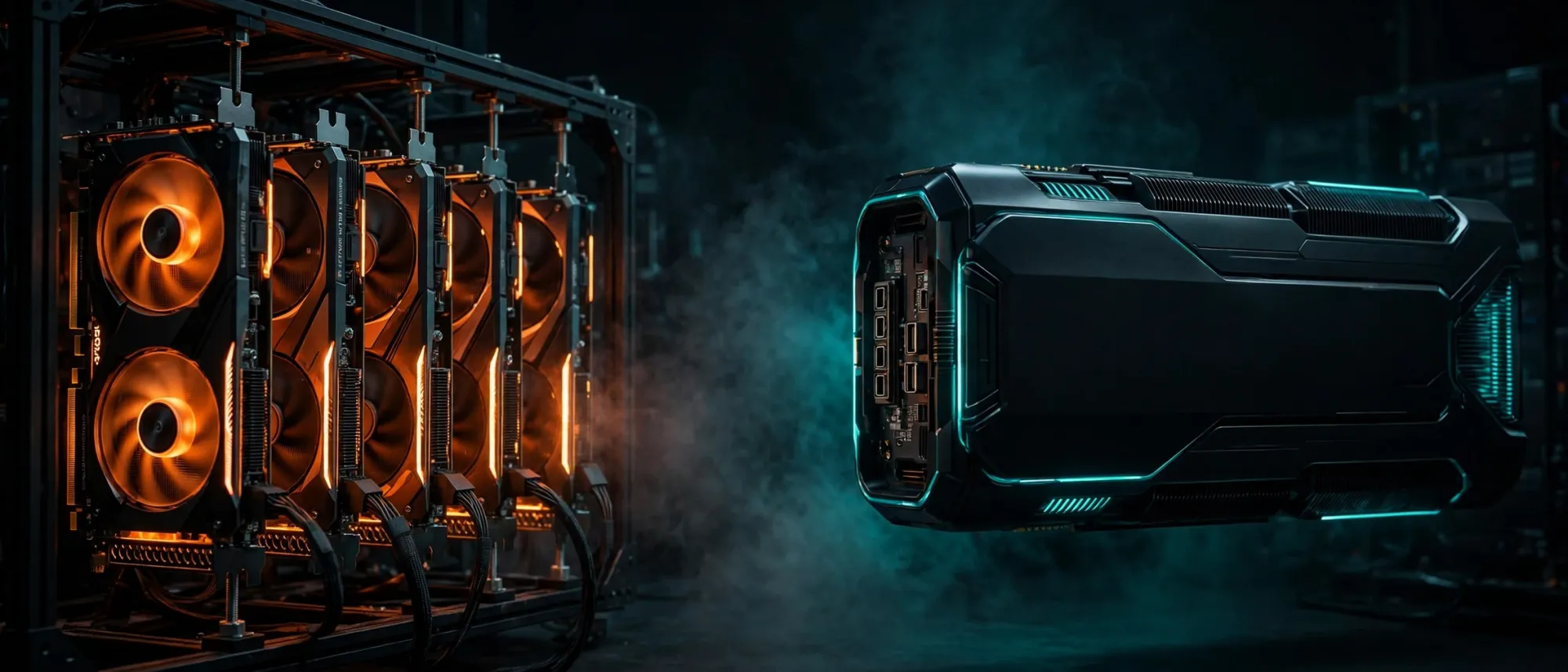
What if the fastest AI chips NVIDIA sells could be replaced — not by another datacenter card, but by five used gaming GPUs, a free kernel module, and a $436 switch board from Alibaba? This article puts that idea to the test with real numbers. And it does it the honest way: nobody buys a B200. Nobody buys an H100 either. Datacenter GPUs are rented by the hour, and that changes the entire comparison — because a used RTX 3080 is a one-time purchase, which means its rental cost is $0 per hour. Every hour you run it costs only electricity. The question is not what a B200 costs. The question is how many hours of rental the rig replaces before it pays for itself.
The recipe is three ingredients. First, five used RTX 3080s at $300 each — the lowest verified Facebook Marketplace price in the United States as of November 23, 2026, from the previous article in this series. Second, gpu-unlock, a Linux kernel module that removes the firmware cap NVIDIA puts on GeForce tensor cores — the same "Tensor Pinning" technique covered in the benchmaxxing article on hotconfig.com. Third, a PEX88096 PCIe 4.0 switch backplane that hangs all five cards off one ordinary motherboard — the $436 board from Kamil Skowron's viral post about skipping the €9,000 Threadripper PRO platform. Total all-in cost: about $2,400, once. The datacenter cards it is being compared against charge their rental rate every single hour, forever.
The Rental Market: What a Datacenter GPU ACTUALLY Costs per Hour!
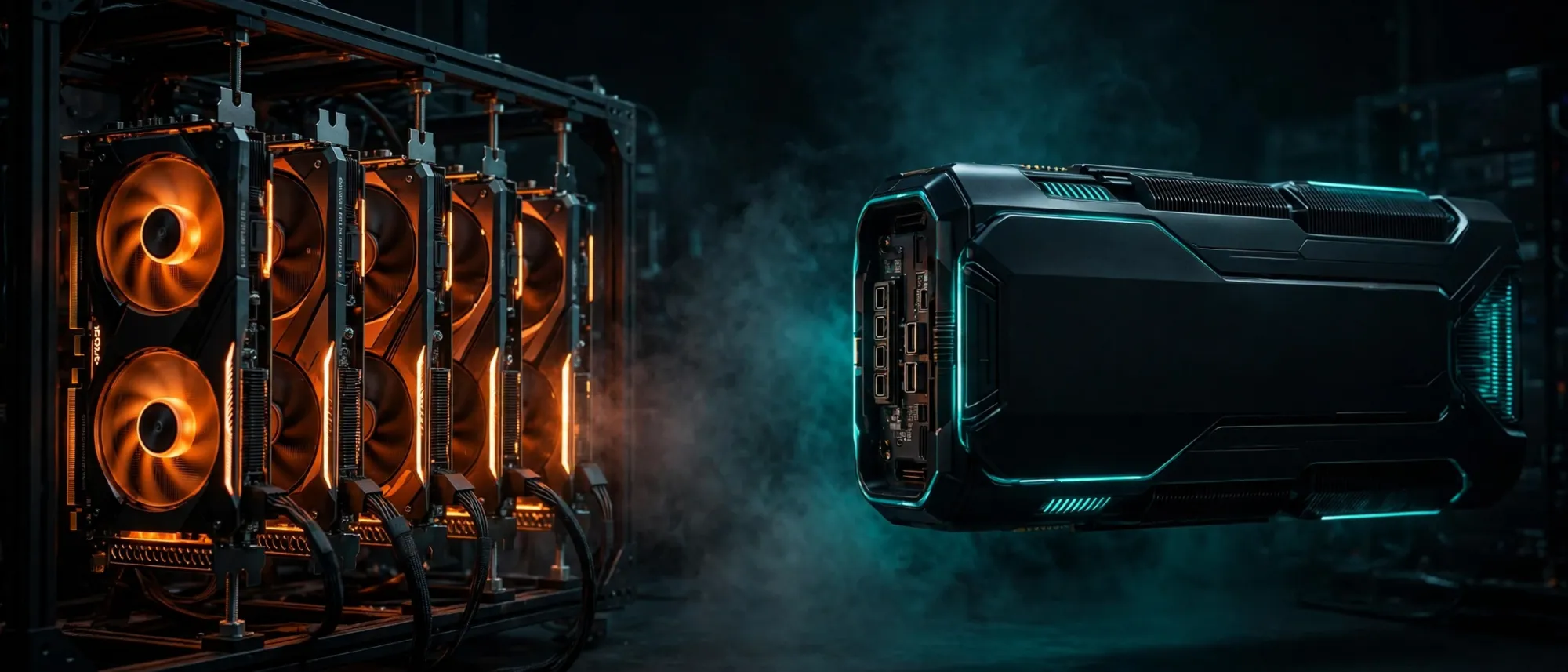
Here is the rental market as it stood in November 2026, with the cheapest credible fixed or on-demand rate for each card — the rate a real person can actually get, not a hyperscaler's list price and not a one-off marketplace floor that vanishes by the hour. The B200 rents for $5.50/hr (Nodus; $5.98 RunPod Community, $7.69–$7.99 Lambda/RunPod Secure, $14–$16.11 on hyperscalers). The H100 rents for $2.60/hr (Nodus; $2.69 RunPod Community, $4.89 Lambda). The H200 rents for $3.59/hr (Nodus; $3.59 RunPod Community). The RTX 6000 Ada rents for $0.74/hr (RunPod Community; $0.80 Vast.ai on-demand). The RTX PRO 6000 Blackwell rents for $1.69/hr (RunPod Community; $1.55 median on Vast.ai). And the B100 — the card this article was originally going to lead with — cannot be rented at all: zero listings on every aggregator checked, because NVIDIA concentrated Blackwell production on the B200/B300. The B200 is the Blackwell rental proxy.
| Metric (dense) | 5× unlocked 3080 rig | B200 SXM | H100 SXM | H200 SXM | RTX 6000 Ada | RTX PRO 6000 |
|---|---|---|---|---|---|---|
| FP32 CUDA | 148.9 TFLOPS | 75 TFLOPS | 67 TFLOPS | 67 TFLOPS | 91.1 TFLOPS | 120 TFLOPS |
| FP16 / BF16 tensor | 595.5 TFLOPS | 2,250 TFLOPS | 989 TFLOPS | 989 TFLOPS | 364 TFLOPS | 1,000 TFLOPS |
| INT8 tensor | 1,190.5 TOPS | 4,500 TOPS | 1,979 TOPS | 1,979 TOPS | 728.5 TOPS | 2,000 TOPS |
| FP8 tensor | — | 4,500 TFLOPS | 1,979 TFLOPS | 1,979 TFLOPS | 728.5 TFLOPS | 2,000 TFLOPS |
| FP4 tensor | — | 9,000 TFLOPS | — | — | — | 4,000 TFLOPS |
| VRAM | 50 GB total (5× 10 GB) | 180 GB HBM3e | 80 GB HBM3 | 141 GB HBM3e | 48 GB GDDR6 ECC | 96 GB GDDR7 ECC |
| Memory bandwidth | 3.8 TB/s aggregate | 7.7 TB/s | 3.35 TB/s | 4.8 TB/s | 0.96 TB/s | 1.6 TB/s |
| Power | 1,600 W | 1,000 W | 700 W | 700 W | 300 W | 600 W |
| Rental $/GPU-hour | $0.00 ($0.28 power) | $5.50 | $2.60 | $3.59 | $0.74 | $1.69 |
Read that table carefully, because it already contains the whole argument and its whole rebuttal. On raw throughput the B200 is about 3.8× faster in FP16 than the rig, and it owns two precisions — FP8 and FP4 — that Ampere cannot run at all. Its 180 GB of unified HBM3e at 7.7 TB/s is in a different universe from five separate 10 GB pools. And yet, look at the FP32 row: five 3080s deliver twice the FP32 throughput of the B200, because FP32 is the one precision the datacenter card doesn't accelerate — it is just CUDA cores, and five mid-range cards have more of them than one flagship. And look at the bottom row: the rig's rental rate is zero. The RTX 6000 Ada is the most interesting row in the table — a workstation card with 48 GB of ECC memory that rents for $0.74/hr, cheaper per hour than the rig's $2,400 purchase price can beat quickly. That card is the rig's real rival, and it gets its own section below. The B100 is listed in the specs where it belongs, but it has no rental rate, because there is no rental: if you want Blackwell, you rent a B200.
Tensor Pinning UNLEASHED: Your 3080 Was Running at HALF SPEED?!
Here is the secret the benchmaxxing article exposed, and it is worth restating because the whole comparison depends on it. NVIDIA ships GeForce cards with their tensor cores capped to half speed for FP16, BF16 and TF32 math with FP32 accumulation — the exact modes nearly all AI training and unquantized inference uses. The same GA102 silicon sold as a professional card runs at full rate. The split is in NVIDIA's own whitepaper: the RTX 3090 is listed at 142 TFLOPS for FP16 with FP16 accumulate, but only 71 TFLOPS for FP16/BF16 with FP32 accumulate. The reason, per the gpu-unlock README, is market segmentation — NVIDIA wants businesses to buy the professional cards.
gpu-unlock removes the cap at boot, and the elegance of the method is the story. It is a Linux kernel module that runs inside the initramfs, before the stock NVIDIA driver loads: it writes the hardware speed selectors (SS0 = 0x88888888 for full BF16 issue rate, SS1 = 0x8), performs a PCIe Function Level Reset, and then the unmodified proprietary driver loads and binds the card as usual — with full-rate tensor throughput preserved. No VBIOS flash, no patched driver, nothing to redo when NVIDIA releases a new driver, and outputs are bit-identical before and after. Install is git clone, make install, add gpu_unlock.targets=all to the GRUB command line, reboot. Ampere (RTX 30-series) is stable with 100+ user reports; Ada and Turing are experimental; Blackwell is not supported and unlikely to be.
But — and this is the part the hype skips — "up to 2×" is the tensor instruction issue rate, measured on a registers-only pipe test. Real dense GEMM on a real RTX 3080 goes from 65 to 113 BF16 TFLOPS, a +73% gain, not +100%. A 3080 Ti measured by three independent sources lands at 101–114 BF16 TFLOPS unlocked. Real applications gain less still: LLM prefill +25–55% depending on the engine, image generation +30–58%, fine-tuning +20–50%. And some workloads gain nothing at all: INT8, FP8 and INT4 are unaffected (the unlock only flips the FP16/BF16/TF32 selectors), FP32 CUDA is unchanged, gaming is unchanged, and LLM decode — token generation — is memory-bandwidth bound, so it is unchanged too. One correction worth making openly: the hotconfig article says the unlock affects FP8, but the README and a measured CUTLASS FP8 GEMM (+0.3%) say it does not. The benchmaxxing data itself is BF16, and it is real — the FP8 line is the one thing worth re-testing.
The €9,000 Motherboard Is DEAD! A $436 Switch Changes EVERYTHING!
Five GPUs need five slots, and that is where most home builders hit the wall. The native answer is the legendary ASUS Pro WS WRX90E-SAGE SE with seven PCIe 5.0 x16 slots — and as Kamil Skowron's post points out, that board needs a Threadripper PRO CPU and 128 GB of DDR5 ECC Registered memory, and the platform alone costs around €9,000 before a single GPU. The prices check out at US retail: the board is $1,365.99, the cheapest Threadripper PRO 7975WX is $3,592.99, and 128 GB of DDR5 ECC RDIMM is $5,577.56 — $10,537 for the platform alone, and the RAM costs more than the CPU.
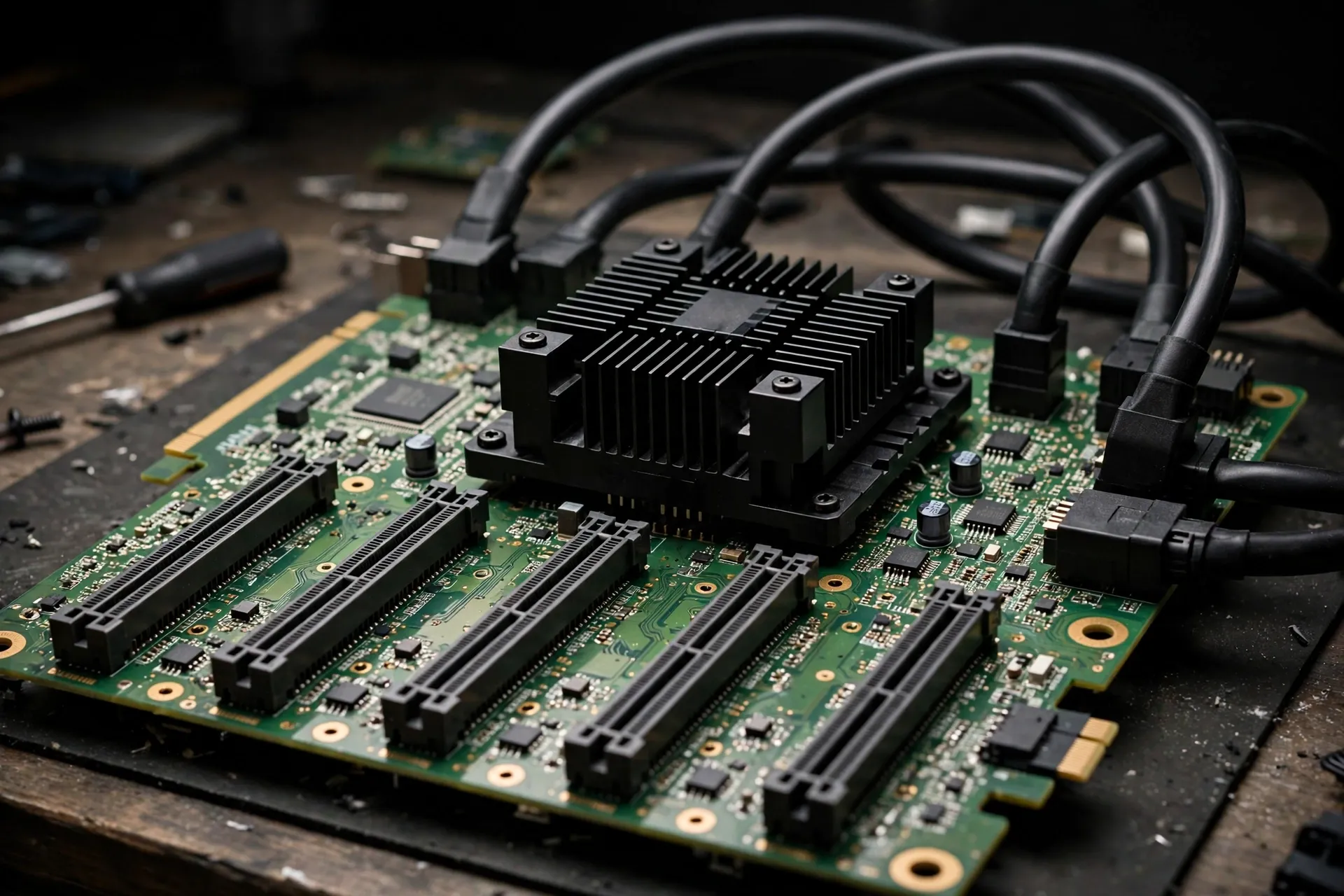
Skowron's leap of faith was the alternative: a PCIe 4.0 switch backplane built around Broadcom's PEX88096 chip — the HLT "5-Port GPU Backplane Expansion Kit" on Alibaba at $436.10 for 1–24 sets ($427.20 for 25–49, $418.30 for 50+), corroborated by independent listings for the same class of board at $419–$548, and one builder paid $577.50 for the full kit including the host adapter and SFF-8654 cables. The backplane does not plug into a motherboard slot at all: a small host card goes in the motherboard's x16 slot, SlimSAS cables run to the backplane, and the switch chip — 96 lanes, 16 upstream, 80 downstream — gives each GPU a Gen4 x16 link to the switch, with GPU-to-GPU traffic running peer-to-peer inside the switch. No bifurcation needed, no €9,000 platform. A standard B650 board at $109.99 is enough host.
Building the Rig: Where the $2,400 Actually Goes!
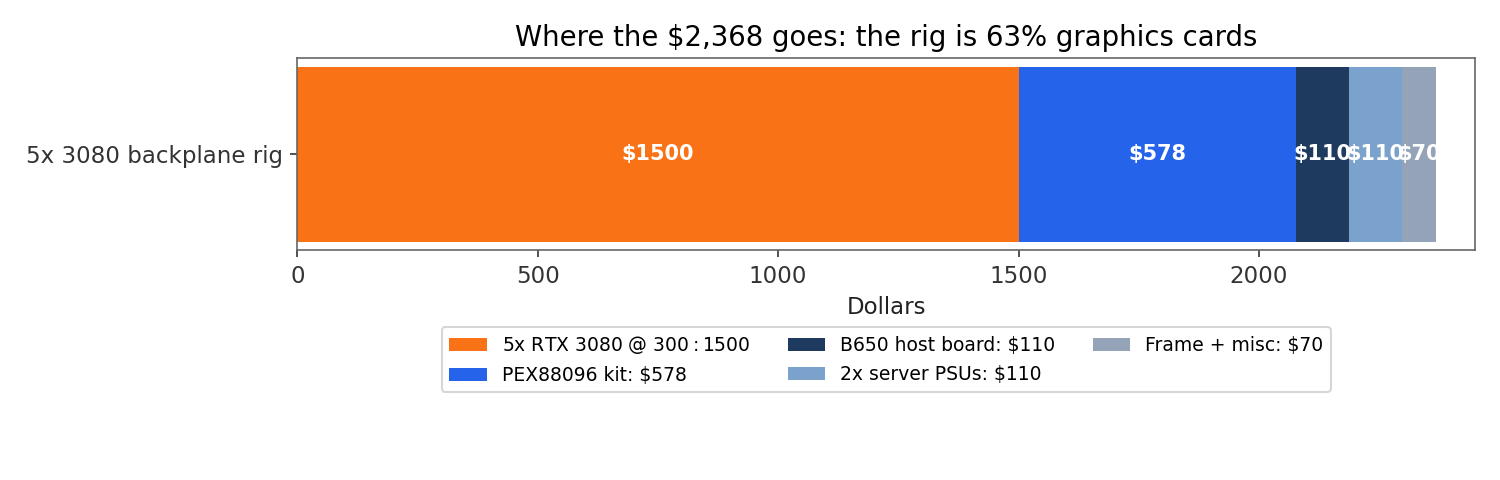
Here is the full build, mid-case, with every price verified on November 23, 2026. The GPUs dominate — as they should. And remember the framing: this is a one-time purchase. After this table, the rig's rental rate is $0/hr, and its only hourly cost is electricity.
| Item | Cost | Notes |
|---|---|---|
| 5× RTX 3080 @ $300 | $1,500 | Lowest verified Marketplace price, Nov 2026 |
| HLT PEX88096 5-port backplane kit | $436–578 | $436 tweet tier; $578 paid kit price incl. host adapter + cables |
| Gigabyte B650 Eagle AX host board | $110 | Any board with a Gen4 x16 slot works |
| 2× HP DPS-1200FB server PSUs + breakouts | ~$110 | $35 each used + $10–20 breakout boards |
| Open-air mining frame | $70–250 | $70 frame; $250 purpose-built case |
| Total, one-time | ~$2,230–2,830 (mid ~$2,400) | Host CPU/RAM/SSD reused or $0–300 budget |
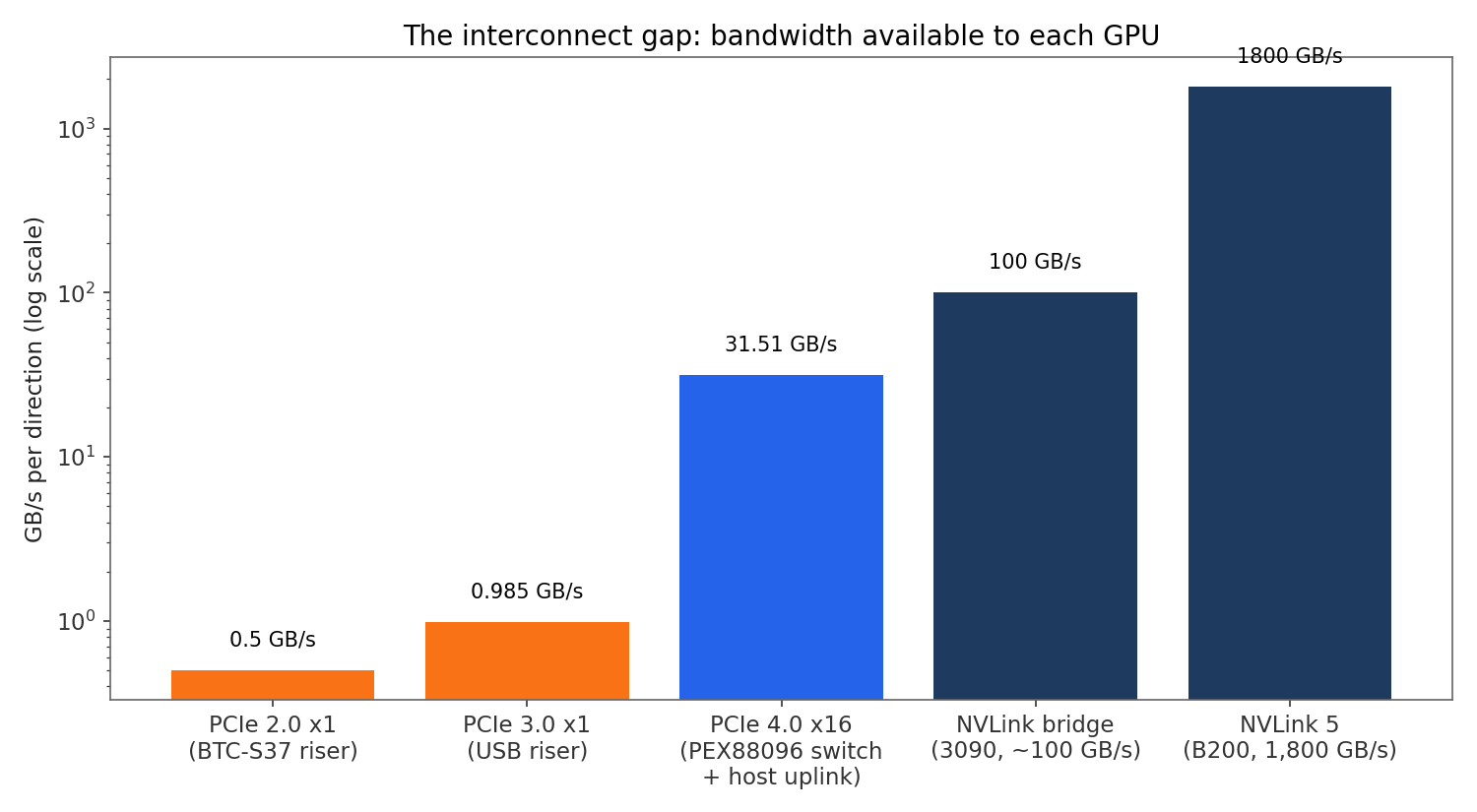
There is a cheaper route, and it is worth knowing about precisely so you can avoid it for the wrong jobs. A BTC-S37 mining board with an onboard Celeron costs about $75 used, USB risers are $21 for five, and the whole 5×3080 rig lands at roughly $1,800 all-in. The catch is the interconnect: every GPU on that board gets PCIe Gen2 x1 — about 0.5 GB/s. That is fine for five independent jobs (five separate models, five users, batch inference split by request), and it is a catastrophe for one big model split across five cards, for reasons the next sections will make painfully concrete. The $600 difference between the cheap route and the switch route buys roughly 30× the inter-GPU bandwidth. That is the single best $600 in this entire article.
Dollars per TFLOP-HOUR: The ONLY Price That Matters!
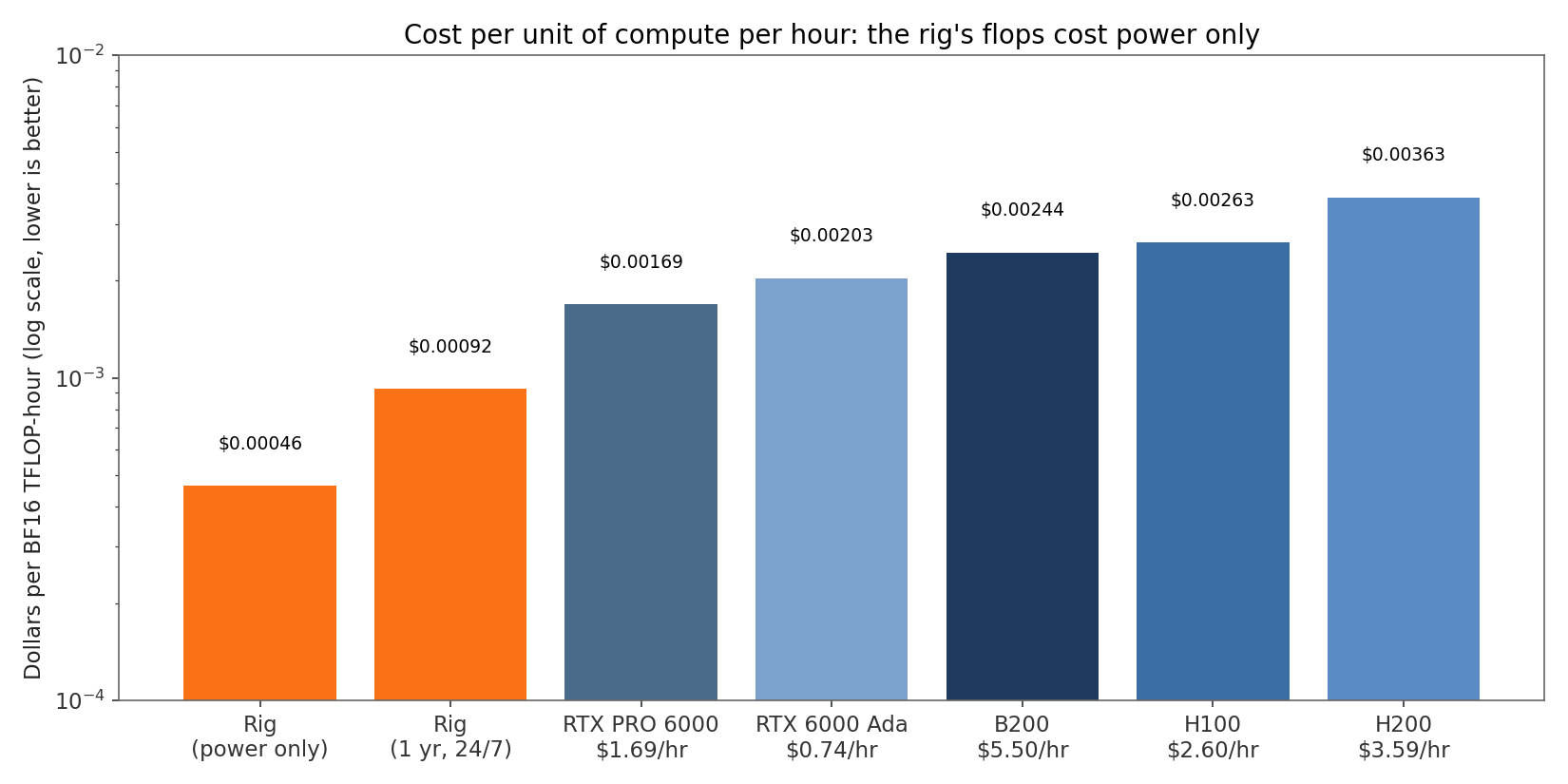
Forget dollars per TFLOP — that number assumed you buy the card. The number that decides rent-vs-own is dollars per TFLOP-hour: the rental rate divided by the throughput, for the rentals; and for the rig, the power cost per hour divided by the throughput, plus the purchase price amortized over the hours you actually use it. At the US average electricity rate the rig costs $0.28 per hour to run (1,600 W × 17.23¢/kWh), which is $0.00046 per BF16 TFLOP-hour in power alone. Spread the $2,400 purchase over a year of 24/7 use (8,760 hours) and the rig's all-in rate is $0.55/hr, or $0.00092 per BF16 TFLOP-hour — the cheapest compute in this comparison, bar none.
| Compute | $/BF16 TFLOP-hour | How |
|---|---|---|
| 5× 3080 rig, power only | $0.00046 | $0.28/hr ÷ 595.5 TFLOPS |
| 5× 3080 rig, 1 year 24/7 amortized | $0.00092 | ($2,400 + power) ÷ 8,760 hrs ÷ 595.5 TFLOPS |
| RTX PRO 6000, rented $1.69/hr | $0.00169 | $1.69 ÷ 1,000 TFLOPS |
| RTX 6000 Ada, rented $0.74/hr | $0.00203 | $0.74 ÷ 364 TFLOPS |
| B200, rented $5.50/hr | $0.00244 | $5.50 ÷ 2,250 TFLOPS |
| H100, rented $2.60/hr | $0.00263 | $2.60 ÷ 989 TFLOPS |
| H200, rented $3.59/hr | $0.00363 | $3.59 ÷ 989 TFLOPS |
| 5× 3080 rig, only 1,000 hrs/year amortized | $0.00449 | ($2,400 + power) ÷ 1,000 hrs ÷ 595.5 TFLOPS |
Two things jump out. First, the H200 is the worst value per flop in this table despite being the newer card — it costs 38% more per hour than the H100 for identical compute, and you pay the premium purely for the extra 61 GB of VRAM. H100 vs H200 is a memory decision, not a compute decision. Second, look at the last row: if the rig only runs 1,000 hours a year, it becomes the most expensive compute here, at $0.00449 per TFLOP-hour — because the $2,400 purchase is spread over too few hours. Utilization is the whole game. A rig that runs 24/7 is the cheapest compute on this page. A rig that sits idle is the most expensive. Renting wins when you use the GPU rarely; owning wins when you use it constantly. Everything else in this article is just working out where the crossover sits.
Break-Even: How Many Hours Until Owning WINS?!
The crossover, computed exactly: the rig pays for itself against each rental after a fixed number of hours, because every hour of use saves the rental rate minus the $0.28/hr of electricity. Against a rented B200 at $5.50/hr, the rig breaks even after 459 hours — 19 days of 24/7 use. Against an H100 at $2.60/hr, 1,033 hours (43 days). Against an H200 at $3.59/hr, 724 hours (30 days). Against the RTX PRO 6000 at $1.69/hr, 1,697 hours (71 days). And against the RTX 6000 Ada at $0.74/hr — the cheapest rental in this comparison — 5,169 hours, or 215 days of continuous use. The $2,400 that buys the rig outright buys only 436 hours of B200 rental, 923 hours of H100, 669 hours of H200, 1,420 hours of PRO 6000 — and 3,243 hours of RTX 6000 Ada.
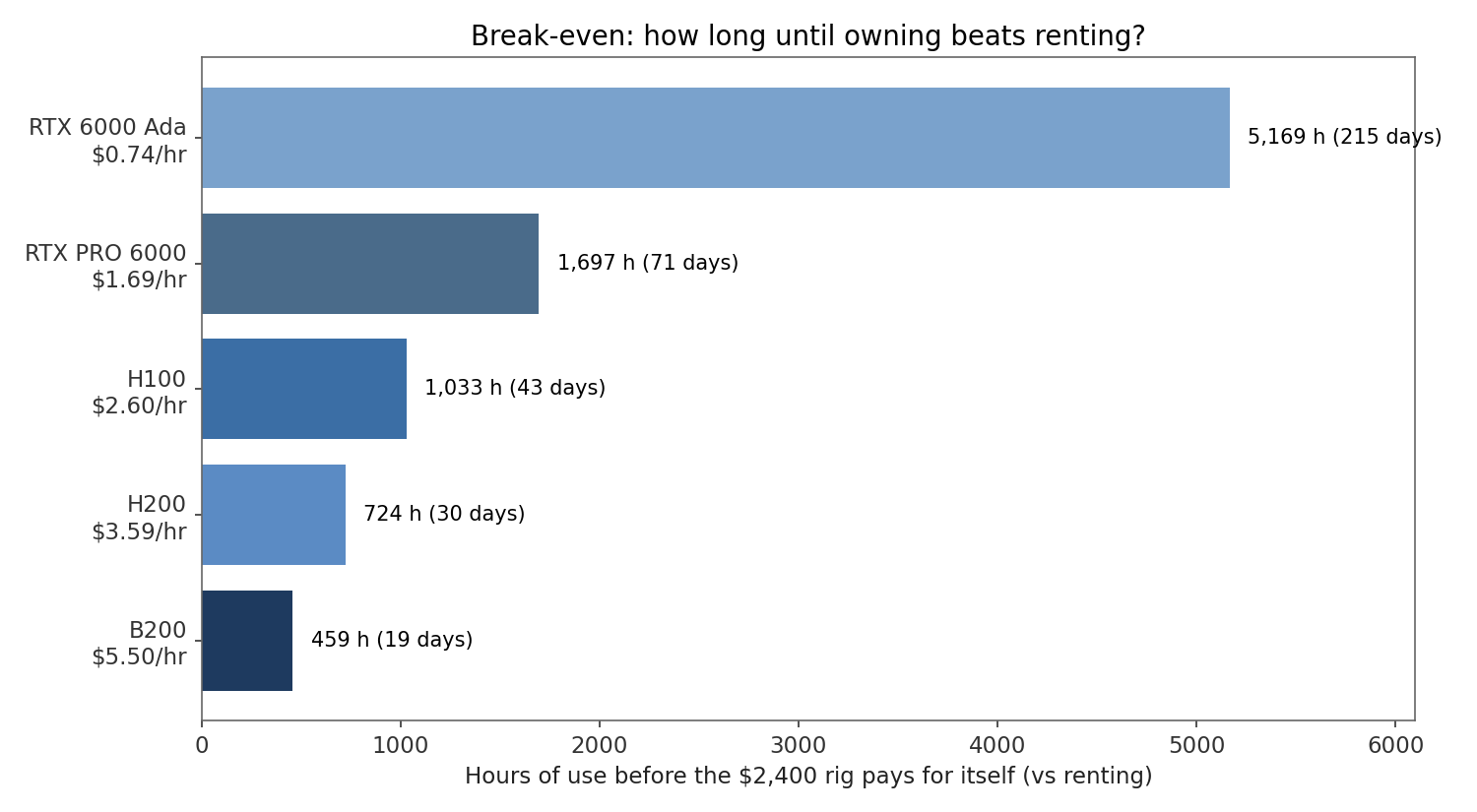
That last number is the one to sit with, because the RTX 6000 Ada is the rig's real rival. It is a workstation card with 48 GB of ECC memory — nearly five times the VRAM of one 3080, and enough to hold a 70B model in 4-bit or a 32B model in FP16 on a single card — renting for $0.74/hr with a 3-year warranty and professional support behind it. If your workload is one model at a time and you run it a few hours a week, renting the RTX 6000 is cheaper than owning the rig, full stop, and it is simpler, quieter, and under warranty. The rig only wins when the hours pile up: past 5,169 hours of RTX 6000 rental, the rig has paid for itself and every hour after that is nearly free. The B200 is the opposite case — so expensive per hour that the rig pays for itself in under three weeks of continuous use.
The RTX 6000 Ada: The Rig's REAL Rival!
Everything above assumes the alternative to the rig is a datacenter card. It isn't — the closest rival is a workstation card, the RTX 6000 Ada Generation, and it deserves its own section because it attacks the rig from the opposite direction: not more speed, but more memory, less hassle, and a rental rate so low the rig needs 215 days of continuous use to beat it. The card is an AD102 — the same die as the RTX 4090 — configured as a professional part: 18,176 CUDA cores, 91.1 FP32 TFLOPS, 364 FP16 TFLOPS dense (FP16-accumulate convention, the same one used throughout this article), 728.5 FP8 TFLOPS and 728.5 INT8 TOPS dense, and crucially 48 GB of GDDR6 with ECC at 960 GB/s, in a 300 W dual-slot blower card. No NVLink, no MIG — it is a single-GPU accelerator. It launched in December 2022 at $6,799; used cards now sell for around $7,150, above the original MSRP, in a thin market of roughly a dozen sales a month.
What 48 GB buys is a different model ceiling. Per the Spheron guide: a 70B model fits in 4-bit on one card, a 32B model fits in FP16; QLoRA fine-tuning reaches ~70B parameters versus ~20B on a 4090, FP16 LoRA reaches ~34B versus ~13B, full fine-tuning reaches ~7B versus ~3B. ECC memory guards long training runs against silent data corruption — a correctness feature, not a luxury — and the card carries a 3-year NVIDIA warranty with dedicated professional-products support (which does not extend to used purchases). Against the rig, the trade is clear: one rented RTX 6000 Ada holds models the rig's five separate 10 GB pools cannot hold at all, for $0.74/hr, with no build, no kernel module, no 1,600 W of heat in your garage. Against the rig's strengths, it loses on aggregate throughput (364 vs 595.5 FP16 TFLOPS), on FP32 (91.1 vs 148.9), and on the long game — past 5,169 hours, the rig is cheaper forever. Its Blackwell successor, the RTX PRO 6000 Server Edition, raises the stakes: 96 GB of GDDR7 ECC, 1,000 FP16 TFLOPS, 2,000 FP8, 4,000 FP4, 600 W, and a $1.69/hr rental — the cheapest datacenter-class retune in this article, as the next sections show.
Throughput: Where the Rig ACTUALLY Stands!
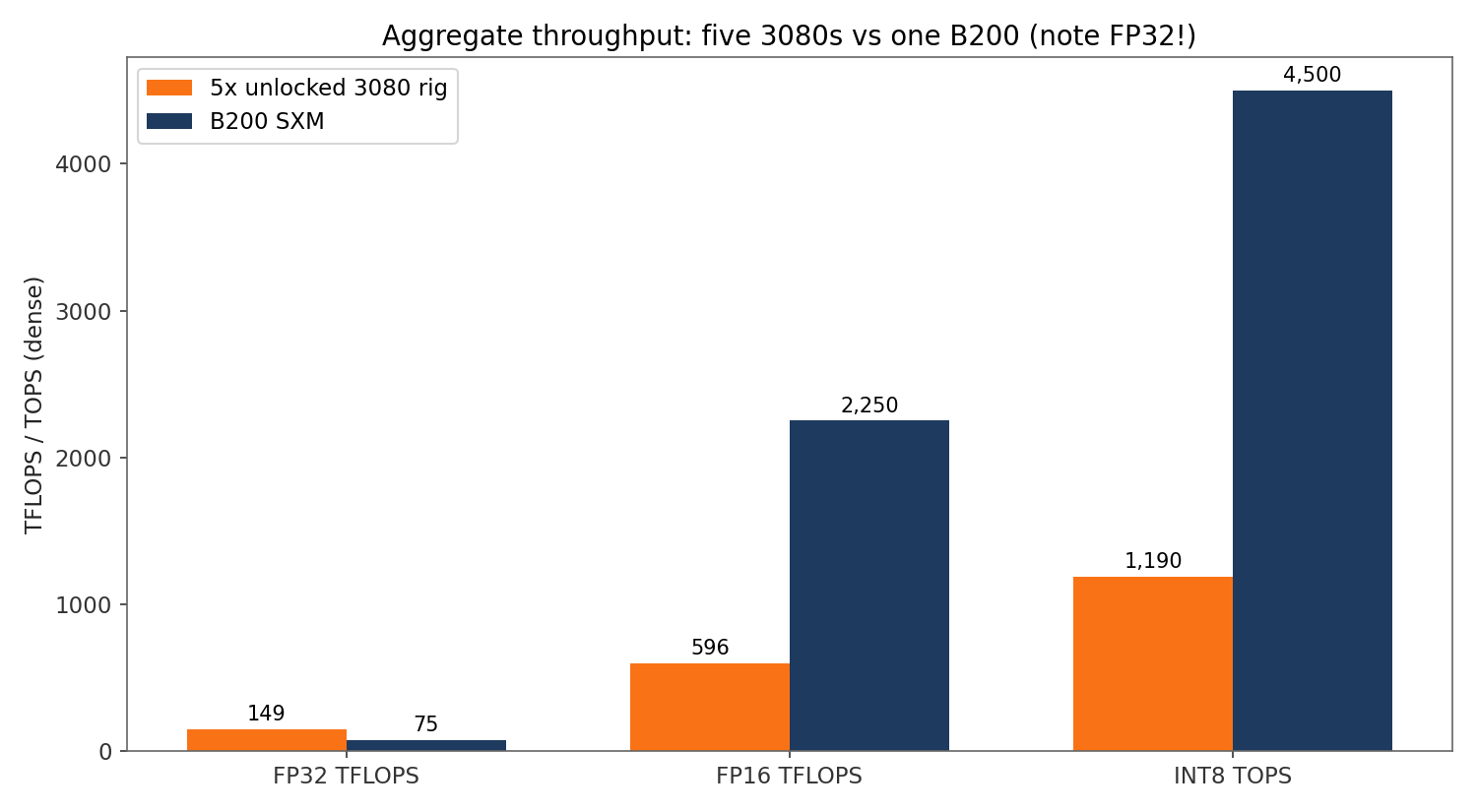
The aggregate numbers, with the measured figures where they exist instead of the spec sheet. Five unlocked 3080s deliver 595.5 FP16 TFLOPS on paper and 565 measured on dense GEMM — 26% of a B200's 2,250, 60% of an H100's 989, and 164% of a rented RTX 6000 Ada's 364. In INT8 the rig is 1,190.5 TOPS against the B200's 4,500 and the H100's 1,979. In FP32 it is 148.9 TFLOPS — double the B200, double the H100, and 1.6× the RTX 6000 Ada. The precisions the rig cannot run at all are FP8 and FP4: the B200 does 4,500 FP8 and 9,000 FP4 TFLOPS, the PRO 6000 does 2,000 and 4,000, and Ampere does neither — so for FP8 inference workloads (the fastest-growing serving format in 2026) the rig is not a slower B200, it is a non-starter, and the honest recommendation is to rent the PRO 6000 at $1.69/hr. But for BF16/FP16 training and prefill, FP32 work, and INT8 inference, the rig is a quarter to a half of a datacenter card at a rental rate of zero — and the question is never the peak number, it is how many hours you need it for.
VRAM: The Wall That Matters MORE Than FLOPS!
Throughput is the headline; VRAM is the wall. The B200 holds 180 GB in one unified pool. The H200 holds 141 GB. The PRO 6000 holds 96 GB. The RTX 6000 Ada holds 48 GB. The rig holds 50 GB — but split across five separate 10 GB cards, and a model shard cannot borrow memory from another card. That split is the rig's hardest limit, and it decides what you can train before any FLOPS number matters. The ladder, for a 1B-token LoRA dataset with AdamW offloaded to the host where stated: a 12B model fits BF16 LoRA at 4.8 GB per card sharded; a 35B model needs 8-bit QLoRA at 7.0 GB per card; a 72B model fits only in 4-bit at 7.2 GB per card. Full fine-tuning with AdamW (16 bytes per parameter) fits nowhere on the rig, and not for 35B or 72B on a B200 either — that workload needs 8-GPU nodes or optimizer offload regardless of whose card you rent. The rented cards' advantage is not that they fit everything; it is that one card holds the whole model, so you skip the sharding, the gradient synchronization, and the interconnect tax entirely. The RTX 6000 Ada's 48 GB fits a 35B model in 8-bit on one card; the PRO 6000's 96 GB fits it in BF16. That simplicity is worth real money, and it is priced into the $0.74 and $1.69 hourly rates.
The Interconnect: Why the $436 Switch Is NOT Optional!
Five cards only help if they can talk to each other, and the numbers here are brutal. The cleanest measured evidence: a Qwen 2.5 14B model split tensor-parallel across GPUs runs at 316.5 tokens/s over a PCIe x1 link and 3,018 tokens/s over NVLink — a 9.53× difference from interconnect alone. The B200's NVLink 5 moves 1.8 TB/s between GPUs; the H100/H200's NVLink 4 moves 900 GB/s. The rig's PEX88096 switch gives each GPU a Gen4 x16 link to the switch (about 25 GB/s) with peer-to-peer traffic inside the switch — roughly 30× the bandwidth of the $1,800 BTC-S37 riser route at 0.5 GB/s per card, and the reason the $600 upgrade from the cheap route to the switch route is the best money in this build. The catch that the switch does not fix: the host uplink is a single shared Gen4 x16 slot, so host-to-GPU traffic for all five cards shares ~25 GB/s, and there is no NVLink-style direct memory pool. For data-parallel training — each card holding a full model replica, gradients synchronized over Ethernet — that is fine; LoRA gradient sync is megabytes per step. For tensor-parallel inference of one big model, the rig will always lose to a single rented card with unified memory, no matter how many FLOPS the five cards add up to.
Power: The Bill That NEVER Stops — Even at $0/hr Rent!
Owning the rig means the rental meter stops but the power meter doesn't. At the US average residential rate of 17.23¢/kWh, the rig's 1,600 W costs $198.49 a month running 24/7; a rented B200's 1,000 W would cost $124.06 in power (on top of its $5.50/hr rental — $4,015 a month at 730 hours); an H100 or H200 at 700 W costs $86.84; the RTX 6000 Ada at 300 W costs $37.22; the PRO 6000 at 600 W costs $74.43. In New England (28.84¢/kWh) the rig costs $332.16 a month; in West South Central (14.61¢/kWh) it costs $168.16. The power bill is the rig's real hourly cost, and it is also the reason the break-even math in this article uses $0.28/hr for the rig instead of $0.00 — free rent is not free compute.
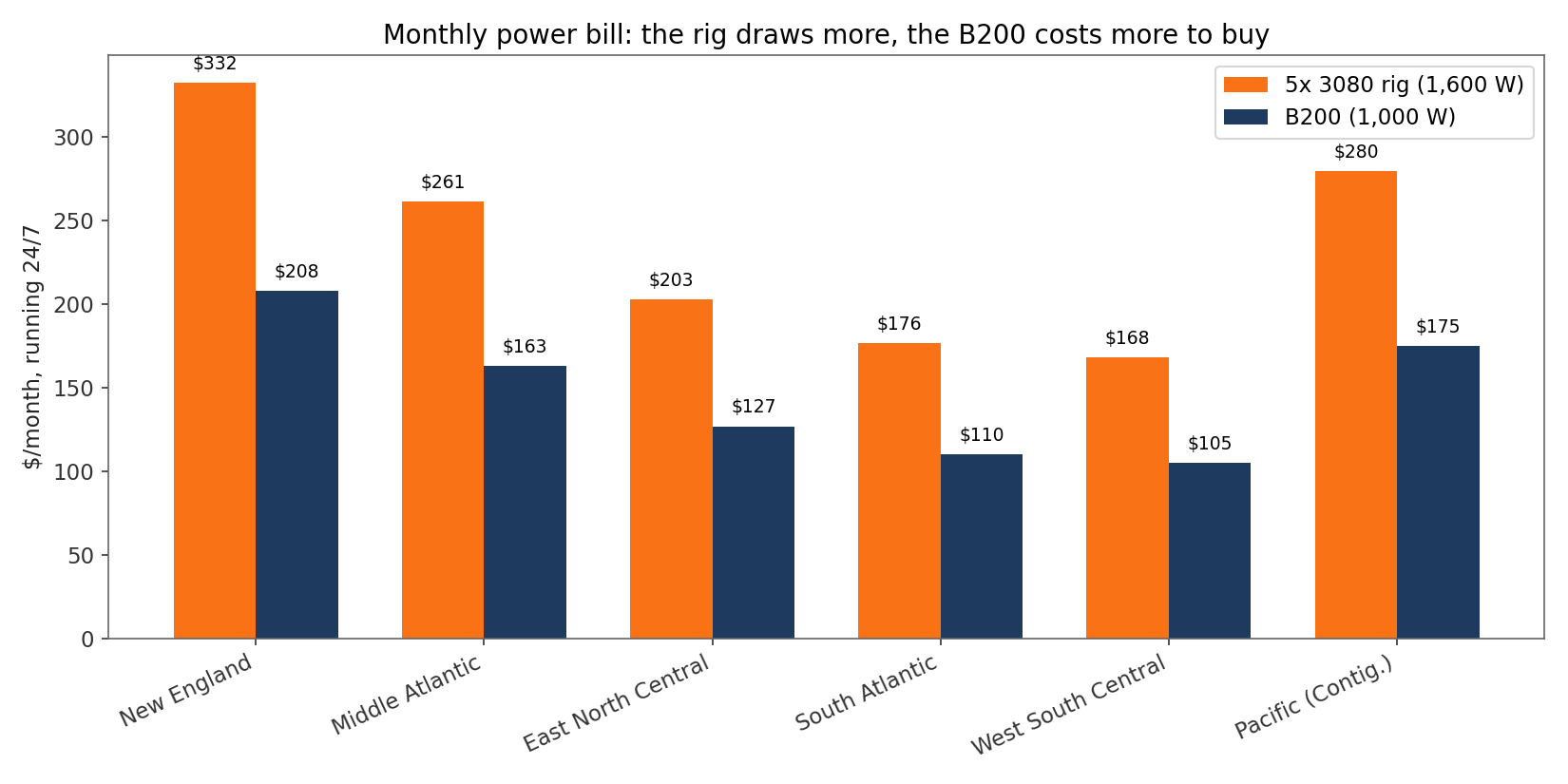
One trap, flagged because it has bitten real builders: the HP DPS-1200FB server PSUs that power this build deliver only 900 W each on US 110–120 V mains. The full 1,200 W rating needs 240 V. Two of them on 120 V give 1,800 W of capacity against a 1,600 W load — it works, but with less headroom than the label suggests, and a third PSU or a 240 V circuit is the comfortable answer. The rig also makes about 5,460 BTU/h of heat at full load — a space heater that never turns off — which is a winter feature and a summer problem, depending on your hemisphere.
Retune Economics: A 35B Retune for $60 in Power — or $211 Rented!
The workload that motivated this whole comparison is retraining: LoRA and QLoRA fine-tunes of 12B, 35B and 72B models on a 1B-token dataset. The method, stated plainly so anyone can check it: training FLOPs ≈ 4ND for LoRA (Chinchilla's 6ND, minus the backward-through-frozen-weights term, per the kojen.ai estimator convention), full fine-tuning is 6ND (×1.5 the LoRA time), MFU assumed at 30% for the rig and 45% for the rented datacenter cards (labeled assumptions — the rig's PCIe interconnect and five-way sharding cost real efficiency, and the LOMO paper measured far lower real throughput on PCIe 3090s at batch 1 with ZeRO-3, so treat these times as a well-configured run, not a guarantee).
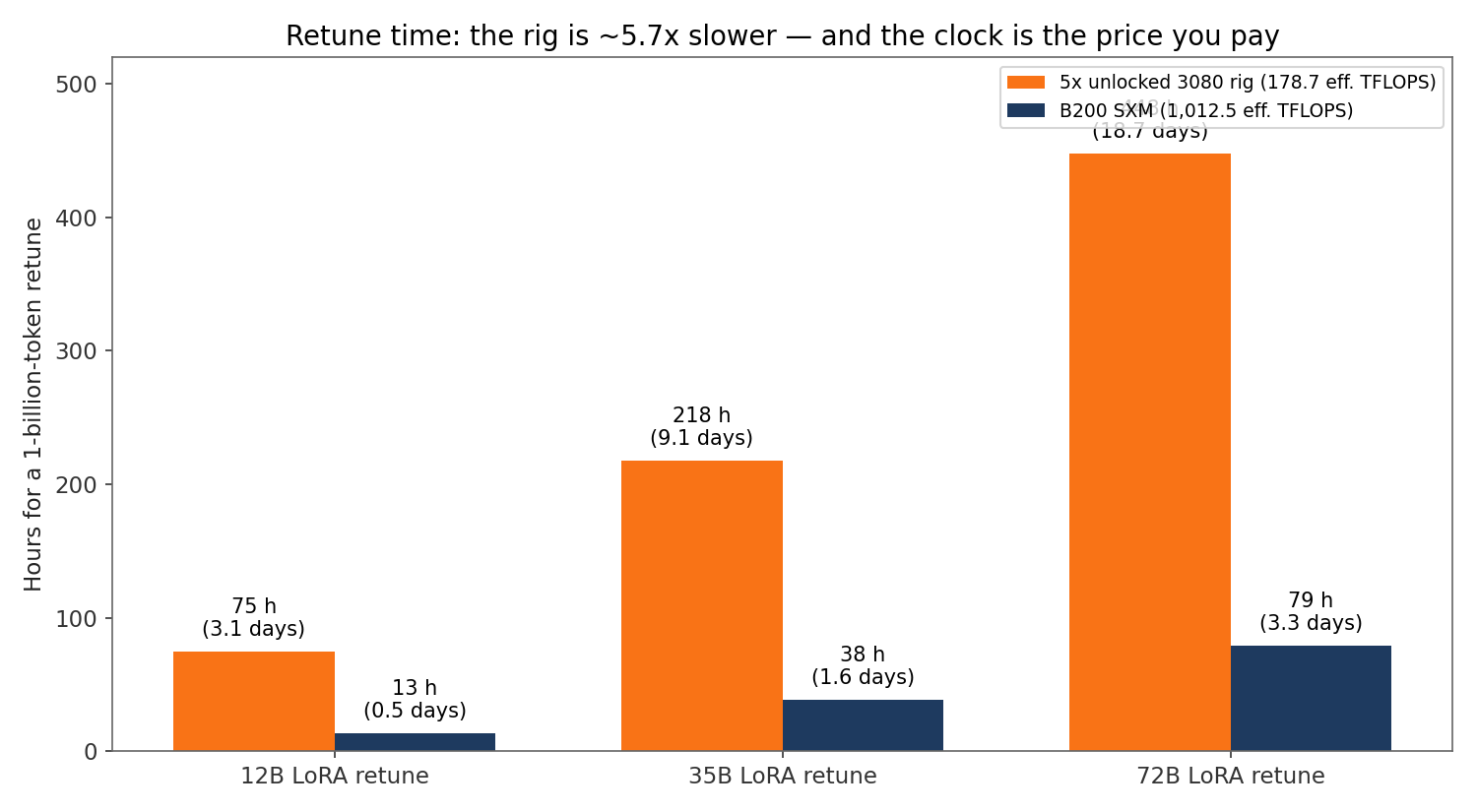
| One 35B LoRA retune (1B tokens) | Hours | Cost |
|---|---|---|
| 5× 3080 rig (power only) | 217.7 h (9.1 days) | $60.01 |
| RTX PRO 6000, rented $1.69/hr | 86.4 h | $146.05 |
| RTX 6000 Ada, rented $0.74/hr | 237.4 h | $175.69 |
| B200, rented $5.50/hr | 38.4 h | $211.25 |
| H100, rented $2.60/hr | 87.4 h | $227.19 |
| H200, rented $3.59/hr | 87.4 h | $313.70 |
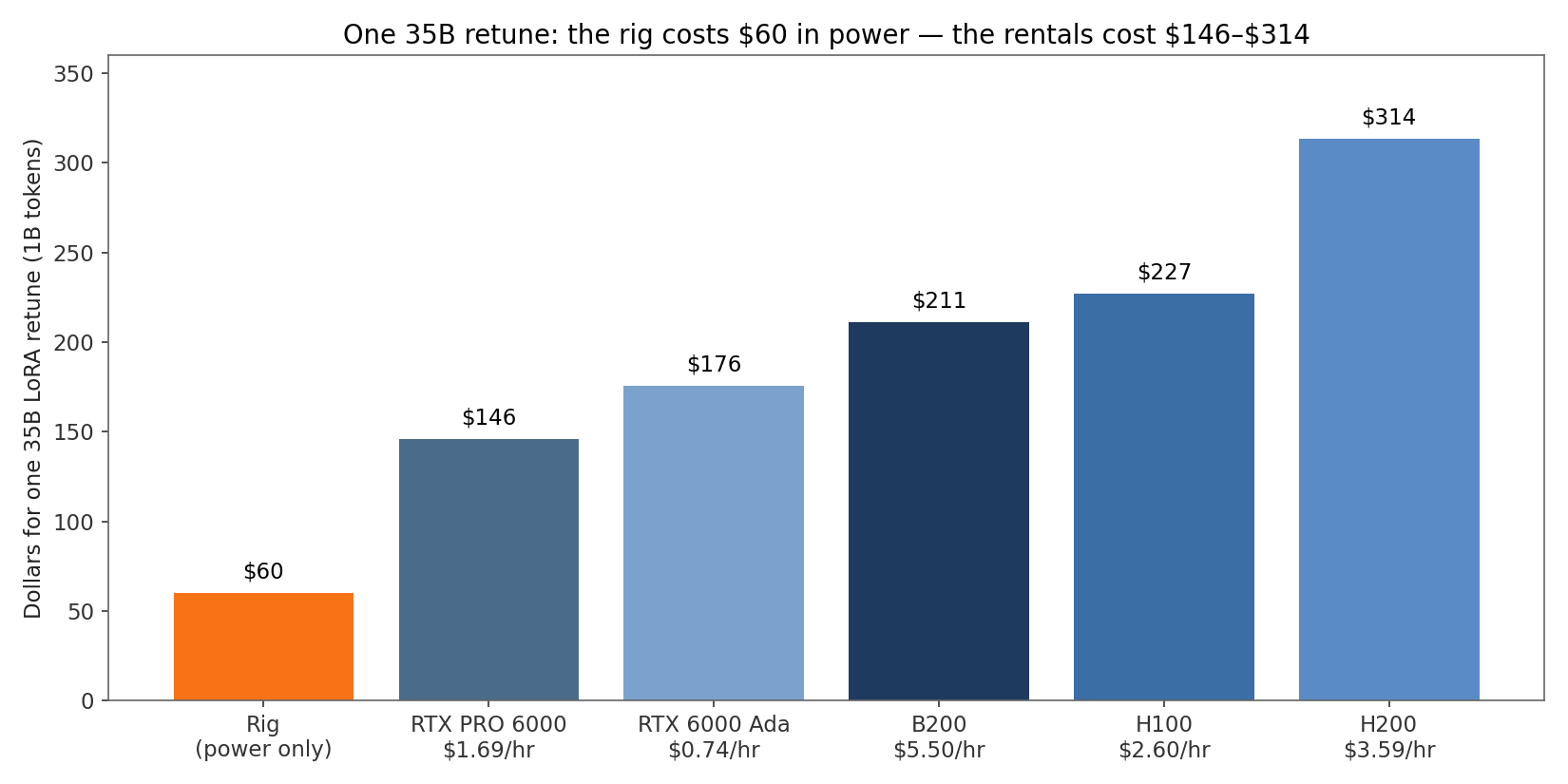
The table's surprise is that the B200 is not the cheapest rental per retune — the RTX PRO 6000 is, at $146.05, because it is fast enough (86.4 hours) and cheap enough ($1.69/hr) to beat the B200's $211.25 despite being 2.3× slower in peak FLOPS. The H200 is the worst rental per retune at $313.70: same speed as the H100, 38% more per hour, for VRAM a LoRA retune doesn't need. And the RTX 6000 Ada, the rig's great rival, costs $175.69 per 35B retune — cheaper than the B200, H100 and H200 — but takes 237.4 hours, longer than the rig's 217.7. The rig is the cheapest per retune and the second-slowest; the B200 is the fastest and the second-most-expensive. The 12B and 72B numbers follow the same pattern: a 12B LoRA costs $20.58 on the rig, $50.07 on a rented PRO 6000, $72.43 on a rented B200; a 72B LoRA costs $123.45 on the rig, $300.44 on the PRO 6000, $434.57 on the B200.
Now the honest year-one math, because the retune table hides the purchase price. Ten 35B retunes in year one cost $3,000 on the rig — the $2,400 purchase plus $600 of power — against $1,460 for ten retunes on a rented PRO 6000, $1,757 on a rented RTX 6000 Ada, $2,112 on a rented B200, $2,272 on a rented H100, and $3,137 on a rented H200. In year one, renting the PRO 6000 is cheaper than owning the rig for ten retunes. The rig only pulls ahead from year two, when ten more retunes cost $600 in power against $1,460 rented. The number of 35B retunes needed for the rig to break even: about 10 against the H200, 14 against the H100, 16 against the B200, 21 against the RTX 6000 Ada, and 28 against the PRO 6000. If you retune occasionally, rent the PRO 6000. If you retune constantly — a pipeline, a product, a research group — the rig's $0/hr rent eventually wins against every card here, and the more retunes you run, the wider the gap gets.
Going BIGGER: The 20-Card 3080 Ti Cluster — One B200's Worth of FLOPS, Rented NEVER!
Scale the same idea to four motherboards, each with five tensor-unlocked RTX 3080 Ti cards on a PEX88096 backplane: 20 cards total, $14,072 all-in ($3,518 per motherboard — five Ti cards at $500 each, the $578 kit, $110 board, $110 PSUs, $70 frame, $150 host). The aggregate: 2,020–2,280 BF16 TFLOPS — 90–101% of a rented B200 — plus 1,160 TF32 (105% of the B200), 682 FP32 (9.1× the B200), 5,456 INT8 TOPS (121%), and 240 GB of VRAM split across 20 cards. The measured unlock figures are what make this real: a 3080 Ti does 101 BF16 TFLOPS at 300 W and 114 at 315 W unlocked, against 71.6 locked — so the cluster's numbers are measured GEMM, not spec-sheet fantasy.
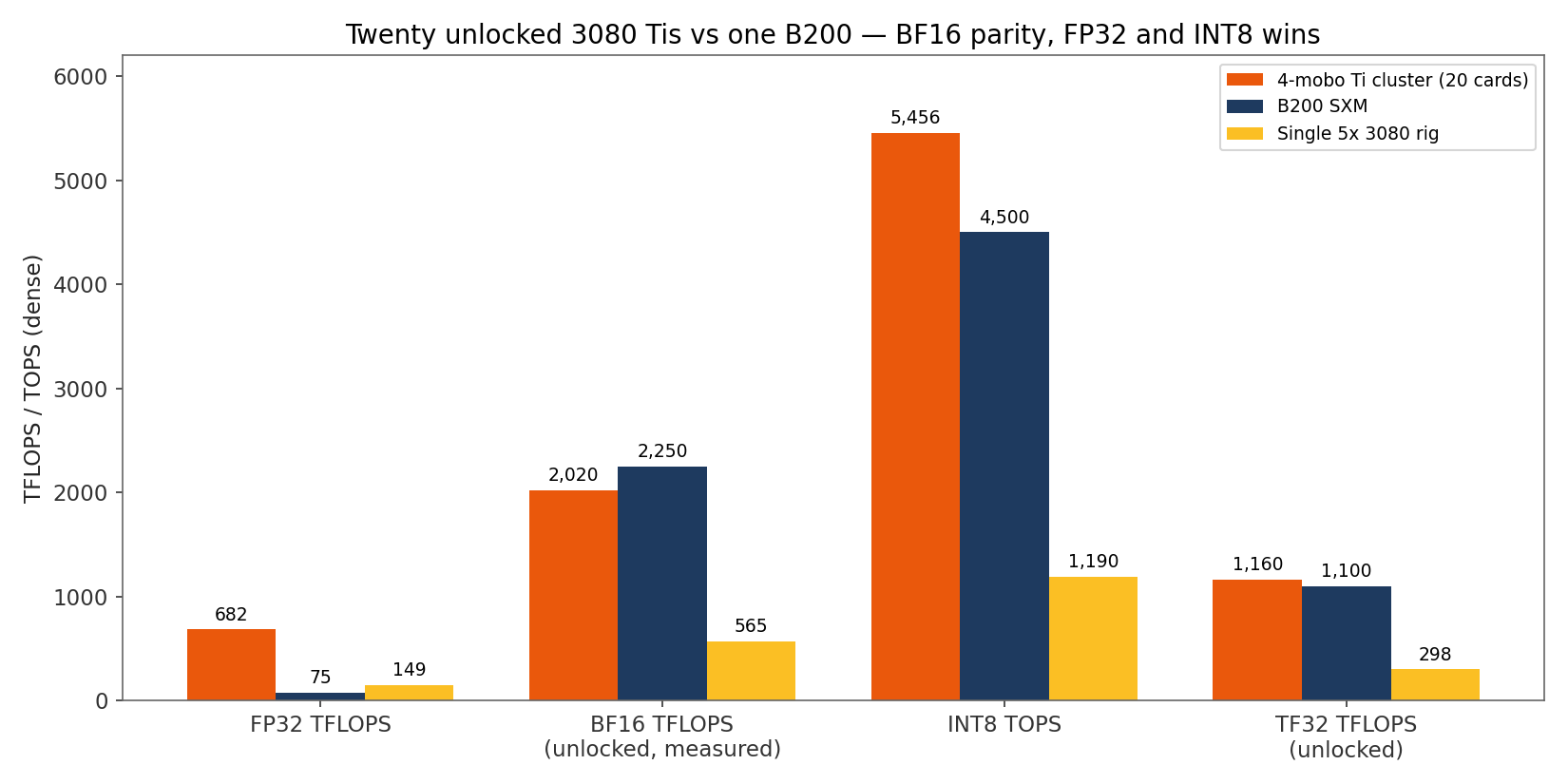
The cluster's rental framing is different from the single rig's, because the upfront cost is serious money. Against renting one B200 at $5.50/hr, the $14,072 cluster breaks even after 3,200 hours — 133 days of continuous B200-equivalent use — because the cluster's power costs $1.10/hr against the B200's $5.50. One 35B LoRA retune across all 20 cards in data-parallel takes about 56.9 hours and costs $62.70 in power, against $211.25 for a rented B200; four 35B retunes can also run in parallel, one per motherboard, at ~227 hours each. But ten 35B retunes in year one cost $14,699 on the cluster against $2,112 rented on a B200 — the cluster only makes sense at very high utilization, roughly 95 retunes before it beats B200 rental on that workload, which is 225 days of continuous retuning. The cluster is for a small team running a pipeline, not a hobbyist. And one honest kicker, carried over from the original version of this article: twenty plain 3080s give 2,260 BF16 TFLOPS for about $10,072 — the Ti premium buys VRAM, bandwidth, FP32 and INT8, not BF16, because the unlock equalizes the cards. The plain-3080 cluster breaks even against B200 rental after 2,289 hours instead of 3,200.
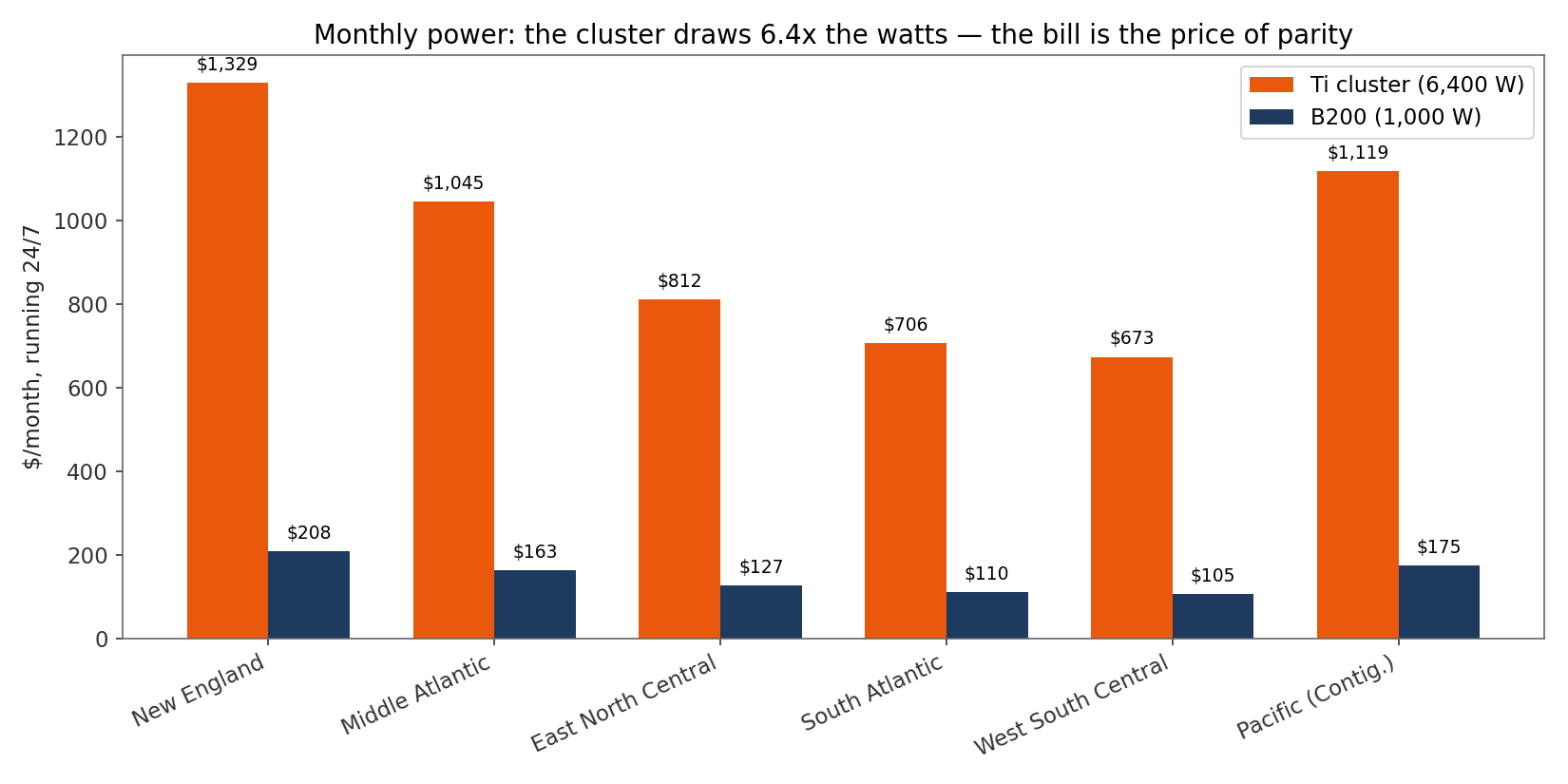
Power is the cluster's real constraint: 6,400 W at 300 W per card (6,700 W at 315 W, 7,400 W at full TDP), $793.96 a month at the US average rate and $1,328.95 in New England, 21,800 BTU/h of heat to remove. It needs two 240 V/30 A circuits or one 240 V/50 A circuit; 120 V is impossible at this scale, and the HP server PSUs only deliver their full 1,200 W on 240 V anyway. If you do not have 240 V where the cluster lives, the cluster does not live there.
The Verdict: Rent, Build, or BOTH?!
There is no single winner, because rent-vs-own is a utilization question, not a hardware question — and this article's numbers finally say exactly where the lines fall. Rent a B200 if you need one retune done by Monday, or FP8/FP4, or 180 GB in one pool: $211.25 for a 35B LoRA in 38.4 hours, and you never touch a PSU. Rent the RTX PRO 6000 if you retune regularly but not constantly: $146.05 per 35B retune, 96 GB of ECC memory, FP4 support, the cheapest rental per retune in this comparison. Rent the RTX 6000 Ada if your workload is one model at a time and your hours are few: $0.74/hr, 48 GB ECC, a warranty, and the rig needs 215 days of continuous use to beat it. Build the $2,400 rig if you will use it constantly — past 459 hours it has beaten B200 rental, past 1,697 hours it has beaten the PRO 6000, and from year two onward every retune costs $60 in power. Build the cluster only if you are running a pipeline: 95 retunes to beat B200 rental, 133 days of continuous use to break even, and a 240 V circuit to feed it.
The original version of this article compared purchase prices — $2,400 against $45,000 — and that comparison was wrong in the way that matters most: nobody buys these cards. The rental comparison is harder on the rig in year one and kinder to it forever after, and it surfaces the real rival nobody expected: a $0.74/hr workstation card with 48 GB of ECC memory that takes 215 days to beat. The B200 is still the fastest card here by a wide margin. It is just no longer the comparison. The comparison is the meter — and the rig is the only machine on this page where the meter stops.
Method, Assumptions, and Sources
All throughput figures are dense (non-sparse); NVIDIA headlines 2:4 structured-sparsity figures, which are exactly 2× the dense figure. The 3080/3080 Ti figures are measured dense GEMM from the gpu-unlock README and independent reports (MarcJSchmidt, hotconfig.com), not spec-sheet rates. Rental rates are the cheapest credible fixed or on-demand rates found in November 2026 — Nodus $5.50 (B200), $2.60 (H100), $3.59 (H200); RunPod Community $0.74 (RTX 6000 Ada), $1.69 (RTX PRO 6000) — from provider pricing pages and aggregators (joulemath, GPUwerk, GPU Floor, Sillectus, Spheron, Thunder Compute, taipeiledger); marketplace medians move daily and hyperscaler rates run $6.88–$16.11/hr. The B100 has no rental listings on any aggregator checked (Flopper, getdeploying) and is shown as unrentable. One flag: a $0.69/hr Lambda listing for the RTX 6000 Ada may be the Turing-era Quadro RTX 6000, so $0.74/hr is used as the anchor. Electricity at the US average 17.23¢/kWh (EIA 2025). Retune math: C ≈ 4ND for LoRA, 6ND for full fine-tuning, 1B-token dataset, MFU 30% rig / 45% datacenter (labeled assumptions). B200/H100/H200 specs from NVIDIA's product pages; RTX 6000 Ada specs from TechPowerUp and Spheron; PRO 6000 specs from Lenovo Press and RunPod. GPU prices from the previous article in this series; backplane pricing from the Alibaba listing and Kamil Skowron's post. This article was updated on November 23, 2026 to replace purchase-price comparison with rental-price comparison throughout, and to add the B100, H100, H200, RTX 6000 Ada and RTX PRO 6000.